

What's New With the Maps App in iOS 16: Multi-Stop Routing, Transit Card Support and More

The iOS 16 Maps app didn't get as many changes as some of the other apps in the update, but there is at least one major change that's worth noting -- multi-stop routing. Multi-stop routing is a long-awaited Maps feature, plus there are a few other new options.
iOS 16 Maps Guide Feature Cool
This guide highlights all of the features that are new to the Maps app in iOS 16, which is available now for all eligible devices.

Multi-Stop Routing

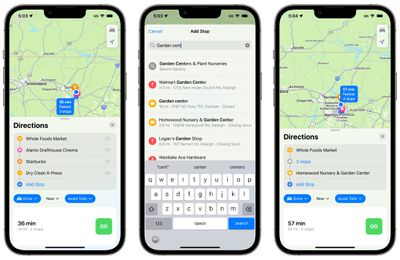
With iOS 16, you can plan a route that has multiple stops for the first time. Prior to now, you could only route yourself to a single location, and the Apple Maps app was far behind competitors like Waze and Google Maps when planning for more than one stop on a trip.
ios 16 maps multi stop routing
When you type in a destination in the Maps app in iOS 16, you can tap on the new "Add Stop" button to choose multiple locations. Up to 15 locations can be added on one route, and the Maps app will go to each stop in turn. Note that the Maps app does not optimize the route, so you'll need to do that manually when you type in stops.

Add Stops With Siri

If you're already on the road and want to insert a stop into your route, you can use Siri voice commands to do so.

Plan Routes on Mac

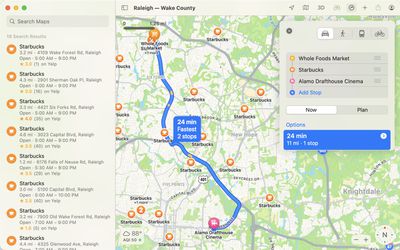
For planning a trip with multiple stops, you can get everything ready on the Maps app on Mac, then port it over to the iPhone when you're ready to go.
apple maps mac plan route

Maps Interface Updates

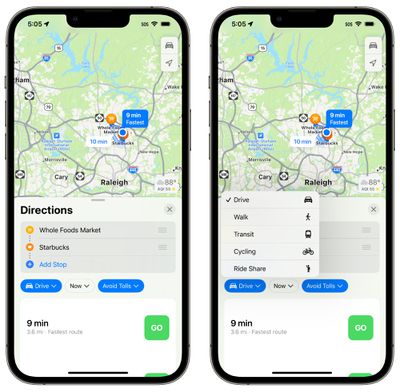
To accommodate the new multi-stop routing option, getting directions has been streamlined. It's simpler to change between driving, walking, transit, cycling, and ride share.
ios 16 maps interface
There are also drop down menus for changing travel mode, time you want to leave, and options to avoid tolls or highways, which makes it quicker to drill down into your preferences when getting directions.

The recent routes that you've used will show up in the Recent section for quicker access.

Transit Cards in Maps

Transit cards added to the Wallet app are integrated into the Maps app, so you can see if your balance is low and add more funds without having to swap over to the Wallet app.
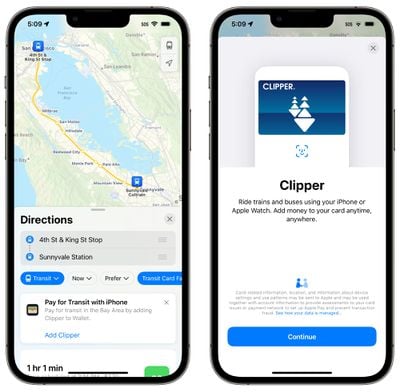
ios 16 maps clipper card

Transit Fares

When planning a transit route, you can see how much it will cost in transit fares in select cities.
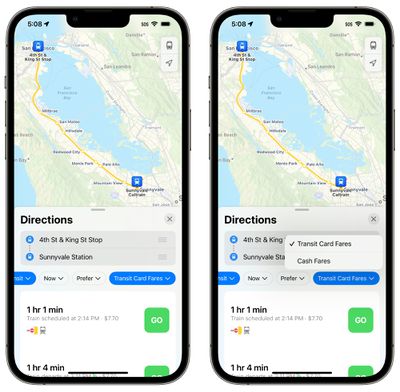
ios 16 maps transit fares

Photo Use Permissions

The Maps app in iOS 16 has a toggle for allowing companies to use photos that you upload using the built-in Maps rating feature. This is applicable to companies that provide photos to Maps, and it includes location information, but not identity.
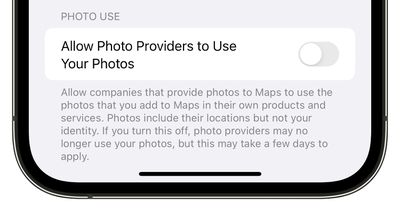
ios 16 maps photo permissions

Revamped Apple Map Design

Apple in iOS 15 introduced a new, more detailed ‌Apple Maps‌ design that provides more detail for roads, pathways, greenery, and more. The updated Maps app is coming to the following countries in iOS 16:

  • Belgium
  • France
  • Israel
  • Liechtenstein
  • Luxembourg
  • Monaco
  • Netherlands
  • New Zealand
  • Palestinian Territories
  • Saudi Arabia

Guide Feedback

Have questions about Maps in iOS 16, know of a feature we left out, or want to offer feedback on this guide? Send us an email here.


Popular Stories

Aston Martin CarPlay Ultra Screen

Apple's CarPlay Ultra to Expand to These Vehicle Brands Later This Year

Sunday February 1, 2026 10:08 am PST by
Last year, Apple launched CarPlay Ultra, the long-awaited next-generation version of its CarPlay software system for vehicles. Nearly nine months later, CarPlay Ultra is still limited to Aston Martin's latest luxury vehicles, but that should change fairly soon. In May 2025, Apple said many other vehicle brands planned to offer CarPlay Ultra, including Hyundai, Kia, and Genesis. In his Powe...
Apple Logo Black

Apple's Next Launch is 'Imminent'

Sunday February 1, 2026 12:31 pm PST by
The calendar has turned to February, and a new report indicates that Apple's next product launch is "imminent," in the form of new MacBook Pro models. "All signs point to an imminent launch of next-generation MacBook Pros that retain the current form factor but deliver faster chips," Bloomberg's Mark Gurman said on Sunday. "I'm told the new models — code-named J714 and J716 — are slated...
iOS 26

iOS 26.3 and iOS 26.4 Will Add These New Features to Your iPhone

Tuesday February 3, 2026 7:47 am PST by
We are still waiting for the iOS 26.3 Release Candidate to come out, so the first iOS 26.4 beta is likely still at least a week or two away. Following beta testing, iOS 26.4 will likely be released to the general public in March or April. Below, we have recapped known or rumored iOS 26.3 and iOS 26.4 features so far. iOS 26.3 iPhone to Android Transfer Tool iOS 26.3 makes it easier...
Apple MacBook Pro M4 hero

New MacBook Pros Reportedly Launching Alongside macOS 26.3

Sunday February 1, 2026 5:42 am PST by
Apple is planning to launch new MacBook Pro models with M5 Pro and M5 Max chips alongside macOS 26.3, according to Bloomberg's Mark Gurman. "Apple's faster MacBook Pros are planned for the macOS 26.3 release cycle," wrote Gurman, in his Power On newsletter today. "I'm told the new models — code-named J714 and J716 — are slated for the macOS 26.3 software cycle, which runs from...
iOS 26 Home Feature

Apple Gives Final Warning to Home App Users

Tuesday February 3, 2026 8:55 am PST by
In 2022, Apple introduced a new Apple Home architecture that is "more reliable and efficient," and the deadline to upgrade and avoid issues is fast approaching. In an email this week, Apple gave customers a final reminder to upgrade their Home app by February 10, 2026. Apple says users who do not upgrade may experience issues with accessories and automations, or lose access to their smart...

Top Rated Comments

_Spinn_ Avatar
47 months ago
I really like the improvements Apple has been making to Maps lately. One thing I would like to see is my actual speed when driving.
Score: 22 Votes (Like | Disagree)
tYNS Avatar
47 months ago
Just used Apple Maps on a trip we took. It is fantastic. Very accurate and the predictive assisted lane usage was great to making sure travel was easy. Can't wait for the multi-route feature. Great job the apple team is doing.
Score: 20 Votes (Like | Disagree)
Sheepish-Lord Avatar
47 months ago

I really like the improvements Apple has been making to Maps lately. One thing I would like to see is my actual speed when driving.
Does your speedometer not work?
Score: 18 Votes (Like | Disagree)
Anijake Avatar
47 months ago
did they do anything to the crash report. It really needs to go by distance instead of time when asking if its still there because if stuck in the traffic caused by the crash, it will timeout before I get there to see if it just traffic or the crash is still there..
Score: 16 Votes (Like | Disagree)
xxray Avatar
47 months ago
I actually prefer Apple’s navigation directions more than any other app. The maps are the easiest on the eyes and the directions are the easiest to understand. Siri’s voice is a lot more natural compared to Waze too.

I wish Apple Maps had look around everywhere like Google Street View. Apple had cars all over the U.S. for years now, so I don’t know why look around is so slow to roll out and so limited.

I also desperately wish Apple Maps had first party reviews right in the app and showed how busy a location was (and it’s usual business depending on the hour and day of the week) like Google Maps does.

I find myself stuck in between maps apps because of this. Apple is great for navigation. Google Maps is better for discovering places, seeing business levels, and for reviews/questions about places. Waze is best for rough traffic, road trips, or the most up to date road status.

I wish Apple Maps could combine the best features of all three apps.
Score: 13 Votes (Like | Disagree)
DreadedFun Avatar
47 months ago
Living in Denmark I expect not to see any of these features. Apple is very limited in their features when it comes to spread it out to more countries. It’s like they develop a feature, include it in the product for the US, set the tick mark that’s it is done and then stop spreading it out to the rest of the world.

Sorry, I need to rant every time I see some new Maps features and know that the rest of the world only gets small part of these features and Apple don’t seem to care.

Still don’t have swipe keyboard in my native language. No word predictions. Stuff that 3rd party keyboards have had since 3rd part keyboards became a thing.
Score: 13 Votes (Like | Disagree)














