iOS 16: How to Use Multi-Stop Routing in Maps - MacRumorsOpen MenuShow RoundupsShow Forums menuVisit ForumsOpen Sidebar
Skip to Content

iOS 16: How to Use Multi-Stop Routing in Maps

by

In iOS 16, Apple Maps has received an update that brings multi-stop routing to the navigation app. Keep reading to learn how to use it.
iOS 16 Maps Guide Feature Warm
With iOS 16, the Maps app allows you to plan a route that has multiple stops instead of just a single destination. While Google Maps has had this feature for some time, this is the first version of Apple's Maps app to include support for it.

When entering a destination, ‌Apple Maps‌ allows you to add up to 15 locations to stop at en route, and the app will navigate you to each stop in turn. Here's how it works.

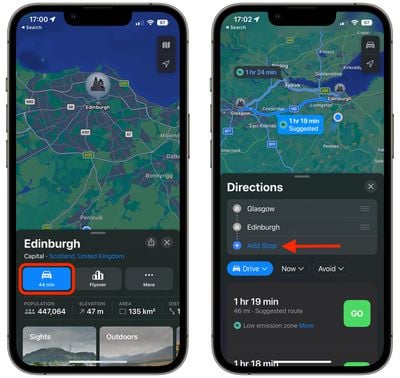
  1. In ‌Apple Maps‌, enter your destination and then tap the Directions button for your chosen mode of transport.
  2. In the Directions panel, tap Add Stop to search for and include a stop en route to your destination. Repeat this step up to 15 times to add multiple stops to your journey.
    maps

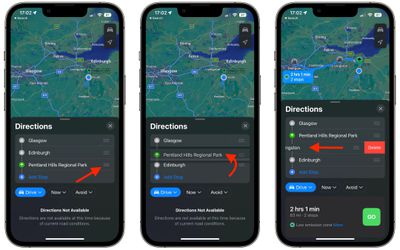
  3. Use the hamburger icons (the three lines) beside each location name to drag your stops so that they are in the desired order.
  4. To remove a stop from your journey, simply swipe left on the stop and tap the Delete button that appears.
  5. When you're happy with your journey plan, choose a directions option below and tap the Go button to get started.
    maps

Note that the Maps app does not optimize the route, so you'll need to do that manually when you type in stops.

Tip: If you're already on the road and want to insert a stop into your route, you can use Siri voice commands to do so.


Popular Stories

trump lake america

Apple Maps Renames Lake Ontario 'Lake America'

Tuesday September 1, 2026 1:58 pm PDT by
Apple Maps users in the United States will now see "Lake America" instead of "Lake Ontario" for the Great Lake on the border of Ontario and New York. The updated name is currently rolling out to iPhone, iPad, and Mac users. The Maps app still has the Lake Ontario label for the body of water, but tapping it now says "Lake America." Apple will likely change the label in the next few hours....

Apple Maps Google Maps Icons

Google Maps Showing 'Lake America' in U.S., Apple Maps Yet to Follow

Monday August 31, 2026 6:33 am PDT by
Google Maps users in the U.S. will now see the name "Lake America" instead of "Lake Ontario" for the Great Lake that straddles the New York—Ontario border. Google said it made this change in response to the U.S. Geographic Names Information System (GNIS) updating the name for "Lake Ontario" to "Lake America," following an executive order issued by U.S. President Donald Trump last week....
apple maps ads live

Apple Maps Ads Are Here, and There's No Way to Turn Them Off

Tuesday August 25, 2026 1:40 pm PDT by
Ads in Apple Maps are live in the United States and Canada, which means iPhone and iPad users will see them when searching for locations and when viewing Suggested Places. Apple announced plans to bring ads to the Maps app in March, and said the feature would roll out starting in late summer. Apple confirmed to 9to5Mac that ads began showing up for users over the last few days, with ad...

🔗 Related Apple News & Rumors

Stay updated with the latest Apple ecosystem news and verified rumors