

Everything New in the iOS 15 Weather App

Apple in 2020 acquired popular weather app Dark Sky, and in iOS 15 some of those Dark Sky features have been incorporated into the official app. Apple's Weather app has received a major design overhaul in iOS 15, making it a much better weather resource.
iOS 15 Weather Feature

Design Overhaul

The Weather app in iOS 15 has an updated design that makes it easier than ever to see the information that you want to know at a glance. The Weather app adopts the card-style interface that's also been used for the Settings app, separating different information into sections.
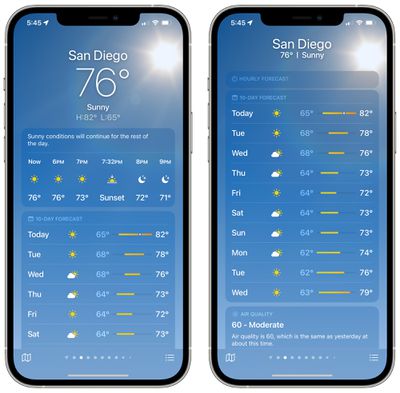
ios 15 weather app main view
There continues to be a main view with the weather conditions on an hourly basis that you can shift through, and a new 10-day forecast view lets you know what weather you can expect in the future. The updated 10-day forecast shows expected conditions and has a bar that makes it easier to see the temperature over time at a glance.

Scrolling down through the Weather app will bring you to new weather modules, where new graphical weather data has been added. There are modules for air quality, temperature, UV index, sunset and sunrise, wind, precipitation, humidity, visibility, and pressure.
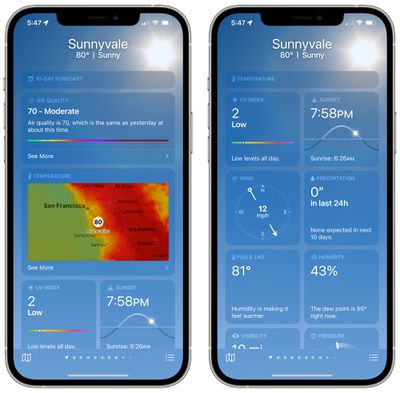
ios 15 weather app modules
For each of these modules, Apple provides graphics, context, and more information than was previously made available. Apple shows the specific direction of the wind, for example, and provides details like when precipitation is next expected, what the UV level will be like throughout the day, temperature adjusted for humidity, dew point, and more.

Colored Bars

With the 10-day forecast, there are colored bars next to each temperature listing, which many people have been curious about. These bars represent the temperature range of the day, with the dot in the middle representing the current temperature.
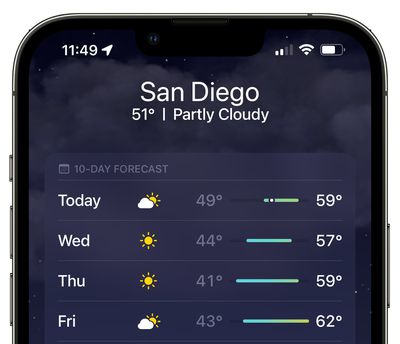
weather bars ios 15
We have more on the colored bars and what the colors mean in our Weather app how to.

Weather Maps

Apple in iOS 15 added full-screen weather maps that provide overview data on expected precipitation, air quality, and temperature. You can get to the maps by tapping on the default temperature map and then tapping on the stack to change the view to precipitation or air quality.
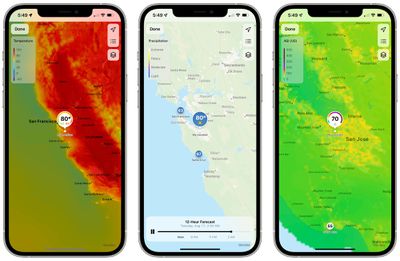
weather maps ios 15
There's also an option to access the weather maps from anywhere by tapping on the small folded map icon in the bottom left corner of the app.

The precipitation maps are animated and show the path of incoming storms and the intensity of rain and snow, while the air quality and temperature maps let you see the conditions in your area and the surrounding areas. You can zoom in or out as far as necessary.
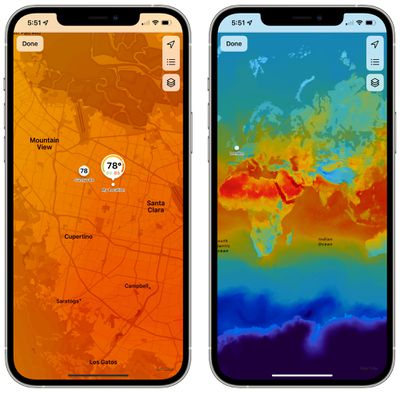
weather map ios 15 zoom in out
Air Quality information is limited to Canada, China mainland, Germany, France, India, Italy, Mexico, Netherlands, Singapore, South Korea, Spain, UK, and the United States.

Next-Hour Precipitation

When it's going to rain, snow, or hail in the next hour, you can sign up for next-hour precipitation notifications to get a heads up.
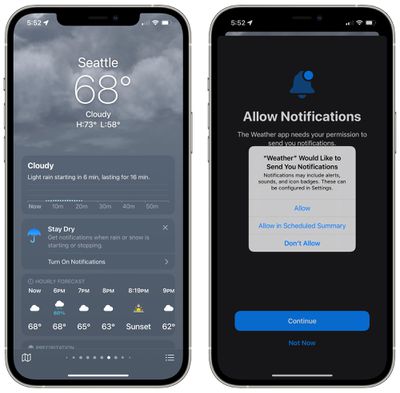
ios 15 weather app precipitation notifications
Next-hour precipitation notifications are available in the United States, the UK, and Ireland.

Animated Backgrounds

To go along with the updated design in the Weather app, Apple offers thousands of new animated backgrounds that provide more information on sun position, rain, clouds, storms, and other weather phenomena. Backgrounds change throughout the day and the night and shift based on weather patterns.
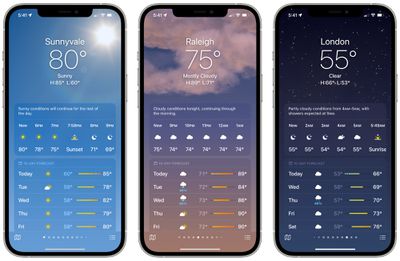
ios 15 weather app backgrounds
Animated backgrounds are available on all devices with an A12 Bionic chip or later. Earlier iPhones will not have access to the more detailed animations.

Guide Feedback

Have questions about the new Weather app features in iOS 15, know of a feature we left out, or want to offer feedback on this guide? Send us an email here.


Related Forum: iOS 15

Popular Stories

Aston Martin CarPlay Ultra Screen

Apple's CarPlay Ultra to Expand to These Vehicle Brands Later This Year

Sunday February 1, 2026 10:08 am PST by
Last year, Apple launched CarPlay Ultra, the long-awaited next-generation version of its CarPlay software system for vehicles. Nearly nine months later, CarPlay Ultra is still limited to Aston Martin's latest luxury vehicles, but that should change fairly soon. In May 2025, Apple said many other vehicle brands planned to offer CarPlay Ultra, including Hyundai, Kia, and Genesis. In his Powe...
Apple Logo Black

Apple's Next Launch is 'Imminent'

Sunday February 1, 2026 12:31 pm PST by
The calendar has turned to February, and a new report indicates that Apple's next product launch is "imminent," in the form of new MacBook Pro models. "All signs point to an imminent launch of next-generation MacBook Pros that retain the current form factor but deliver faster chips," Bloomberg's Mark Gurman said on Sunday. "I'm told the new models — code-named J714 and J716 — are slated...
Apple MacBook Pro M4 hero

New MacBook Pros Reportedly Launching Alongside macOS 26.3

Sunday February 1, 2026 5:42 am PST by
Apple is planning to launch new MacBook Pro models with M5 Pro and M5 Max chips alongside macOS 26.3, according to Bloomberg's Mark Gurman. "Apple's faster MacBook Pros are planned for the macOS 26.3 release cycle," wrote Gurman, in his Power On newsletter today. "I'm told the new models — code-named J714 and J716 — are slated for the macOS 26.3 software cycle, which runs from...
iOS 26

iOS 26.3 and iOS 26.4 Will Add These New Features to Your iPhone

Tuesday February 3, 2026 7:47 am PST by
We are still waiting for the iOS 26.3 Release Candidate to come out, so the first iOS 26.4 beta is likely still at least a week or two away. Following beta testing, iOS 26.4 will likely be released to the general public in March or April. Below, we have recapped known or rumored iOS 26.3 and iOS 26.4 features so far. iOS 26.3 iPhone to Android Transfer Tool iOS 26.3 makes it easier...
14 inch MacBook Pro Keyboard

Apple Changes How You Order a Mac

Saturday January 31, 2026 10:51 am PST by
Apple recently updated its online store with a new ordering process for Macs, including the MacBook Air, MacBook Pro, iMac, Mac mini, Mac Studio, and Mac Pro. There used to be a handful of standard configurations available for each Mac, but now you must configure a Mac entirely from scratch on a feature-by-feature basis. In other words, ordering a new Mac now works much like ordering an...

Top Rated Comments

SSDGUY Avatar
58 months ago
Hey Apple, make it for iPadOS, along with the calculator.
Score: 103 Votes (Like | Disagree)
randolorian Avatar
58 months ago
Is it sad this is what I'm most excited about in iOS15? :)
Score: 48 Votes (Like | Disagree)
The Reverend Dr Galactus Avatar
58 months ago
This looks great, but if Apple doesn't finally port Weather to the iPad by the time Dark Sky goes dark, I'm getting a Surface.

(Not really, but... come on.)
Score: 28 Votes (Like | Disagree)
rdinterman Avatar
58 months ago
Well, it’s a great app. But it SHOULD be on the iPad too. It would look awesome.
Score: 23 Votes (Like | Disagree)
jonnyb098 Avatar
58 months ago
The amount of time Apple has spent all summer reverting safari back to normal they could have built three weather apps for iPad. Maybe a calculator app too
Score: 17 Votes (Like | Disagree)
nutmac Avatar
58 months ago

Is it sad this is what I'm most excited about in iOS15? :)
Not at all. Apple should be proud of the new Weather app.

I will still use CARROT Weather, but for a vast majority of people, Apple's Weather app is the best weather app out there.
Score: 12 Votes (Like | Disagree)














