

iOS 15: How to Use Apple's New Weather Maps - MacRumorsOpen MenuShow RoundupsShow Forums menuVisit ForumsOpen Sidebar
Skip to Content

iOS 15: How to Use Apple's New Weather Maps

by

In iOS 15, Apple's stock Weather app received a major design overhaul, in part thanks to a number of features brought over from the popular weather app Dark Sky, which Apple acquired in 2020. One of those features is the inclusion of weather maps, and this article explains what they are and how to use them.
iOS 15 Weather Feature
There are three full-screen weather maps available in Apple's native Weather app. They offer a bird's eye view of forecasts for local precipitation, air quality, and temperature. Note that air quality information is limited to Canada, China mainland, Germany, France, India, Italy, Mexico, Netherlands, South Korea, Spain, UK, and the United States.
weather
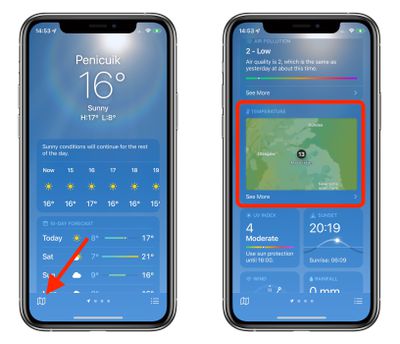
You can access the maps by tapping the small folded map icon in the bottom-left corner of the Weather app, or by scrolling down on a forecast screen, tapping on the default temperature map, and then tapping on the stack to change the view to precipitation or air quality.
weather maps ios 15
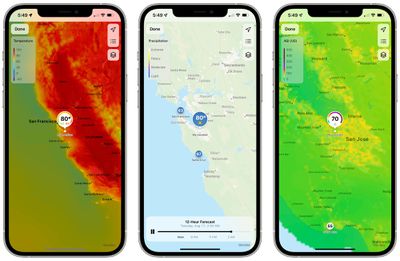
The precipitation maps are animated and show the path of incoming storms and the intensity of rain and snow. The progress bar at the bottom shows you the 12-hour forecast, which you can pause using the Pause button or scrub through by dragging the progress dot with your finger.

The stack icon in the upper right corner can be tapped to switch to the air quality or temperature maps, which likewise give you a view the conditions in your area and the surrounding areas. The icon above it lets you switch between geographical regions in your forecast list, while the top icon zooms you in to your chosen area.
weather map ios 15 zoom in out
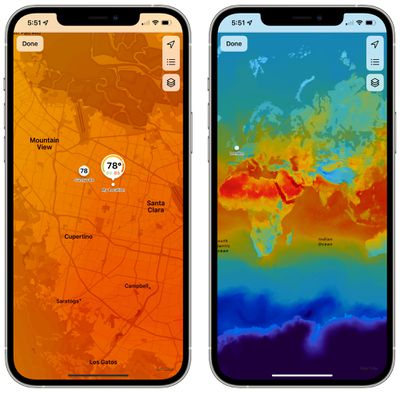
Note that you can zoom in or out as far as you want on any of the maps to get an overview of the chosen weather data.


Related Forum: iOS 15

Popular Stories

iOS 27 Weather App Forecast Feature 1

iOS 27's Weather App Has a New Way to View Forecasts

Thursday June 11, 2026 1:10 pm PDT by
Starting with iOS 27, Apple's Weather app offers new hourly and 10-day overviews for precipitation and wind that you can quickly view at a glance. While this sort of information was already accessible elsewhere in the app, you can now quickly tap between conditions, precipitation, and wind overviews. You can view the percentage chance of rain or snow each hour and day, as well as...

American Express Gold Apple Pay Feature

American Express Announces New Apple Pay Feature

Tuesday June 30, 2026 10:27 am PDT by
American Express today announced that you can now redeem Membership Rewards points when checking out with Apple Pay on the web and in apps on the iPhone and iPad. When checking out with Apple Pay on iOS 18 or iPadOS 18 or later, tap on your eligible American Express card (Platinum, Gold, Green, and others) and select the Membership Rewards points option. You can use points to cover all or...
Apple Acquires Award Winning App Play Feature

Apple Acquires Award-Winning App 'Play'

Monday June 29, 2026 7:39 am PDT by
In February, Apple notified the European Commission that it would be acquiring certain assets from and have the right to hire certain employees from Rabbit 3 Times, the company behind the award-winning app design tool Play. The notification was published on the European Commission's website this week, following a four-month waiting period. Play was a Mac and iPhone app that allowed designers ...

🔗 Related Apple News & Rumors

Stay updated with the latest Apple ecosystem news and verified rumors








































