

iOS 15 Spotlight Improvements: Rich Results, Web Images, Photos Search, Lock Screen Access and More - MacRumorsOpen MenuShow RoundupsShow Forums menuVisit ForumsOpen Sidebar
Skip to Content

iOS 15 Spotlight Improvements: Rich Results, Web Images, Photos Search, Lock Screen Access and More

Apple in iOS 15 is making several improvements to Spotlight, aka the universal search feature that can be accessed on the iPhone or iPad's Home Screen with a downward swipe.

ios 15 spotlight search feature
Spotlight is a one-stop resource for accessing everything you might want to find on an iOS device, and in iOS 15, it's better than ever. This guide highlights all of the new features that are coming to Spotlight with Apple's latest update.

Rich Search Results

Apple's Siri knowledge database has been expanded and the Spotlight feature now supports rich search results, so you can get more information than before directly from the Spotlight interface.
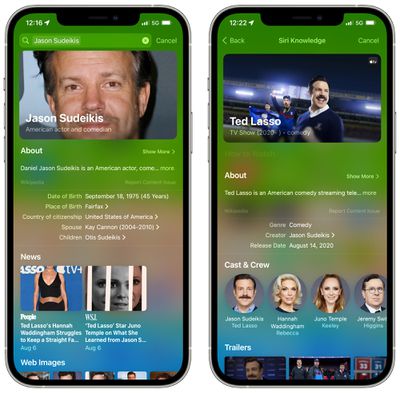
ios 15 spotlight rich results actors
If you search for a movie or a TV show, for example, and then tap on the result, you'll see information like how you can watch the show, the actors, trailers, seasons, links to the TV app, Messages discussions you've had about the content, ‌Siri‌ suggested search results, and more.

With iOS 14, a search such as this brings up a much more limited range of information, typically limited to a web search.
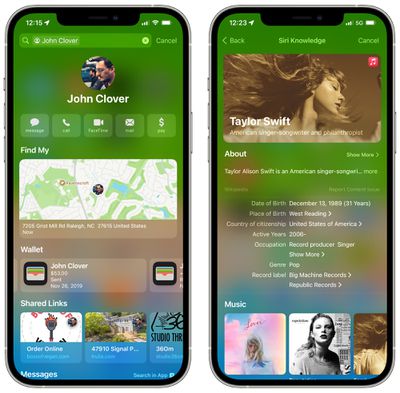
ios 15 rich results contacts siri
Rich search results work for all kinds of search topics, including contacts, actors, musicians, movies, and TV shows. With contacts, it will bring up a full contact card with Message interactions, shared links, Wallet transactions, Find My location, photos from apps, and emails in addition to the standard contact info, making the Spotlight search much more informative.

Spotlight can be used to search for images on the web. So, for example, if you type "cat images" into the Spotlight search interface, Spotlight will now provide a selection of the most popular web images.
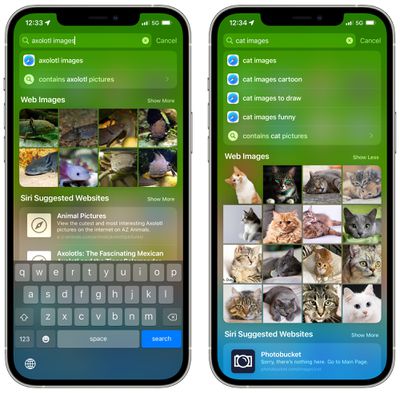
ios 15 spotlight images search
Tapping into an image will show you additional images related to the image you tapped, and you can continue tapping through images to find just what you're looking for.
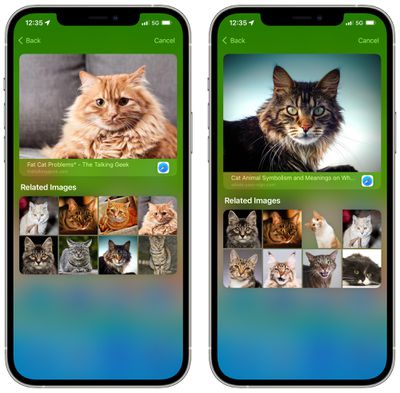
ios 15 spotlight images search 2
The web images search feature can be used to find pictures of people, animals, plants, landmarks, monuments, and more. It doesn't work for every search, but for most topics, just adding an "images" to the search is a quick way to bring up image web results.
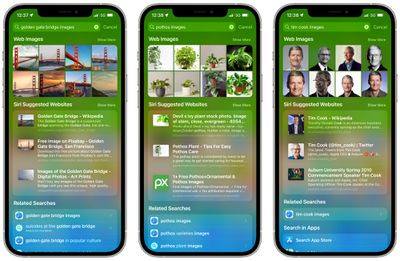
ios 15 spotlight images search type

In addition to searching the web for images, Spotlight can also now look for specific pictures in your own photo library. When you search for "cat photos" or "dog photos," for example, Spotlight surfaces the photos that are stored on your device in the "Photos From Apps" section.
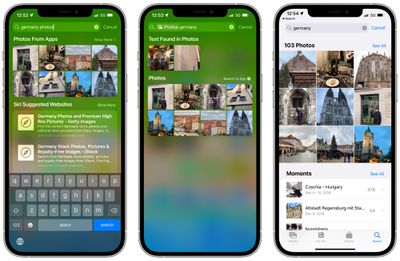
ios 15 spotlight photos search
If you tap into a search, you can see additional search results, and there's also an option to open up the ‌Photos‌ app to see all the photos that are relevant to the search.

You can search through your Photo Library in Spotlight by location, people, scenes, and specific objects that are in the photos like a pet or a plant.

‌Photos‌ that were shared with you through the Messages app can be found in Spotlight by using a contact name in the search.

If you swipe downward on the Lock Screen of the iPhone, you can get to the Spotlight search interface without having to unlock the iPhone.
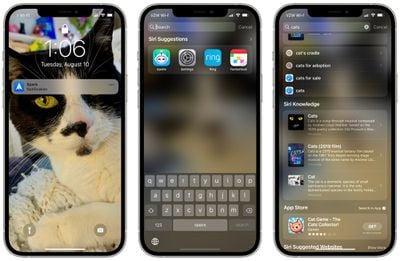
ios 15 spotlight lock screen search
A Spotlight search conducted while the iPhone is locked does not bring up personal information like your own photos, text messages, and contacts, focusing instead on general content from the web, ‌Siri‌ Knowledge, News, Stocks, dictionary, and more.

All personalized results only come up when the iPhone is unlocked, so if someone gets ahold of your iPhone, they can use it for search purposes but will not be able to see your info.

Install Apps

App Store searches have been improved in iOS 15, and if you search for an app that you want to use, you can now install it right from Spotlight without leaving the Spotlight search interface.
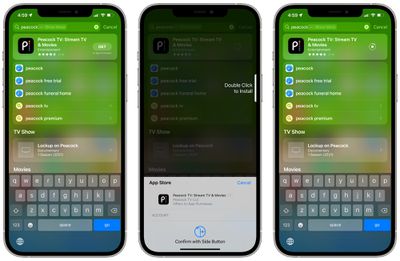
ios 15 install apps from spotlight

Delete Apps

In addition to installing apps using Spotlight, you can also search for an app that you have installed and uninstall it right from the search interface.
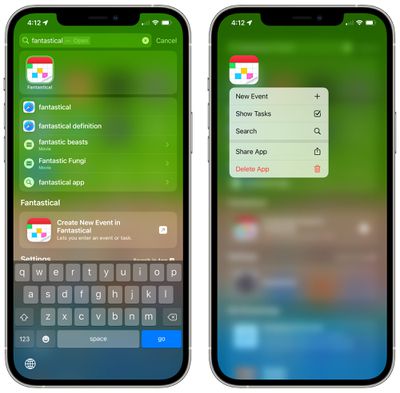
delete app spotlight ios 15
To delete an app, conduct a search and then long press on the result to bring up the delete interface.

Drag Apps From Spotlight to Home Screen

If you search for an app using Spotlight, you can grab it with a long press and drag it out of search and onto your ‌Home Screen‌, which can be a useful way to rearrange apps.

You'll need to do a press, hold, and drag gesture with one finger while using another to swipe up to the ‌Home Screen‌ with the other, exiting the Spotlight search. From there, you can drag the app icon to any of your app pages.

Maps Spotlight Search Improvements

If you search for a business that supports Apple's App Clips feature, you can see action buttons on the Maps result in Spotlight. You can do things like access menus or tickets, see reservations, make an appointment, order takeout or delivery, see waitlist and showtime information, get parking details, and more.
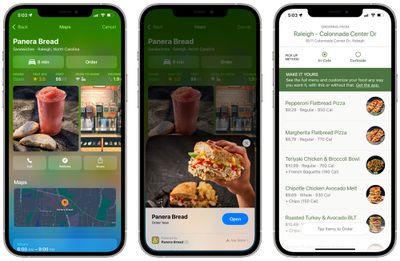
app clip maps spotlight button ios 15

Spotlight Search Warnings

As part of a suite of Child Safety features, Apple is expanding guidance for ‌Siri‌ and Spotlight that will offer resources to help children stay safe online and get help with unsafe situations.

If a user searches for topics related to Child Sexual Abuse Material, for example, Apple will offer interventions that will explain to users that interest in this topic is harmful and problematic, offering resources on ways to get help.

Guide Feedback

Have questions about the new Spotlight features in iOS 15, know of a feature we left out, or want to offer feedback on this guide? Send us an email here.


Related Forum: iOS 15

Popular Stories

Apple HomeView lineup feature1

Apple Announces 'HomeView' Smart Home Hub

Tuesday October 13, 2026 6:00 am PDT by
Apple today announced the "HomeView," an all-new kind of smart home hub featuring a 7-inch Liquid Retina display and Siri AI. Apple's senior vice president of Worldwide Marketing Greg Joswiak said: Apple HomeView is designed to be shared by everyone in the home yet feel completely personal to each user. It recognizes your face to shift from a household screen to your own experience,...
Apple TV 4K 4th Generation feature4

New Apple TV 4K Announced With A19 Chip, Updated Siri Remote, More

Tuesday October 13, 2026 6:08 am PDT by
Apple today announced the fourth-generation Apple TV 4K, with key features including an A19 chip, Siri AI support, an updated Siri Remote that has Find My support with Precision Finding, built in far-field microphones, support for surround sound with four HomePods in front and rear pairs, and more. The A19 chip in the new Apple TV 4K delivers up to 50% faster CPU performance and up to twice...

iOS 26 Home Feature

RIP, homeOS

Tuesday October 13, 2026 9:39 am PDT by
MacRumors was first to reveal the name "HomeView" last week, after discovering a trademark filing from a secretive shell company that we correctly suspected was linked to Apple. Apple was likely behind a "homeOS" trademark filing as well, but the company ultimately decided to stick with generic "HomeView software" naming, just like it refers to the HomePod's operating system as "HomePod...


Top Rated Comments

zakarhino Avatar
68 months ago

...
"no matter how unlikely"
[LIST=1]
* Apple have already ignored their "privacy principles" when the FBI asked them not to encrypt iCloud backups, so the "Apple will resist government requests to expand the tech!" excuse has already been invalidated (not to mention Apple handing over Chinese customers' iCloud encryption keys to the CCP)
* The EU are already in the process of passing laws to mandate a similar method of content scanning that Apple voluntarily created in the US despite no legal requirement to do so
* The CCP already scan people's online materials to look for content that "promotes distrust in the government"
* The US have been pushing for 'encryption backdoors' for years, methods discussed include scanning content before and after it gets sent over an encrypted channel; i.e the "you can have privacy but only when you're talking about something we don't care about" approach.
* Existing surveillance tech in the US has already been abused to subjugate journalists, climate activists, and technologists -- all categories of people that have nothing to do with the "terrorism" farce used to justify those technologies in the first place.

You can joke about "anything could happen" as much as you want but nobody is talking about "anything could happen" like when people talk about microchips in vaccines or the water turning us gay, instead they're saying "look what already happens and has been happening for decades. Look what policies are being pushed globally RIGHT NOW." This is not some far off future conspiracy theory being talked about, this is reality.

The powers that be have already declared their intentions, they have already started their march forward into stripping away more and more of your rights because the population at large represent a threat to the status quo. Don't believe me? Go spend 10 minutes reading about the militarization of the police and ask yourself why they're buying up tanks for domestic police departments. People smarter than you are pointing and screaming about these subjects but people like you prefer to live in denial and pretend nothing's happening because you can't be bothered to face reality. People that mock serious issues such as this are the reason why they get away with it.

Shame on you, go educate yourself and stop the tiresome gimmick of making fun of things you don't understand.
Score: 16 Votes (Like | Disagree)
68 months ago
Spotlight search on lock screen is good. Easier to search!
Score: 3 Votes (Like | Disagree)
Konigi Avatar
68 months ago
These are genuine improvements, which I'm excited for. It seems even more versatile than Google search. I am using Spotlight quite often, and looking forward for a richer experience.

Now please have a similar experience on macOS.
Score: 3 Votes (Like | Disagree)
BGPL Avatar
68 months ago
When will we be able to tag photos with something simple like, "spouse", "cat", "dog", "neighbor laying out by pool"... etc

I wonder how many hours the population of the world has spent in total searching for photos to show people something/whatever. It must be in the millions. I recently spent 10 minutes hunting for a photo and by the time I had found it, the person I was talking to had left the party and I couldn't find anyone who was interested in looking at it, since there was no context.

BTW, the privacy paranoia on this forum is outrageous. Holy Toledo. No one cares.
Score: 2 Votes (Like | Disagree)
63 months ago

Any advice on how to enable/disable some of the Spotlight search features? My "web images" don't show when I search for topics in Spotlight.
me too, I am searching for the most trivial things like "cat", and I still don't get any web images
Score: 1 Votes (Like | Disagree)
travoose Avatar
66 months ago
Any advice on how to enable/disable some of the Spotlight search features? My "web images" don't show when I search for topics in Spotlight.
Score: 1 Votes (Like | Disagree)
Latest Stories
Oops, Apple's Website Just Hinted at iPad Mini 8
5 hours ago
OLED MacBook Pro Won't Get M7 Chips Until Late 2027
7 hours ago
Apple Pledged $25 Million to Trump's White House Ballroom
8 hours ago
Touchscreen MacBook Pro Could Launch on November 6
10 hours ago
New Withings Users Must Pay $99/Year for Apple Health Syncing
10 hours ago
Meta and Apple Bring Muse Spark Open AI Model to Mac Studio
11 hours ago
iPad Mini 8: Apple Has Tested Both 60Hz and 120Hz ProMotion Displays
12 hours ago
Apple TV 4K 2022 vs. 2026 Buyer's Guide: All Differences Compared
13 hours ago
Apple CEO John Ternus on Early Foldables: 'Kind of Cheap and Crappy'
14 hours ago
Greg Joswiak Says Apple Isn't Focused on Making AI for 'Lunatic Fringe'
14 hours ago
Amazon Offers $120 Discount on AirPods Max 2, $50 Off AirPods Pro 3
15 hours ago
Apple CEO John Ternus Featured on Cover of TIME Magazine: 'New Era'
16 hours ago
Apple Announces Deadline to 'Get Ready' to Pre-Order the iPhone Duo
16 hours ago
MKBHD is 'Not Convinced' About Apple's New HomeView, Here's Why
17 hours ago
Apple's Wall-Mounted HomeView Ships Without a Power Adapter
17 hours ago
Rare Apple-1 With Steve Jobs Letter Sells for $1.15 Million
17 hours ago
Apple Now Inviting Media to October 28 'Launch Experience'
18 hours ago
iPhone Duo's A20 Pro Chip Benchmarked Ahead of Launch
1 day ago
10 HomeView Features You Might Have Missed
1 day ago
Apple Becomes Second Company to Close Above $5 Trillion
1 day ago
Which Apple Home Devices Get Siri AI, and When
1 day ago
Apple's Long-Delayed HomeView Was Already Being Tested in 2024
1 day ago
Apple Intelligence Coming to China in December With iOS 27.3
1 day ago
Apple Invites App Updated With Two New Features
1 day ago
OpenAI Says Ex-Employee Showed Its Device Plans to Apple
1 day ago
Discover the Best Cases and Screen Protectors for Your New iPhone Duo
1 day ago
Apple Store Near Los Angeles Closed Due to 'Events Beyond Our Control'
2 days ago
No, HomePod Mini 1 Won't Support Siri AI as CNET Reported
2 days ago
iPhone Duo Compromises: Everything You Have to Give Up
2 days ago
Apple HomeView Has These 15 Apps, Some CarPlay Apps and Widgets Also Supported
2 days ago

🔗 Related Apple News & Rumors

Stay updated with the latest Apple ecosystem news and verified rumors






































