

Safari iOS 14 Guide: Privacy Report, Built-In Translation, Compromised Password Alerts and More - MacRumorsOpen MenuShow RoundupsShow Forums menuVisit ForumsOpen Sidebar
Skip to Content

Safari iOS 14 Guide: Privacy Report, Built-In Translation, Compromised Password Alerts and More

Apple introduces improvements for almost all of the built-in apps with each new iteration of iOS, and iOS 14 is no exception. For Safari, Apple has added some useful new features like built-in translation and a Privacy Report that provides a rundown on all of the trackers that Safari is blocking.
iOS 14 safari feature
This guide includes all of the new features and tweaks you'll find in Safari 14 for iPhone and iPad.

Speed and Performance Improvements

According to Apple, Safari in iOS 14 features a "blazing-fast JavaScript engine" that makes Safari up to 2x faster than Chrome on Android.

Built-In Translation

Safari in iOS 14 has a built-in translation option that can be used to translate websites to English, Spanish, Chinese, French, German, Russian, or Brazilian Portuguese, which goes along with the new Translate app that Apple added in the update.
ios14translatewebsite
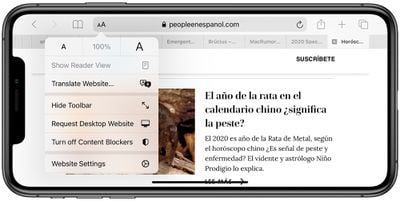
Translating a webpage is as simple as visiting a webpage in a supported language and then tapping on the "aA" icon in the menu bar to bring up the translate option. Tap translate and the webpage is automatically translated into the language that your phone is set to.

Additional languages to translate to can be added in the Settings app of the iPhone, as outlined in the how to below.

Password Monitoring and Compromised Password Alerts

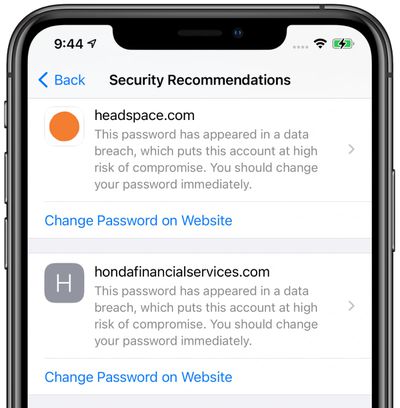
Safari in iOS 14 is able to monitor saved passwords, watching for passwords that have been involved in a data breach.
passwordmonitoringsafari
To enable this feature, Safari uses cryptographic techniques to regularly check derivations of your passwords against a list of breached passwords in what Apple promises is a secure and private way. If a breach is discovered, Safari will let you know and will provide prompts for upgrading to Sign in with Apple if possible or automatically generating a new secure password.

You can see potential problems under the "Security Recommendations" heading in the Passwords section of the Settings app.

Privacy Report

Safari in iOS 14 (and macOS Big Sur) adds a Privacy Report feature that expands on Apple's Intelligent Tracking Prevention functionality. For the last several years, Apple has been working to prevent cross-site tracking, a feature that websites use to track your internet usage as you browse different sites for ad targeting, analytics, and more.
privacyreportsafari
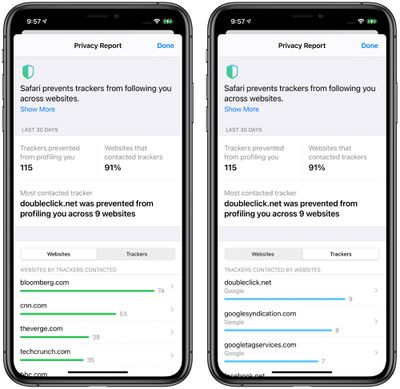
Intelligent Tracking Prevention is Apple's description for its set of tools that block cross-site trackers in Safari, and in iOS 14, Apple lists which sites are using trackers, how many trackers those sites have installed, and the most prevalent trackers you encounter while browsing the web.

Any website that uses ads for monetization or an ad network for that same purpose will have these trackers on it, as will any site that uses analytics services like Google Analytics for collecting data on user behavior for site and content improvements.

Safari on iPhone and ‌iPad‌ lists the number of trackers on each site that you visit, the number of trackers Safari has prevented, the number of websites you've visited that have trackers, and a list of the most frequently seen trackers such as Google's DoubleClick.net.

You can get to the Privacy Report section in Safari by tapping on the icon that's two As next to each other and choosing the "Privacy Report" option. Note that you must have cross-site tracking prevention enabled for Privacy Report to work, and Privacy Report will prompt you to enable the feature if it's not turned on already.

Picture in Picture

In Safari on iPhone, if you're watching a video, you can now tap the Picture in Picture button to watch it in windowed mode, so you can continue browsing another website or doing something else on your iPhone while the video plays. We have more details on Picture in Picture in our Picture in Picture guide.
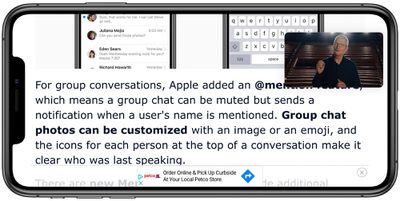
ios14pictureinpicture

If you type a URL like MacRumors.com in the pull down search interface on the iPhone, you can hit the "Go" button to open the website directly without having to tap a link in the search results.

Simpler Sign in with Apple

Apple made new tools for developers to allow them to translate existing web accounts to Sign in with Apple, which will hopefully make new options available to iPhone, ‌iPad‌, and Mac users who want to convert existing logins to Sign in with Apple, which is more secure.

signinwithapple

Tracking Permission

Apps that want to track you across apps and websites to deliver personalized ads will now need to secure user permission to do so. Allow Tracking or Ask App Not to Track are two settings designed for apps, but the feature goes hand in hand with Privacy Report to keep apps from monitoring your app usage and website browsing habits.
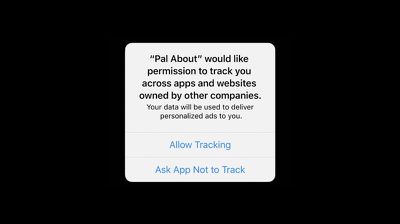
app tracking pop up ios 14

iPadOS 14 - Scribble Support

With an ‌iPad‌ running iPadOS 14, you can use the new Scribble feature with Safari to handwrite URLs, Google searches, and more, with the handwritten text then translated to typed text. For more on Scribble, make sure to check out our guide.


Use Another Browser

Not a fan of Safari? In iOS 14 you can set a different browser like Google's Chrome as the default browser that will activate when you tap links.

Other Safari Tutorials

Guide Feedback

Have questions about the new Safari features in iOS 14, know of a feature we left out, or or want to offer feedback on this guide? Send us an email here. If you want to know more about what's new in iOS 14, make sure to check out our iOS 14 roundup.


Tag: Safari
Related Forum: iOS 14

Popular Stories

Switch to Safari

Apple Explains Why Chrome Users Should 'Switch to Safari'

Tuesday October 13, 2026 5:29 am PDT by
Apple has launched a new "Switch to Safari" marketing campaign that encourages Chrome users to switch to Safari as their web browser of choice on the Mac. "Safari is a more powerful and private browser than Chrome," says Apple. Apple has a new "Switch to Safari" page on its website that outlines more than 10 reasons that Chrome users should switch to Safari, including faster performance...

safari iphone duo webkit

Apple Wants to Fix Safari's Cramped Layout on iPhone Duo

Saturday October 24, 2026 9:58 pm PDT by
Apple is considering changes to Safari on the iPhone Duo that would give websites access to more of the outer display, although the company has yet to settle on an approach. The challenge is allowing pages to occupy the area beneath Safari's side-mounted controls without making parts of a website inaccessible. In an Friday, October 23 WebKit post, Apple's Jen Simmons explained that an...
Switch to Safari

Apple Addresses Web Security Threat, Working on macOS Update With Additional Fix

Sunday October 25, 2026 4:07 pm PDT by
Earlier this month, a security researcher discovered that private cryptographic keys associated with eight of Indian company eMudhra's intermediate certificate authority (CA) certificates were weak. The compromised keys could have allowed attackers to impersonate legitimate websites, potentially putting users' sensitive information at risk. However, there is currently no evidence that the keys...

Top Rated Comments

81 months ago
Compromised password alerts sounds like a cool feature.
Score: 9 Votes (Like | Disagree)
TheYayAreaLiving 🎗️ Avatar
81 months ago
Nicely written! Good job Macrumors!
Score: 8 Votes (Like | Disagree)
LeadingHeat Avatar
81 months ago
I think the thing that keeps me in the Apple ecosystem the most is the privacy first mindset. In the hardware and software. It isn’t just lip service, everything they do seems to aim towards improving transparency and security.
Score: 5 Votes (Like | Disagree)
arn Avatar
81 months ago

"Safari in ‌iOS 14‌ features a "blazing-fast JavaScript engine" that makes Safari up to 2x faster than Chrome on Android."

What sort of double speak, trickery, half-truthiness is that! Is it faster than Chrome on iOS or not???
Chrome on iOS has to use safari’s rendering engine. So it’s the same on iOS.

arn
Score: 5 Votes (Like | Disagree)
I7guy Avatar
81 months ago
To me the privacy report and co promised passwords are the standout features.(although I think some of these new features are a drop in the bucket of what is hopefully to come)
Score: 4 Votes (Like | Disagree)
Apple_Robert Avatar
81 months ago

I haven’t been able to find this setting, for any of the stock apps. Is it not activated yet?
Not live, yet. And when it does go live, the developer will have to make the option available.
Score: 2 Votes (Like | Disagree)
Latest Stories
Apple Watch Ultra 4 Hits All-Time Low Price With Amazon's $99 Discount
6 hours ago
Reminder: Apple's Big Discount on Beats 360 Ear Cushions Ends Today
6 hours ago
Here's a New Tour of Apple's HomeView Software
6 hours ago
Apple Reveals New iPad Mini's Battery Capacity
7 hours ago
Top Stories: Apple's Big MacBook Pro, iPad mini and iMac Updates
8 hours ago
'Pluribus' Season 2 Reportedly Starts Production Today
15 hours ago
iPhone 18 Pro Sales Surge in China, Offsetting Decline in U.S. and Japan
16 hours ago
HomeView Software 27.2: Wallpapers, Control Center, and More
22 hours ago
Apple Alerts Stores to iPhone Duo's Display Cracking Issue
23 hours ago
iOS 27.3 Will Enable These Apple Intelligence Features in China
1 day ago
Apple Says iOS 27.3 Beta Coming Next Week
1 day ago
Apple's Flash Storage Suppliers Are Finally 'Getting Their Revenge'
1 day ago
14 New Things Your iPhone Can Do in iOS 27.2
1 day ago
iPhone Duo Review: One Week Later
1 day ago
Samsung Mocks iPhone Duo Display Cracks in New Ad Campaign
1 day ago
The MacRumors Show: OLED MacBook Pro, iPad Mini 8, and More
1 day ago
MacBook Pro With Touch Display: 15 More Details Revealed
1 day ago
Russia Places Apple on State Surveillance Registry
1 day ago
Halloween Weekend Brings Discounts on Apple Accessories and Pre-Orders
1 day ago
Apple Has Released More Than 25 New Products in the Past Two Months
1 day ago
Local Code Launches as Free, Private AI Assistant Tool for Mac
1 day ago
Apple Acquires Ascend.io
1 day ago
HomePod Mini 2 Launches Today: All the New Features
1 day ago
AirTag 2 4-Pack Drops to New Low Price of $69.99
1 day ago
Rian Johnson's iPhone Camera App Goes Viral
1 day ago
Where Did All the iPhone Duos Go? Mostly to Apple's Stores
1 day ago
Apple's Touchscreen MacBook Pro Could Ship 1.5M Units in 2027
2 days ago
New Apple TV 4K and iPad Mini: RAM Amounts Revealed
2 days ago
Apple Executive Comments on New iPad Mini Lacking 120Hz Display
2 days ago
Here's a Hands-On Look at HomePod Mini 2's New Two-Tone Colors
2 days ago

🔗 Related Apple News & Rumors

Stay updated with the latest Apple ecosystem news and verified rumors










































