Haptic Touch vs 3D Touch: What's the Difference? - MacRumorsOpen MenuShow RoundupsShow Forums menuVisit ForumsOpen Sidebar
Skip to Content

Haptic Touch vs 3D Touch: What's the Difference?

by

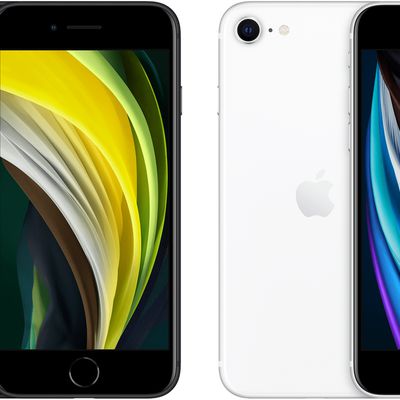
With the iPhone 11, 11 Pro, 11 Pro Max, and 2020 iPhone SE, Apple did away with 3D Touch across its entire iPhone lineup, replacing the former ‌3D Touch‌ feature with Haptic Touch.

In this guide, we'll go over everything you need to know about Haptic Touch and how it differs from the ‌3D Touch‌ feature that's been available since the iPhone 6s.
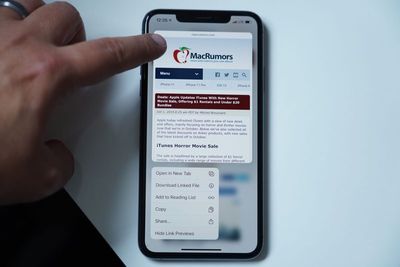
haptictouchsafari

What is Haptic Touch?

Haptic Touch is a 3D Touch-like feature that Apple first introduced in the 2018 iPhone XR and later expanded to its entire iPhone lineup.

Haptic Touch uses the Taptic Engine and provides haptic feedback when the screen is pressed on one of Apple's new iPhones. A Haptic Touch is a touch and hold gesture, and it can be used across the iOS 13 operating system.
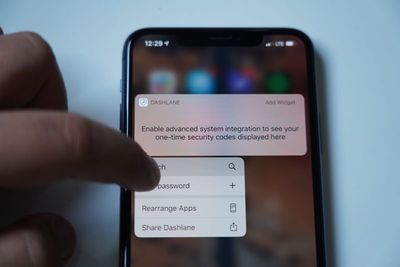
haptictouchapps2
Haptic Touch can be used by pressing in a relevant location until a little haptic pop is felt against the finger and a secondary menu pops up, with content varying based on where you're using the feature. A simple tap will activate one of the options on the secondary menu that pops up.

How is Haptic Touch different from 3D Touch?

‌3D Touch‌ supports multiple levels of pressure, so you could have a softer press do one thing and a harder press do another thing. As an example, Apple used the multiple pressure levels for "Peek and Pop" gestures.

On a ‌3D Touch‌ device, you were able "Peek" into a web link to see a preview, and then press harder to pop into it and open it up in Safari, for example. Those secondary "pop" gestures are not available with Haptic Touch because it's a single level of pressure (essentially a long press) rather than multiple pressure levels.
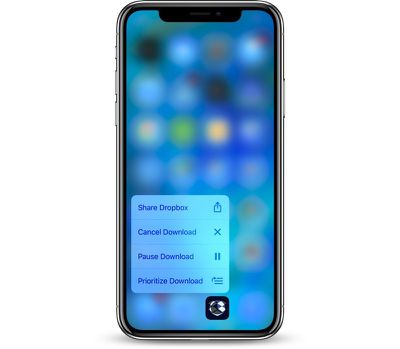
3dtouchprioritize
You can still sort of get the same functionality as Peek and Pop, but now it's more of a Peek and Tap. Just press and hold to activate a Peek with Haptic Touch and then tap the relevant section of the menu or preview that pops up.

Where does Haptic Touch work?

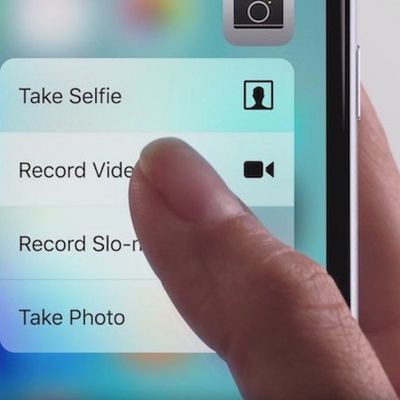
Haptic Touch works everywhere that ‌3D Touch‌ works. You can use it on Home screen app icons to bring up Quick Actions, you can use it on links, phone numbers, addresses, and more to preview content or to activate different gestures on the iPhone or to bring up various contextual menus.
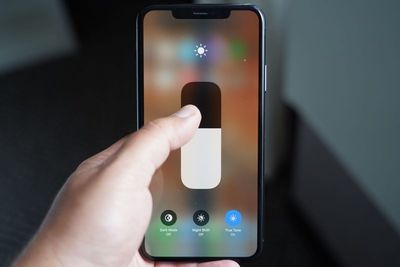
haptictouchcontrolcenter
There are some notable differences in how Haptic Touch and ‌3D Touch‌ behave. As an example, with ‌3D Touch‌, you could press anywhere on the keyboard to turn the iOS keyboard into a cursor. With Haptic Touch, you have to use that gesture on the space bar, which is an adjustment.

Deleting apps has also changed somewhat. Rather than pressing and holding briefly to make the apps "jiggle," a press and hold now brings up an option to "Rearrange" apps, which lets them be rearranged or deleted. You can still use the old method, but the press and hold needs to be a lot longer.

Below are some of the main things that Haptic Touch can do:

  • Activating Live Photos
  • Trackpad activation (with space bar)
  • Expand notification options
  • Activate Quick Actions on the Home screen
  • Bring up quick reply options in Messages
  • Preview links in Safari and access menu options
  • Open new tabs in Safari
  • Preview Photos and bring up menu options
  • Preview Mail messages and bring up quick actions
  • Activate the flash light on the Lock screen
  • Activate the camera on the Lock screen
  • Activate extra features in Control Center
  • Deleting apps (the new Rearrange option)

Haptic Touch essentially works across the iOS 13 operating system and in most of the Apple designed apps, along with some third-party apps. Almost all apps have extra elements that can be activated with a Haptic Touch gesture, so it's worth experimenting to figure out what's what.

Note that on the 2020 iPhone SE, Haptic Touch does not work with notifications on the Lock screen or in the Notification Center.

Does Haptic Touch feel different?

Haptic Touch does feel different, mostly because it works a bit slower than ‌3D Touch‌ gestures. Haptic Touch is a press and hold sensation, while ‌3D Touch‌ is a faster press with force kind of gesture that activates quicker.

The actual haptic feedback component of Haptic Touch feels similar to the feedback received from a ‌3D Touch‌, so in that respect, it's close to indistinguishable. As mentioned, though, there's no secondary level of feedback when using Haptic Touch like there was with ‌3D Touch‌.

Why did Apple get rid of 3D Touch?

‌3D Touch‌ was never available on the iPad, so Apple may have nixed it to make sure the iPhone and the ‌iPad‌ offer a similar experience.

With Haptic Touch and a long press on the ‌iPad‌, the gestures used to get to additional contextual information like Quick Actions are the same. That was never the case with ‌3D Touch‌ -- the ‌iPad‌ simply didn't have the extra gestures available.
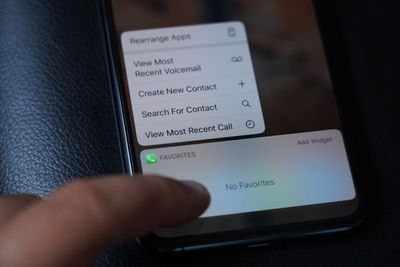
haptictouchapps
‌3D Touch‌ was also something of a fringe feature that was never mainstream, which could also be a reason why Apple decided to go with something that's simpler and ultimately more intuitive. One single press gesture is easier to use than a press gesture that supports multiple levels of pressure for different actions.

Where are the Haptic Touch controls?

Haptic Touch can be somewhat customized with an adjustable time that it takes to trigger Haptic Touch. You can choose between fast or slow activation, with the default setting being fast.
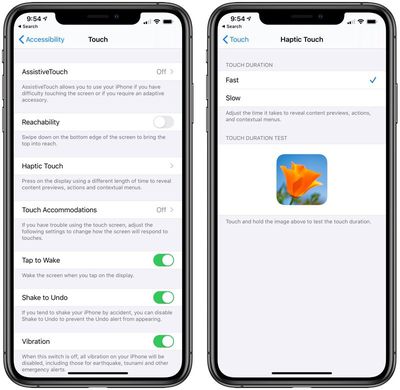
haptictouchaccessibility
This feature is located in the Accessibility section of the Settings app:

  • Open up the Settings app.
  • Choose the Accessibility section.
  • Tap on "Touch."
  • Tap on "Haptic Touch."

There's an option to preview the Haptic Touch feedback options right in the Settings app. Most people are likely going to want to keep the Haptic Touch feedback set to Fast because even Fast is on the slow side compared to ‌3D Touch‌.

The Future of Haptic Touch

Now that ‌3D Touch‌ has been eliminated across Apple's iPhone lineup and ‌3D Touch‌ gestures have been tweaked to be more Haptic Touch friendly even on older iPhones, Haptic Touch seems to be the new standard. We can expect Haptic Touch to be the new feedback feature in iPhones going forward, and it's not likely ‌3D Touch‌ will be making a return.

Guide Feedback

Have questions about Haptic Touch, know of a feature we left out, or want to offer feedback on this guide? Send us an email here.
Related Forum: iPhone

Related Articles

iphonesehaptictouch

New iPhone SE Supports Haptic Touch, With 3D Touch Now Officially Eliminated From Apple's iPhone Lineup

Wednesday April 15, 2020 10:58 am PDT by
The new iPhone SE, like the iPhone XR, iPhone 11, 11 Pro, and 11 Pro Max, features support for Haptic Touch instead of 3D Touch, which means that 3D Touch has officially been eliminated from Apple's iPhone lineup as the now-discontinued iPhone 8 was the last iPhone Apple sold that supported 3D Touch. Apple first removed 3D Touch from the iPhone XR in 2018, replacing it with Haptic Touch. The ...
3d touch iphone zoom

3D Touch Likely Dropped in 2019 iPhones as Haptic Touch Expanded Across iPhones and iPads

Tuesday June 4, 2019 7:55 am PDT by
Earlier this month, it was reported that 3D Touch will not be supported by 2019 iPhones. This rumor was surfaced by a team of Barclays analysts after they traveled to Asia and spoke with multiple Apple suppliers, likely meaning that there is evidence of 3D Touch being removed at the hardware level. Now, on the software side, there are changes that suggest the rumor is accurate. It really...


3d touch iphone zoom

Apple Expected to Remove 3D Touch From All 2019 iPhones in Favor of Haptic Touch

Monday May 27, 2019 12:13 pm PDT by
Four years after 3D Touch debuted on the iPhone 6s, the pressure-sensitive feature appears to be on the chopping block. Last week, in a research note shared with MacRumors, a team of Barclays analysts "confirmed" that 3D Touch "will be eliminated" in all 2019 iPhones, as they predicted back in August 2018. The analysts gathered this information from Apple suppliers following a trip to Asia...
iphone xr haptic touch imessage

Haptic Touch Will Work With Notifications on iPhone XR in iOS 12.1.1

Thursday November 8, 2018 12:21 pm PST by
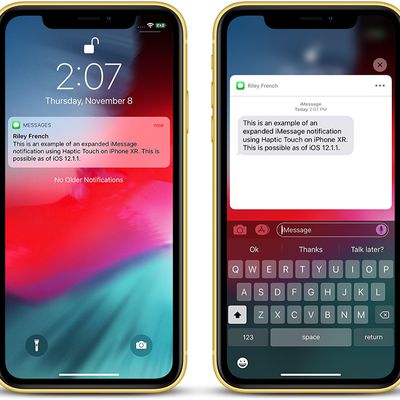
As noted by 9to5Mac, Haptic Touch can be used to expand notifications on the iPhone XR starting with iOS 12.1.1. To use this feature, simply tap and hold a notification on the lock screen or in Notification Center for a split second. Once you feel haptic feedback from the Taptic Engine, let go and the notification will expand, providing more detailed information and contextual shortcuts, such...
haptic touch

Apple Plans to Expand Uses of Haptic Touch on iPhone XR Over Time

Tuesday October 23, 2018 9:10 am PDT by
By now, you've probably heard that the iPhone XR features a new technology called Haptic Touch instead of the usual 3D Touch. Haptic Touch is simply a marketing name for a long press combined with haptic feedback from the Taptic Engine. The feature is a substitute for 3D Touch, which Apple wasn't able to include on the iPhone XR in order to achieve a nearly edge-to-edge LCD screen, a...
Latest Stories
Apple Watch Ultra 4 Hits All-Time Low Price With Amazon's $99 Discount
11 hours ago
Reminder: Apple's Big Discount on Beats 360 Ear Cushions Ends Today
11 hours ago
Here's a New Tour of Apple's HomeView Software
11 hours ago
Apple Reveals New iPad Mini's Battery Capacity
12 hours ago
Top Stories: Apple's Big MacBook Pro, iPad mini and iMac Updates
14 hours ago
'Pluribus' Season 2 Reportedly Starts Production Today
20 hours ago
iPhone 18 Pro Sales Surge in China, Offsetting Decline in U.S. and Japan
21 hours ago
HomeView Software 27.2: Wallpapers, Control Center, and More
1 day ago
Apple Alerts Stores to iPhone Duo's Display Cracking Issue
1 day ago
iOS 27.3 Will Enable These Apple Intelligence Features in China
1 day ago
Apple Says iOS 27.3 Beta Coming Next Week
1 day ago
Apple's Flash Storage Suppliers Are Finally 'Getting Their Revenge'
1 day ago
14 New Things Your iPhone Can Do in iOS 27.2
1 day ago
iPhone Duo Review: One Week Later
1 day ago
Samsung Mocks iPhone Duo Display Cracks in New Ad Campaign
1 day ago
The MacRumors Show: OLED MacBook Pro, iPad Mini 8, and More
1 day ago
MacBook Pro With Touch Display: 15 More Details Revealed
1 day ago
Russia Places Apple on State Surveillance Registry
2 days ago
Halloween Weekend Brings Discounts on Apple Accessories and Pre-Orders
2 days ago
Apple Has Released More Than 25 New Products in the Past Two Months
2 days ago
Local Code Launches as Free, Private AI Assistant Tool for Mac
2 days ago
Apple Acquires Ascend.io
2 days ago
HomePod Mini 2 Launches Today: All the New Features
2 days ago
AirTag 2 4-Pack Drops to New Low Price of $69.99
2 days ago
Rian Johnson's iPhone Camera App Goes Viral
2 days ago
Where Did All the iPhone Duos Go? Mostly to Apple's Stores
2 days ago
Apple's Touchscreen MacBook Pro Could Ship 1.5M Units in 2027
2 days ago
New Apple TV 4K and iPad Mini: RAM Amounts Revealed
2 days ago
Apple Executive Comments on New iPad Mini Lacking 120Hz Display
2 days ago
Here's a Hands-On Look at HomePod Mini 2's New Two-Tone Colors
2 days ago

🔗 Related Apple News & Rumors

Stay updated with the latest Apple ecosystem news and verified rumors