

Haptic Touch Will Work With Notifications on iPhone XR in iOS 12.1.1 - MacRumorsOpen MenuShow RoundupsShow Forums menuVisit ForumsOpen Sidebar
Skip to Content

Haptic Touch Will Work With Notifications on iPhone XR in iOS 12.1.1

by

As noted by 9to5Mac, Haptic Touch can be used to expand notifications on the iPhone XR starting with iOS 12.1.1.

To use this feature, simply tap and hold a notification on the lock screen or in Notification Center for a split second. Once you feel haptic feedback from the Taptic Engine, let go and the notification will expand, providing more detailed information and contextual shortcuts, such as a reply field for iMessage conversations.
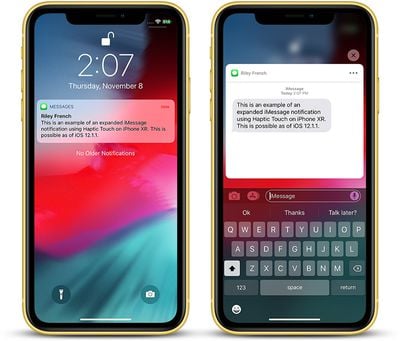
iphone xr haptic touch imessage

iMessage notification expanded with Haptic Touch on iPhone XR

Haptic Touch is simply a marketing name for a long press combined with haptic feedback from the Taptic Engine. The feature is a substitute for 3D Touch, which Apple wasn't able to include in the iPhone XR, as it had to remove the pressure-sensitive layer from the screen to achieve a nearly edge-to-edge LCD.

Haptic Touch works in only a few places, such as the flashlight and camera shortcuts on the lock screen, and in Control Center to pop open additional toggles and menus, but Apple recently confirmed it is working to bring the 3D Touch replacement to more places across iOS over time, and notifications is a start.
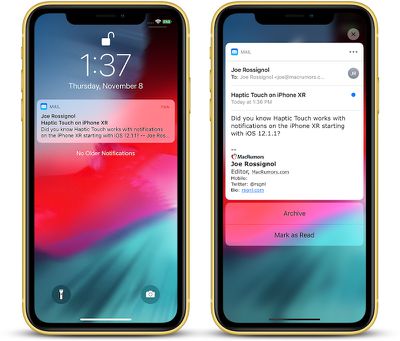
iphone xr haptic touch mail

Mail notification expanded with Haptic Touch on iPhone XR

Haptic Touch can only be implemented for actions that don't already rely on a long press. For example, long-pressing on an app icon on the home screen enables "wiggle mode," allowing apps to be deleted or rearranged on the home screen, so 3D Touch's Quick Action menus are not supported on the iPhone XR.

Haptic Touch also doesn't support Peek and Pop for previewing content such as websites and messages since the feature relies on detecting multiple levels of pressure, and the iPhone XR does not have pressure sensitivity at all.
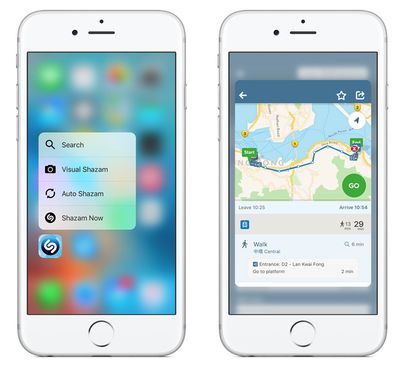
peek pop

3D Touch features on iPhone 6s: Quick Actions on left, Peek and Pop on right

On the iPhone 6 and earlier, which lack 3D Touch and Haptic Touch, a notification can be expanded by sliding it to the left and tapping View. This is still an option on the iPhone XR, but the Haptic Touch solution is more convenient.

Haptic Touch support for notifications on the iPhone XR is functional in the second beta of iOS 12.1.1, seeded to developers and users enrolled in Apple's Beta Software Program on Wednesday. The update is a relatively minor one overall, so it will likely be released to the public fairly soon.


Related Forum: iPhone

Top Rated Comments

101 months ago
I love 3D touch. Big reason why I wouldn't go for the Xr.
Score: 14 Votes (Like | Disagree)
dannyyankou Avatar
101 months ago
There’s no reason this feature couldn’t have been available for all iPhones without 3D Touch.
Score: 10 Votes (Like | Disagree)
MrGimper Avatar
101 months ago
So can someone explain why they have never put vibration/Taptic Engine in the iPads?
Score: 9 Votes (Like | Disagree)
101 months ago
Why in the world did apple regress with the Xr and 3D touch? Did they really think it would sell more XS and XS maxes that way? Most people probably didn't even realize the Xr was missing the feature until they went to use it. Now I'm sure some customers are feeling burned.
Score: 7 Votes (Like | Disagree)
AngerDanger Avatar
101 months ago
So can someone explain why they have never put vibration/Taptic Engine in the iPads?
I like this idea a lot. The iPad is significantly bigger, so to achieve even vibration, it'd probably be necessary to put in multiple engines, like one in each corner. With a little customization, unique ringtones could be assigned to contacts, so receiving a call will drive your iPad around if it's resting on a table.

tl;dr: RC iPad car: YES

haptic touch notifications iphone xr image
Score: 6 Votes (Like | Disagree)
101 months ago
3D Touch is such an important and convenient feature for me, it makes using the phone much more enjoyable. Can't live without my 3D shortcuts, and peek and poke.
Score: 5 Votes (Like | Disagree)

Popular Stories

Apple Event Logo

Apple Working on All-New Operating System

Wednesday July 29, 2026 11:39 am PDT by
Apple is developing an all-new operating system that is essentially a mix of tvOS, watchOS, and iOS, according to Bloomberg's Mark Gurman. In a report this week, he said the operating system will feature a grid of icons, widgets, and apps, along with customizable clock faces. The new software platform is intended for Apple's long-rumored smart home hub. With built-in facial recognition,...


Four iPhone 18 Pro Colors Mock Feature

iPhone 18 Pro and iPhone Ultra: Pre-Orders and Release Date

Thursday July 30, 2026 6:12 am PDT by
Apple has yet to reveal when the iPhone 18 Pro and iPhone Ultra will be announced and released, but the dates usually follow a familiar pattern. Labor Day is September 7 this year. The last time the holiday fell on that day was in 2020, but the iPhone event that year was delayed until October due to the COVID-19 pandemic. So, the last time Labor Day was on September 7 in a normal year was in ...
Dynamic Island iPhone 18 Pro Feature

iPhone 18 Pro: Twelve Changes Coming to Apple's Next Flagship

Thursday July 30, 2026 3:43 am PDT by
We're less than two months out from the launch of Apple's premium next-generation smartphone lineup, and while we're not expecting a dramatic change in terms of functionality, there are still several enhancements rumored to be coming to the iPhone 18 Pro and iPhone 18 Pro Max. One thing worth noting is that Apple is reportedly planning a major change to its iPhone release cycle this year,...

🔗 Related Apple News & Rumors

Stay updated with the latest Apple ecosystem news and verified rumors









































