

Top 10 Hidden Force Touch Features on Apple Watch - MacRumorsOpen MenuShow RoundupsShow Forums menuVisit ForumsOpen Sidebar
Skip to Content

Top 10 Hidden Force Touch Features on Apple Watch

Force Touch is one of those Apple Watch features that's so discreet and unassuming it's easy for users to forget it even exists. That's a shame, because just like 3D Touch on iPhone, Apple has implemented the haptic feedback technology across the entire watchOS interface, putting additional hidden functionality right at your fingertips.

In this article, we've collected 10 of our favorite Force Touch features that work on Apple's digital timepiece. Some are more well known than others, but hopefully you'll learn at least one thing new about what a firm press on your Apple Watch screen can do.

1. Clear All Notifications
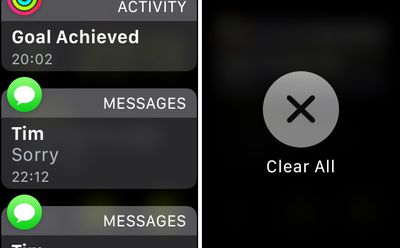
Clear all notifications
The Apple Watch's notifications dropdown can get busy pretty quickly, especially if you often forget to dismiss an incoming alert after reading it. Rather than deleting notifications one by one, you can clear all of them with a Force Touch gesture. Simply press firmly on the Notifications panel and tap the Clear All option.

2. Create and Remove Watch Faces

To create a custom watch face with a background picture, open the Apple Watch Photos app and select a photo. Next, press firmly on the display, tap the Create Watch Face option that pops up, and then select the Photos Face. Alternatively, you can select Kaleidoscope Face to make the picture the basis of a new animating Kaleidoscope.
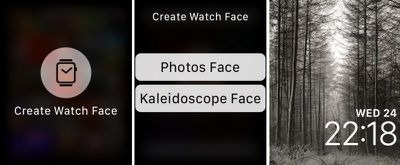
create watch face
When you're done, return to the current active watch face and swipe left or right to find your new creation. If you later decide you don't like your new watch face, press down on it to enter Customize Mode, and swipe up on the offending item to delete.

3. Compose a New Message

Opening the Mail and Messages apps, you'd be forgiven for thinking the Apple Watch only supports replies. That's because the option to compose a new message is revealed with a Force Touch gesture: Press firmly on the display and tap the New Message button that appears.
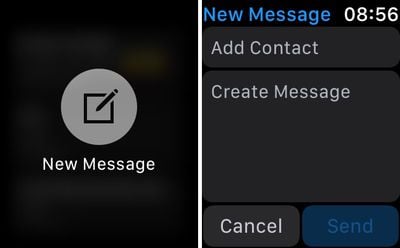
new message
You'll now be able to choose a recipient from your Contacts, input a subject if it's an email you're sending, and write your message using dictation, a scribble, or a short pre-defined phrase. Tap send when you're done.

4. Change Move Goal and Get a Weekly Activity Summary
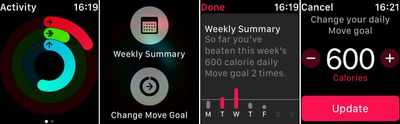
Activity force touch
Press down on the Activity screen to reveal a Weekly Summary option that shows how many times you've beaten your daily move goal so far this week.

If you're beating your move goal far too easily – or if you need a little help closing that long red ring on a daily basis – press down on the Activity screen again and tap the Change Move Goal button to adjust the amount of calories you're aiming to burn.

5. Stream Music to an AirPlay Device
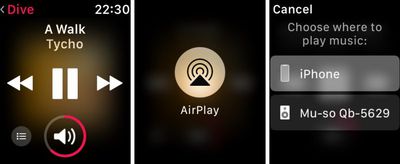
stream to airplay
If you store music on your Apple Watch, you probably listen to it over connected Bluetooth headphones. But did you know it's also possible to stream it to any audio device that supports AirPlay?

Next time you're on the Music app's Now Playing screen, press firmly on the display and tap the AirPlay button that appears. Choose a nearby AirPlay-supporting device from the list, and you're good to go.

6. Share Your Location With a Contact
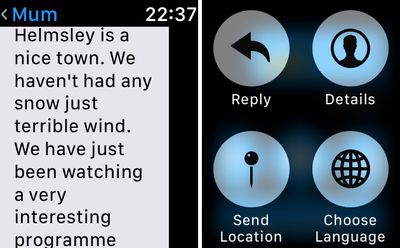
send location
To quickly send your location to someone in an iMessage, open the Messages app on your Apple Watch, select an existing conversation, and activate Force Touch by pressing firmly on the screen. Then simply select the Share Location option from the menu options that appear.

If you haven't enabled it already, you'll be asked to let Messages access your location while using the app (allow it to, otherwise this feature won't work).

7. Switch Map View and Search Local Amenities
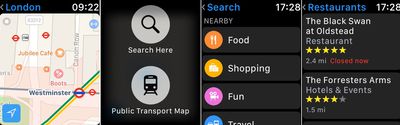
maps app force touch
Whenever you're looking at a map in the stock Maps app, don't forget that you can change to the Transit/Public Transport view at any time with a simple Force Touch. The same action will also bring up the Search Here option, which lets you dictate or scribble a search term or look up local amenities by selecting from the Food, Shopping, Fun, and Travel submenus.

8. Switch App Screen to List View
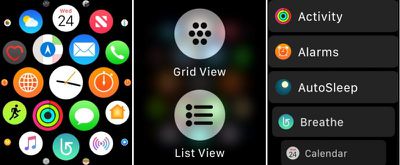
app grid view
To re-arrange Apple Watch apps in the standard Grid layout, long press the app in question and drag it to where you want it. If you still can't get on with the default Grid view, press down firmly on the screen and try the List view instead.

9. Hourly Temperature Forecast and Chance of Rain
weather force touch
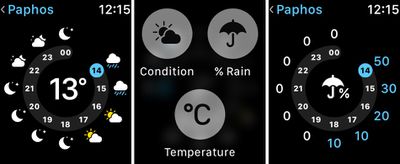
The standard forecast display on the Apple Watch's stock Weather app shows the general weather conditions for the day ahead. But there are two more forecasts available to you. A firm press on the same screen will let you check either the likelihood of rain or any changes in temperature over the next 12 hours.

10. Control Camera Settings Remotely
camera options
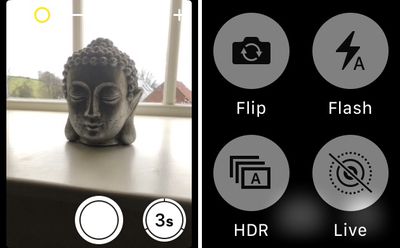
It's not just the shutter of your iPhone's camera that you can remotely control from your wrist. With the Apple Watch Camera app open, press firmly on the screen to reveal a hidden submenu offering access to your iPhone's HDR, Flash, Live Photo, and Flip controls.


Related Roundup: Apple Watch 12
Buyer's Guide: Apple Watch (Buy Now)
Related Forum: Apple Watch

Popular Stories

Surprise and Shine Live Coverage Article

Apple Event Live Blog: iPhone Duo, iPhone 18 Pro, and More

Wednesday September 9, 2026 9:10 am PDT by
Apple's "Surprise and Shine" event kicks off today at 10:00 a.m. Pacific Time, where we're expecting to see the foldable iPhone Duo, the iPhone 18 Pro and Pro Max, Apple Watch Series 12 and Ultra 4 models, new AirPods 5 earphones, and perhaps some other announcements. Apple is providing a live video stream on its website, on YouTube, and in the company's TV app across various platforms. We...


apple surprise and shine event

Apple Event Today: iPhone 18 Pro and iPhone Duo Cheat Sheet

Tuesday September 8, 2026 10:24 am PDT by
Apple's biggest event of the year is almost here, and all eyes are on Cupertino. With the first foldable iPhone expected to headline Apple's "Surprise and Shine" event on Wednesday, September 9, at 10:00 a.m. Pacific Time, the rumor mill has been running full throttle, fuelled by the biggest single design change in the life of the iPhone. To get you up to speed, here's a quick reference...
apple watch series 12

Leak Hints at Four New Features for Apple Watch Series 12 and Ultra 4

Monday September 7, 2026 8:57 am PDT by
Ahead of the announcement of the Apple Watch Series 12 and Ultra 4 later this week, code in the watchOS 27 and iOS 27 betas points to a series of new features for the product line. The information comes from a new post from MacRumors forums member "pdfu." The findings include: New "Readiness" app: An all-new separate Watch app referred to in code as "Readiness," distinct from the...

Top Rated Comments

OldSchoolMacGuy Avatar
113 months ago
Why do they have all these great features and then hide them so people don’t even know they exist?
They aren't hidden. That's like saying you never knew Mario could jump cause you never pressed the B button or why is copy and paste hidden away with a key command.
Score: 7 Votes (Like | Disagree)
113 months ago
Why do they have all these great features and then hide them so people don’t even know they exist?
They’re like right click, I believe.
Score: 5 Votes (Like | Disagree)
itsmilo Avatar
113 months ago
Why do they have all these great features and then hide them so people don’t even know they exist?
Yep reason I also hate 3D Touch. Its just not intuitive or natural.

—-

had no idea this list view grid view thing was possible :o
Score: 3 Votes (Like | Disagree)
MrGimper Avatar
113 months ago
Found the one to switch apps to list view by accident a while ago. Now use this view all the time.
Score: 3 Votes (Like | Disagree)
miniyou64 Avatar
113 months ago
Why do they have all these great features and then hide them so people don’t even know they exist?
Score: 3 Votes (Like | Disagree)
113 months ago
Great tips...thanks for putting it together.
Score: 2 Votes (Like | Disagree)
Latest Stories
Apple's Smart Home Camera Will Apparently Have 'No Video Recording'
2 minutes ago
Apple TV Just Updated Its Selection of 'Bonus' Movies
2 hours ago
iPhone 18 Pro Colors Buyer's Guide: Which Should You Choose?
2 hours ago
Early Prime Big Deal Days: Best Discounts on Accessories, TVs, and More at Amazon
2 hours ago
MacBook Pro With OLED Touch Screen Rumored to Launch in October or November
3 hours ago
Apple's All-New Home Hub Rumored to Launch in These Four Colors
4 hours ago
iPhone 18 Pro Aperture Control Goes Fully Manual in Halide 3.2
5 hours ago
Apple Stores Receive 'Do Not Open' Boxes Ahead of Smart Home Products Launch
6 hours ago
iPhone 18 Pro Sales Jump in China Ahead of iPhone Duo Launch
6 hours ago
Apple TV Still Down for Some Users Following Apple Services Outage
7 hours ago
PSA: Apple Mail on Mac May Stop Syncing Microsoft 365 Accounts Today
7 hours ago
Apple's Smart Home Hub: Everything We Know So Far
18 hours ago
Apple's Home Hub Borrows From the iPhone Duo's StandBy Mode
19 hours ago
Apple Invites App Updated With Three New Features
23 hours ago
Apple Event on October 13?
1 day ago
Apple Watch SE 3 vs. Series 12 Buyer's Guide: Which Should You Buy?
1 day ago
iPad Mini 8 to Offer These 10 New Features
1 day ago
DoorDash Unveils AI Food Ordering Through Apple's Messages App
1 day ago
Amazon Takes Up to $150 Off Select M5 MacBook Air Models
1 day ago
Apple Still Plans to Release a New Full-Sized HomePod
1 day ago
Apple Working to Expand HomeKit
1 day ago
Apple Smart Home Hub to Feature iMac G4-Style Design
1 day ago
Three New Apple Smart Home Products Coming on October 13
1 day ago
Apple Pay Now Available in India With Axis Bank Cards
2 days ago
OpenAI Launches Always-On 'Dots' Agents to Rival Meta's Muse
2 days ago
AirPods 5 Teardown: Batteries Removable, Case Still Tough
2 days ago
iPhone 18 Pro Owners Complain of Speaker Crackling or Popping
2 days ago
You Can 'Get Ready' for iPhone Duo Pre-Orders on October 12
2 days ago
Apple Pay Reportedly Launching in India Today
2 days ago
Apple Releases New AirPods Beta Firmware
2 days ago

🔗 Related Apple News & Rumors

Stay updated with the latest Apple ecosystem news and verified rumors






































