AirPods were a hot ticket item this holiday season, selling out from Apple and other retailers.
We're guessing quite a few MacRumors readers got new AirPods during the holidays, so we thought we'd share some super handy tips and tricks that'll help you get the most out of your new earphones.
AirPods Requirements
To use all of the below features, you're going to need to install iOS 10.2 or later, and for some features, iOS 11 or later is required. On the Apple Watch, watchOS 3 or later is required, and on Mac, macOS 10.12 Sierra or later is required.
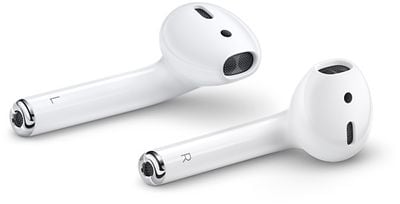
Devices that support iOS 10.2 or later include the iPhone 5 and later, the iPad mini 2 and later, the iPad Air and later, the 6th-generation iPod touch, and all iPad Pro models. All Apple Watch models work with AirPods, as do Macs that support Handoff functionality.
To take full advantage of AirPods, an iCloud account is required, but if you have an Apple device, you likely use iCloud regularly.
Customize Tap Functionality
Your AirPods are equipped with accelerometers and other hardware that allow them to respond to a double tap, and though it isn't obvious, these gestures can be customized to your liking. Here's how:
- Make sure your AirPods are connected to your iPhone or iPad, either when you're wearing them or with the case open and nearby your device.
- Open up the Settings app.
- Choose "Bluetooth."
- Next to the AirPods in the Bluetooth menu, tap the little "i" button.

- Select "Left" and "Right" to customize what your AirPods do when you double tap them. Each one can be set to a separate action.
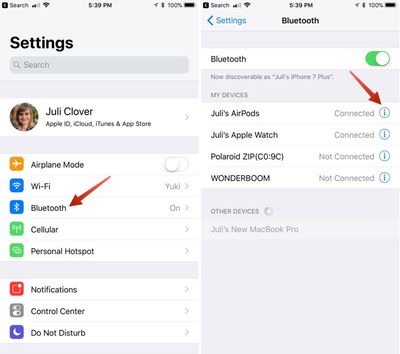
Choices include "Siri," which activates Siri, "Play/Pause," which starts or stops a song, "Next Track," which moves to the next track of whatever's being played, and "Previous Track," which goes back to the track that was previously being played. "Off" turns off whatever's playing.
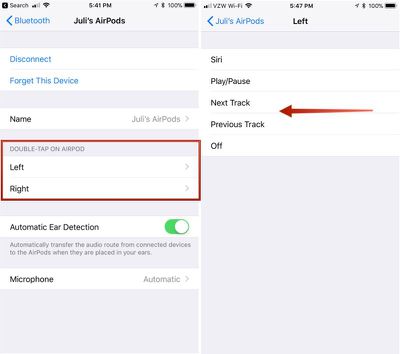
Once you have your settings in place, whenever you double tap on an AirPod, it will activate whatever action you chose. With Siri, for example, you can double tap to bring up Siri.
You can also use this AirPods setting menu to change the name of your AirPods, deactivate Automatic Ear Detection and set either the left or right AirPod to serve as a fixed microphone.
Note: "Next Track" and "Previous Track" are both options that were introduced with iOS 11, so you will need to have iOS 11 installed to see these two AirPods options. Without iOS 11, you can only choose "Siri," "Play/Pause," and "Off."
Tap Your Ear
You don't necessarily have to tap right on your AirPod to use the double tap gestures. Many people prefer to tap softly on the back of an ear instead. It's a little less audibly jarring and it works just as well.

Switching Devices
There's an Apple-designed chip called a "W1" inside of your AirPods, and this chip connects your AirPods to your iCloud account. What this means is that every device you have where you're signed into iCloud knows your AirPods exist and can connect to them without having to go through a pairing process every time.
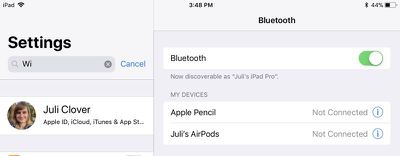
Switching between devices is as simple as opening up the Bluetooth settings on a given device and then choosing your AirPods to connect seamlessly. On the device you used to set up your AirPods, they'll connect automatically whenever you open up the case.
Quickly Pair to Apple TV
There's a little trick to make it easier to pair your AirPods to your Apple TV. With the AirPods in your ears or in the case with the lid open, turn on your Apple TV.
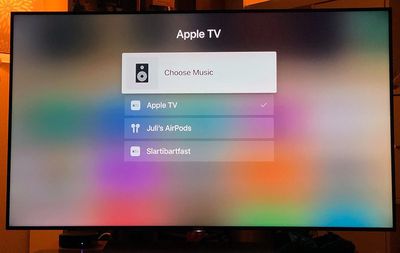
At the main Apple TV screen, hold down on the Play/Pause button on the Siri Remote to bring up an interface that lets you select an audio source. Swipe down to your AirPods, click the main button on the remote, and a connection is established.
If you're using the Apple Remote app or the Control Center Apple TV Remote, you can long press on the Play/Pause button to bring up the audio menu.
Quickly Pair to an iOS device
To pair your AirPods on an iOS device running iOS 11, you don't need to open up the Settings app. Instead, you can use the Now Playing widget in Control Center. Here's how:
- On your iOS device, swipe up from the bottom of the display to bring up Control Center.
- On the main music widget, tap the two lines located in the upper right corner.
- From the list, choose your AirPods.
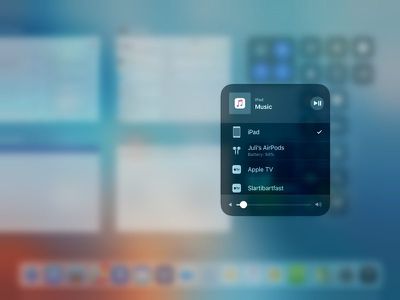
Once selected from the Control Center list, your AirPods will connect to your iOS device automatically. It takes a few swipes and taps, but it's ultimately quicker than opening up the Settings app.
Pair AirPods to Your Apple Watch
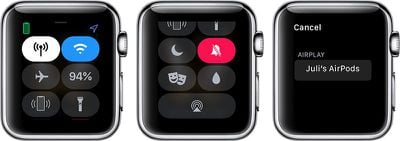
You can pair the AirPods directly to Your Apple Watch to listen to music. Here's how:
- With the AirPods in your ears, swipe up from the bottom of the Apple Watch display to bring up Control Center.
- Tap on the AirPlay icon at the bottom of control Center.
- Choose AirPods.
Take Advantage of Siri
If one of your AirPod double-tap gestures is set to "Siri," you can tap on an AirPod to activate Siri. Siri can play songs and albums from your Apple Music Library, or if you're in the mood for something like 80's music, just ask Siri. Siri will play music from different genres, Apple Music playlists, and radio stations if you have an Apple Music subscription.
Using Siri is a simple, hands-free way to listen to whatever you want on your AirPods, and Siri's also, unfortunately, the only way to adjust the volume on the AirPods without having to use your connected device.
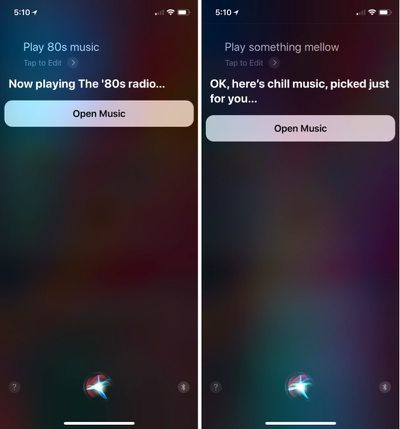
In addition to asking Siri to play music, all of the standard Siri commands are supported, since it's just routing through your phone. Siri can make phone calls, send texts, set reminders, control HomeKit devices, open apps, answer simple questions, and more.
Siri requires an internet connection to function, so the device connected to your AirPods will need to be connected to WiFi or Cellular for Siri on AirPods to work.
Using Just One AirPod
You don't need to use both AirPods at once. If you want to make a call or better hear your ambient surroundings, you can choose to use just one AirPod.
If you have Automatic Ear Detection turned on and take an AirPod out, you may need to press play again, but once you do, it works just like having two AirPods in your ears. Music won't play out of the AirPod not in use, and if you do put it back in, your music resumes in both AirPods.
Pairing AirPods with a non-Apple Device
Your AirPods are designed to work with Apple products, but they use Bluetooth and can pair with your Android device, your PC, or any other device that works with Bluetooth headphones. Here's how to pair with a non-Apple device:
- Put the AirPods in the AirPods case.
- Open up the lid.
- Press and hold the button on the back of the case until a white light flashes.
- Open up Bluetooth settings on the device you're connecting to and choose the AirPods.
Get Your Calls Announced
If you get an incoming call while your AirPods are in your ears and want to know who it is without having to look at your iPhone, there's an "Announce Calls" feature for that. Here's how to use it:
- Open the Settings app.
- Scroll down to "Phone."
- Select "Announce Calls."
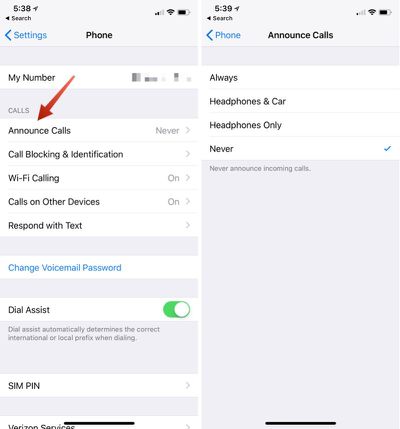
Toggle on "Headphones & Car" to have calls announced when either headphones are connected or you're in the car. "Headphones Only" will announce calls only when your headphones are in, and not when you're in the car, and "Always" means your iPhone will audibly tell you who's calling even when headphones aren't in.
Locate a Lost AirPod
As of iOS 10.3, there's a dedicated "Find My AirPods" feature for keeping track of your AirPods. Find My AirPods is limited to the AirPods themselves -- it can't locate a lost case, nor does it work when the AirPods are disconnected from an iOS device and stored in a case.
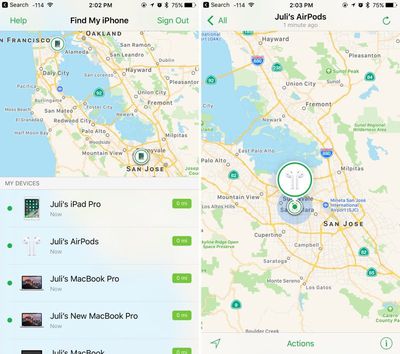
Find My AirPods basically lets you know the last known location of your AirPods. You can access it from the Find My iPhone app or from iCloud, but for detailed instructions on the feature, check out our dedicated how to.
Check Your AirPods Battery
To check the battery of your AirPods while you're using them, swipe on the right of the iPhone or iPad display to bring up your widgets. Find the "Batteries" widget to get a readout on the battery life of your iOS device, your AirPods, and any other connected Bluetooth devices that support the feature.
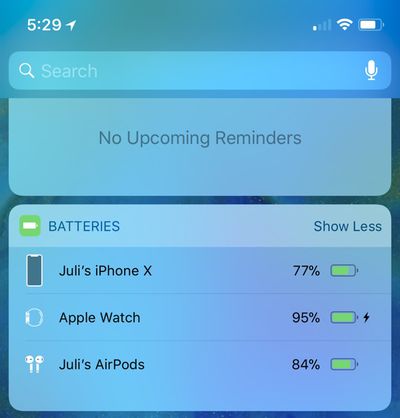
If your AirPods aren't in your ears, just open up the case when it's near your iPhone to get a popup that shows you the battery life. This is also the only way to see the battery of the AirPods case.
If you have an Apple Watch, you can open up the Control Center while you're using the AirPods and tap the battery icon to see the battery life of both the Apple Watch and the AirPods. On Mac, use the Bluetooth menu to check battery on paired AirPods.
You can also ask Siri to tell you what your remaining battery life is.
Interpreting the Light on the AirPods Case
If you open up the case for your AirPods, you'll see a little light located inside.

Here's what each color means:
Green: Fully charged
Orange: Not a full charge
Amber: Less than one full charge remains
Flashing white: Ready to pair
Charging
AirPods charge with a Lightning cable, so it's super simple to charge them up when the battery is low. Given the design of the AirPods, they're compatible with many iPhone docks on the market, so if you have a dock for your iPhone, you can also use it to charge the AirPods.
Get Your AirPods Serial Number and Check Firmware
If you need the serial number for your AirPods or want to make sure you're running the most up-to-date version of the AirPods firmware, here's how:
- Open up the Settings app on your iOS device while your AirPods are in your ears.
- Choose "General."
- Choose "About."
- Scroll down to "AirPods" and tap it.
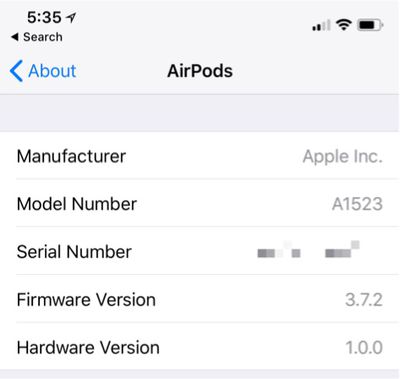
This menu lists model number, serial number, hardware version, and firmware version.
Wrap Up
The AirPods are one of Apple's most popular accessories in recent history, and they've been largely well-received by Apple customers thanks to the ease of use, simple pairing, long range Bluetooth connectivity, universal fit, easy device switching, and decent battery life.
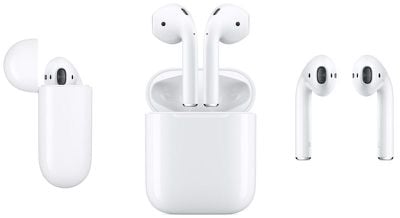
If you're new to AirPods, you'll likely fall in love with them after just a few uses, and even more so when you've read through our tips and figured out everything they're capable of.
Are there must-know AirPods tips and tricks we've left out? Let us know in the comments!