Third iOS 27 and iPadOS 27 Public Betas Now Available - MacRumorsOpen MenuShow RoundupsShow Forums menuVisit ForumsOpen Sidebar
Skip to Content

Third iOS 27 and iPadOS 27 Public Betas Now Available

Apple today released the third public betas of iOS 27 and iPadOS 27, allowing anyone with a compatible device to download and test the new software. The third betas come two weeks after Apple seeded the second betas.
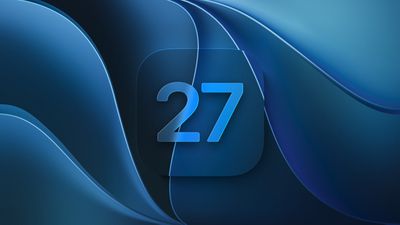
iOS 27 Feature Cool
You can get started by signing up on Apple's beta website and then opting in to the public beta by going to Settings > General > Software Update and choosing the ‌iOS 27‌ or ‌iPadOS 27‌ Public Beta option.

‌iOS 27‌ introduces Siri AI, a more capable version of ‌Siri‌ that can search the web, access your personal information, see what's on your screen, and take actions in and across apps. ‌Siri‌ in ‌iOS 27‌ is more similar to Claude or ChatGPT than the prior version of ‌Siri‌, with a dedicated ‌Siri‌ app for back-and-forth conversations. You can use ‌Siri‌ AI if you have a device that supports Apple Intelligence.

Apple updated the Liquid Glass design that debuted last year, adding a slider to adjust the transparency level and refining its look. There are new AI features in many of Apple's apps. Visual Intelligence moved to the Camera app and supports new features like getting the nutritional information for a meal or splitting a bill, and ‌Siri‌ is able to generate text for you or help you refine your writing with Write with ‌Siri‌.

There are new AI photo editing tools in the Photos app, Safari can organize your tabs automatically, and you can create Shortcuts and Safari extensions using natural language commands. AirPods have custom EQ, the Home app supports 4K video cameras, and there are new child safety controls for parents.

Apple made dozens of improvements to device performance, and everything feels faster, even on older iPhones. Apps launch quicker, AirDrop transfers are faster, the keyboard loads quicker, and more.

Additional information on the new features in ‌iOS 27‌ can be found in our dedicated iOS 27 roundup, with info on ‌iPadOS 27‌ available in our separate iPadOS 27 roundup.

Related Roundups: iOS 27, iPadOS 27

Popular Stories

iOS 27 Feature Dark

Apple Seeds Fifth iOS 27 and iPadOS 27 Betas to Developers

Monday August 10, 2026 10:21 am PDT by
Apple today seeded the fifth betas of iOS 27 and iPadOS 27 to developers for testing purposes, with the update coming two weeks after Apple released the fourth betas. Registered developers can download the betas from the Settings app on the iPhone or iPad by going to the General section and selecting Software Update. iOS 27 introduces Apple's smarter version of Siri, Siri AI. Siri AI is a ...
AirPods Pro Beta Firmware 2

Apple Releases New AirPods Beta Firmware With iOS 27 Features

Tuesday August 4, 2026 11:43 am PDT by
Apple today released a fourth version of the beta firmware it is testing for the AirPods Pro 2, AirPods Pro 3, AirPods 4, and AirPods Max 2. The firmware is available for developers and has a build number of 9A5336b. In iOS 27, iPadOS 27, and macOS Golden Gate, Apple is adding a new AirPods interface, a slider for Adaptive mode, and support for custom EQ, so the firmware adds support for...
ios 27 siri voice

Latest iOS 27 Beta Expands Siri AI Voice Customization

Monday August 10, 2026 11:57 am PDT by
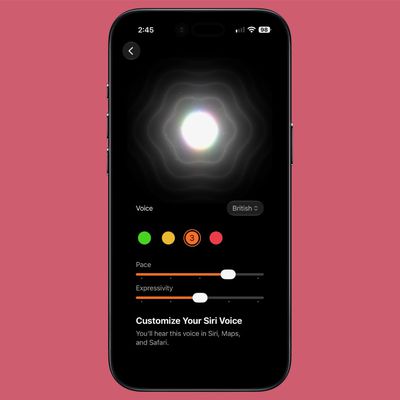
With the fifth beta of iOS 27, Apple has expanded the voice customization options for Siri AI. Pace and Expressivity can now be adjusted for more of the available voice options instead of just the two American voices. There are seven American voice options and four British voices to choose from, all of which can be customized with different Pace and Expressivity settings. Pace changes...

Top Rated Comments

3 weeks ago
Waiting so impatiently for final release on this one. Even the betas run better already. For example, all through iPadOS 26 it had me enter my numeric PIN with the full keyboard every time. It technically works but is asinine and needlessly difficult, like the rest of 26. I notice when going to install this update from beta 2 that it's finally back to the sensible number entry pad.
Score: 3 Votes (Like | Disagree)
DravenInc Avatar
3 weeks ago

Bad question I know but…is it ok for daily use?
I've had the second public beta on my 16 Pro Max for a couple of weeks. Thus far, the only things I've noticed are some flickers when typing on the keyboard, and a little inconsistency with one app, which is a rather local one, not a major app.

Do a backup, read up on how to dial it back to iOS 26 if you need to, and give it a whirl.
Score: 2 Votes (Like | Disagree)
3 weeks ago
Bad question I know but…is it ok for daily use?
Score: 2 Votes (Like | Disagree)
mollie319 Avatar
3 weeks ago

Can confirm. On my 13 Mini, there's a weird black bar on top of the Messages app when you scroll down then back up, on CarPlay I have to tap the text below the round icon inside both Messages (pinned chats) and Apple Maps (favorite destinations like Home and Office in my case) to get them to work. Sometimes the keyboard doesn't appear in Spotlight. Also, Wikipedia's buttons are rendered with some issues on Safari. All these are regressions compared to Beta2.
(sorry for posting screenshots of pictures shot with another phone, but I'm on my work laptop).


But, apart from those regressions, iOS 27 runs WAAAAAAAAAAAAAAAAY betther than 26 on my 13 Mini. Like, nearly as snappy as iOS 18 (26 was a big downgrade on that front). Battery is as bad as iOS 26 on my Mini despite being a beta, so it's good news, but quite a bit better better than iPadOS 26 on my Air M2 11".
I saw that to in the Messages app :-(
I reported it to Apple with feedback, but they have probably a ton of reports on this by now.

I'm positive it'll be fixed before the public release of iOS 27 in September :-D
Score: 1 Votes (Like | Disagree)
3 weeks ago

for me its the best one yet by far. why isn't yours working?
Tons of graphical issues. Some apps are quoting a lot. But over all it is snappier and some stuff works better. I’m looking forward to the final version to see how it works. I’m liking it better than 26.
Score: 1 Votes (Like | Disagree)
apple020997 Avatar
3 weeks ago

The first couple of beta releases were awesome. Worked better than 26, even as a beta. This beta isn't as good as the others. I hope the next build comes quick.
Can confirm. On my 13 Mini, there's a weird black bar on top of the Messages app when you scroll down then back up, on CarPlay I have to tap the text below the round icon inside both Messages (pinned chats) and Apple Maps (favorite destinations like Home and Office in my case) to get them to work. Sometimes the keyboard doesn't appear in Spotlight. Also, Wikipedia's buttons are rendered with some issues on Safari. All these are regressions compared to Beta2.
(sorry for posting screenshots of pictures shot with another phone, but I'm on my work laptop).


But, apart from those regressions, iOS 27 runs WAAAAAAAAAAAAAAAAY betther than 26 on my 13 Mini. Like, nearly as snappy as iOS 18 (26 was a big downgrade on that front). Battery is as bad as iOS 26 on my Mini despite being a beta, so it's good news, but quite a bit better better than iPadOS 26 on my Air M2 11".

Attachment Image

Attachment Image

Attachment Image
Score: 1 Votes (Like | Disagree)

🔗 Related Apple News & Rumors

Stay updated with the latest Apple ecosystem news and verified rumors