iOS 27 Wallet App Gets 'Create a Pass' Feature - MacRumorsOpen MenuShow RoundupsShow Forums menuVisit ForumsOpen Sidebar
Skip to Content

iOS 27 Wallet App Gets 'Create a Pass' Feature

The Wallet app in iOS 27 has a new "Create a Pass" option that's designed to let you add passes for tickets, memberships, and more using Visual Intelligence. If you have a ticket for an event and there's not a digital version available in the Wallet app already, you can create one using the physical pass.
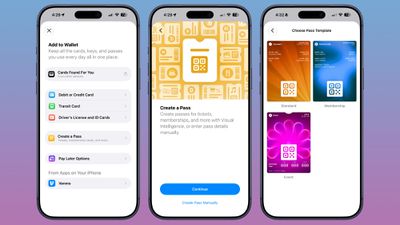
ios 27 wallet create pass
By default, the Wallet app uses ‌Visual Intelligence‌ to scan a pass and add it, but there's also a "Create Pass Manually" option. Pass templates include Standard, Membership, and Event.

Each type includes relevant information like name, location, or admission type, along with a scannable code drawn from an included barcode or QR code that you take a photo of. There are 12 background colors to choose from, or seven custom backgrounds for categories like theater, music, sports, and movies.

Fields can be added or removed as needed when creating a custom pass, with options like label, date, membership, contact, coupon code, VIN, insurance, and more, so most physical cards should be able to be stored digitally.

Related Roundups: iOS 27, iPadOS 27

Popular Stories

Mostly Screen iPhone Purple Feature 2027

Why iOS 28 Is Already Overshadowing iOS 27

Monday June 1, 2026 9:59 am PDT by
We're only a week away from Apple unveiling its first preview of iOS 27, and yet the rumor cycle is already talking up next year's iOS 28. Writing in his latest Power On newsletter over the weekend, Bloomberg's Mark Gurman said that iOS 28 is shaping up to be "far more significant" than the upcoming iOS 27 release, which is expected to roll out this coming September. Apple has reportedly...

Apple Cash banner

Apple Cash in iOS 27 Will Help You Split Bills With Just a Photo

Monday June 1, 2026 11:15 am PDT by
iOS 27 will include a nice quality-of-life improvement for those who frequently split bills with friends and family, allowing them to easily take a photo of a receipt and generate payment requests for different people, according to Bloomberg's Mark Gurman. The feature will be tied to the peer-to-peer Apple Cash feature in the Wallet app, which lets users easily send money to other people and ...
Apple Wallet

iOS 27 Will Add Two New Apple Wallet Features to Your iPhone

Monday June 1, 2026 12:15 pm PDT by
Apple is set to unveil iOS 27 during its WWDC 2026 keynote on Monday, June 8, and the update will reportedly include two new Apple Wallet features. First, iOS 27 will reportedly let users create their own digital passes by scanning items like movie tickets, concert passes, and gym membership cards. Many apps already offer Apple Wallet passes, but now users will be able to create a custom...

Top Rated Comments

ipedro Avatar
3 weeks ago

The question is... will the event, store, etc. accept your newly created pass...? 🤔

Honestly, I doubt it.
Do you really think some cashier who is looking forward to their next break gives a crap what you scan?

I've used custom passes for years with other apps and sometimes just the photo of the card and not once did I get questioned. It's just a barcode.
Score: 9 Votes (Like | Disagree)
drew_some1 Avatar
3 weeks ago

Yeah, Pass4Wallet was pretty useful. I used the trick of including a barcode in an unsupported format as just an image, in order to put my library card in Apple Wallet (many libraries apparently use the Codabar format for barcodes).

But, unfortunately, I was clever enough to include the expiration date on the card, so I'd remember to renew it, and then Apple Wallet expired it when the time came, and Pass4Wallet has all the details of the card, but won't let me generate a new one, saying "We were unable to connect to the service at this time", and their website is gone.

Annoyingly, the app has been broken for a long time and yet shows updates as recently as two months ago on the App Store. Also, if it collects no data, and has all the card details sitting in memory, why does it need to contact a server in order to assemble the card? (I've never given the app any details more scandalous than my library card number - I'm not too worried about that, but this is no way to build/run an app.)
Passes have to be signed using a “Pass Type ID” associated with the developer’s Apple account. Unfortunately that means all pass generation apps must call out to some server to sign passes for the user - it can’t all be done on device.
Score: 3 Votes (Like | Disagree)
CarlJ Avatar
3 weeks ago
What I really want to see in Apple Wallet...

First, support for additional barcode formats - for instance, a lot of libraries use Codabar format.

Second, support (presumably including an API) for codes that change with time - Target and Costco come to mind - they have codes that change every minute or so, specifically to keep people from screenshotting them and potentially giving the image to other people. But opening a specific app and navigating is much less convenient.

So give the companies an API where Apple can say, "hey app XYZ, the user is trying to display your XYZ card in Apple Wallet, please give the correct current payload and format to use for QR/barcode", and the app can answer as needed so Apple Wallet can display the right code for this minute, and then you can use Apple Wallet at whatever store, rather than digging out the right app, and potentially logging in, and navigating to the right page, and hitting the "show membership card" button.
Score: 3 Votes (Like | Disagree)
CarlJ Avatar
3 weeks ago

The question is... will the event, store, etc. accept your newly created pass...? 🤔
I've got a handful of loyalty cards generated by a 3rd party app (that is, it's my membership number but an app prepared the artwork and turned the membership number into the proper barcode / QR code, and made a "card" Apple Wallet would accept), and they work just fine. You occasionally get a slightly astonished look when you hold up a phone to scan instead of a plastic card, but they scan it and it works.
Score: 2 Votes (Like | Disagree)
3 weeks ago

The question is... will the event, store, etc. accept your newly created pass...? 🤔
Depends on the pass type and store.

For instance, Costco generates a new pass every N number of seconds for a given user. That won't work.

But my local rec center uses barcode reader, so it should work without issue.

I'd expect any unchanging barcode or QR code to work, assuming the scanner can see it.
Score: 2 Votes (Like | Disagree)
3 weeks ago
Finally!! I use other apps to create discount cards and other information I need to keep in my digital wallet. Even if they can’t be scanned (and they should have that functionality- a bar code is a bar code!), this will help!
Score: 2 Votes (Like | Disagree)

🔗 Related Apple News & Rumors

Stay updated with the latest Apple ecosystem news and verified rumors