Apple Says iOS 27 Can Automatically Add Captions to Your Personal iPhone Videos
Apple this week previewed new accessibility features that are coming later this year, and one is particularly notable: automatic captions for personal videos.
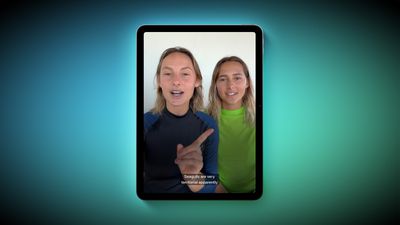
For videos that do not already have captions, Apple said a new on-device speech recognition model can automatically generate them for spoken audio. According to Apple, this feature will be available for videos that you record on your iPhone, videos that you receive from friends and family, and videos that are streamed online.
The automatic captions will initially be limited to English in the U.S. and Canada.
Apple ensured that the captions are generated privately, and you will be able to customize their appearance in the video playback menu or in the Settings app. The feature will be supported across the iPhone, iPad, Mac, Apple TV, and Vision Pro, with the "later this year" timing pointing to iOS 27, iPadOS 27, macOS 27, tvOS 27, and visionOS 27.
Apple will unveil those software versions during its WWDC 2026 keynote, which begins on Monday, June 8 at 10 a.m. Pacific Time, so we expect to learn more about this feature and its exact implementation in a few weeks from now.
Popular Stories
Apple released iOS 27.2, uniting the iPhone Duo and other iPhone models on the same version of iOS. iOS 27.2 is the first major iOS 27 update, and it adds several useful new features.
Siri AI Improvements
Siri AI can recall past conversations you had with it, so you can ask Siri about something it told you before, like a restaurant it previously recommended. It's also able to draw on more...
Apple today seeded the release candidate of an upcoming iOS 27.2 update to developers for testing purposes, with the update coming a week after Apple released the fourth iOS 27.2 beta. Apple also seeded the iPadOS 27.2 RC.
Registered developers can download the beta updates by opting in under Settings > General > Software Update and selecting the iOS 27 developer beta.
The beta was used...
Apple today released iOS 27.2 and iPadOS 27.2, the first major updates to the iOS 27 and iPadOS 27 operating systems that came out in September. iOS 27.2 is available for all iPhones able to run iOS 27, including the iPhone Duo, while iPadOS 27.2 is available for all iPads able to run iPadOS 27, including the newly announced OLED iPad mini.
The iOS 27.2 update expands Siri AI to new...



















































