Skip to Content

iOS 26.4 Enables Stolen Device Protection by Default for All iPhones

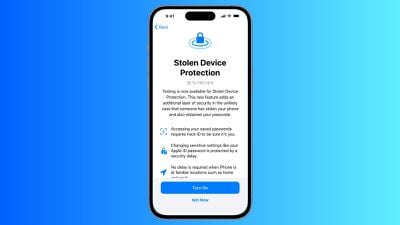
Starting with iOS 26.4, Stolen Device Protection will be enabled by default and turned on for all iPhone users. Stolen Device Protection adds extra security in case of physical ‌iPhone‌ theft.

ios stolen device protection
Apple implemented Stolen Device Protection back in 2023 after reports about a new ‌iPhone‌ theft method. Thieves would spy on an intended victim to learn their passcode, then steal the target's ‌iPhone‌. With the passcode, criminals were able to empty bank accounts, access passwords, and turn off Find My.

Stolen Device Protection requires additional authentication through Face ID or Touch ID to access certain ‌iPhone‌ features like the Passwords app, Lost mode in ‌Find My‌, Safari purchases, and more. Some features are disabled entirely without authentication, while others have a one-hour security delay.

Actions requiring ‌Face ID‌ or ‌Touch ID‌ to complete:

  • Viewing/using passwords or passkeys saved in iCloud Keychain
  • Applying for a new Apple Card
  • Viewing an ‌Apple Card‌ virtual card
  • Turning off Lost Mode
  • Erasing all content and settings
  • Taking certain Apple Cash and Savings actions in Wallet
  • Using payment methods saved in Safari
  • Using your ‌iPhone‌ to set up a new device

These actions do not have a passcode backup, so you can't use a passcode to avoid using ‌Face ID‌ or ‌Touch ID‌.

Actions that have a 1-hour security delay, and require two biometric authentications:

  • Changing your Apple ID password
  • Updating select ‌Apple ID‌ account security settings, including adding or removing a trusted device, trusted phone number, Recovery Key, or Recovery Contact
  • Changing your ‌iPhone‌ passcode
  • Adding or removing ‌Face ID‌ or ‌Touch ID‌
  • Turning off ‌Find My‌
  • Turning off Stolen Device Protection

Prior to iOS 26.4, Stolen Device Protection had to be enabled manually in the ‌Face ID‌ and Passcode section of the Settings app. There is an option to remove security delays when the ‌iPhone‌ is in a familiar location, which allows full functionality at home but protection when out and about.

iOS 26.4 is limited to developers at the current time, but a public beta will be coming in the near future. Apple plans to release the update in the spring.

Related Roundups: iOS 26, iPadOS 26
Related Forum: iOS 26

Popular Stories

Apple Announces Special Event in New York Feature 1

Apple Teases 'A Big Week Ahead' With Announcements Starting Monday

Thursday February 26, 2026 6:06 am PST by
Apple CEO Tim Cook today teased "a big week ahead," with announcements starting Monday. His post included an #AppleLaunch hashtag with a colorful Apple logo, along with a short video that ultimately shows an Apple logo on the lid of a Mac. Apple is reportedly planning a three-day stretch of product announcements from Monday, March 2 through Wednesday, March 4, with up to five new products...
iphone fold text

iPhone Fold Crease Measurements Revealed as Device Hits Production

Wednesday February 25, 2026 5:37 am PST by
Apple has submitted production line orders for its upcoming foldable iPhone, effectively confirming that the device will launch this year, claims a Chinese leaker. According to the Weibo account "Fixed Focus Digital," assembly lines recently received the orders from Apple, which has apparently allowed the leaker to learn the crease measurements for the device's 7.8-inch inner display....
m3 macbook pro blue

M5 Pro and M5 Max MacBook Pro: What to Expect

Wednesday February 25, 2026 3:02 pm PST by
Apple is working on a new MacBook Pro that could launch next week ahead of the "Special Experience" planned for March 4, so we thought we'd highlight all of the rumors about the device so far. Design There are no rumors of design changes, and we are expecting the upcoming M5 MacBook Pro models to look just like the M4 versions. Apple will continue to offer 14-inch and 16-inch size options,...

Top Rated Comments

ProbablyDylan Avatar
2 weeks ago

This is going to be a disaster for device trade-ins/upgrades and repairs. Apple has put the cart before the horse by not developing a system that doesn’t require the 1-hr delay in these situations.
They're going to need to lean into the Bar part of the Genius Bar.
Score: 14 Votes (Like | Disagree)
contacos Avatar
2 weeks ago
Oh dear, my mother can hardly remember her Apple Account password and that her passcode and sim pin aren't the same thing.
Score: 10 Votes (Like | Disagree)
2 weeks ago

TURN THIS POOP OFF!!!
You can turn it off anytime. I don't quite understand what's the problem. Could you elaborate?
Score: 10 Votes (Like | Disagree)
2 weeks ago

This is going to be a disaster for device trade-ins/upgrades and repairs. Apple has put the cart before the horse by not developing a system that doesn’t require the 1-hr delay in these situations.
Perhaps this is all part of Apple's plan to make their Stores familiar locations...
Score: 9 Votes (Like | Disagree)
2 weeks ago

It doesnt protect from devices getting stolen
Duh.
What it does protect from is your data being stolen, *if* your device happens to be stolen.
Score: 9 Votes (Like | Disagree)
2 weeks ago

TURN THIS POOP OFF!!!
It doesnt protect from devices getting stolen, it causes major headaches. It should honestly be called "How to annoy you when I need to get a new phone detection"

This made me be stuck for a long time with my family when upgrading them to 17's.

Now if this turns back on after they update, I will he furious that I have to go through trouble.

This feature is a family IT guy nightmare.
It isn't advertised to keep your device from getting stolen! It's to protect YOU and YOUR MONEY should your device get stolen. If this is a default, thieves might realize it's not worth the effort to steal your device in the first place!

But feel free to keep your family's iPhones all unlocked, PIN-less and all security measures OFF.
Score: 8 Votes (Like | Disagree)

🔗 Related Apple News & Rumors

Stay updated with the latest Apple ecosystem news and verified rumors