Skip to Content

macOS Tahoe Finder Bug Underscores Apple's Slipping UI Polish

Apple released macOS Tahoe last September, but despite two point updates since then, it is still struggling to resolve an embarrassing interface issue in Finder that appears to have been introduced with its Liquid Glass redesign.
macOS Tahoe Finder Bug Underscores Apples Slipping UI Polish Feature
If you updated your Mac to macOS Tahoe and you prefer to work in Finder's column view, there's a good chance you've been frustrated by the glitch, which developer Jeff Johnson has been admirably tracking over on his blog.
finder

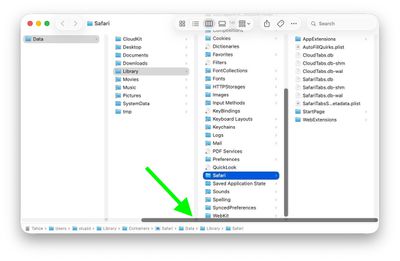
Scroll bar blocking column resize handles (Original image: Jeff Johnson)

At the bottom of each Finder column are handy little resize handles allowing you to expand or reduce each column as you see fit. But in macOS 26 and macOS 26.2, when scroll bars are set to "always show," the horizontal scroll bar at the bottom overlaps and covers those handles, so you can't click them to adjust column widths the way you could in earlier macOS versions like Sequoia.
finder

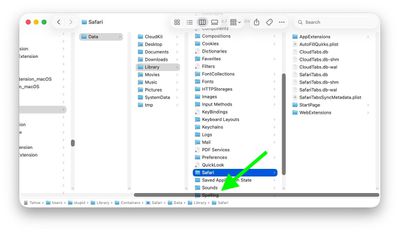
Scroll bar occluding column content (Original image: Jeff Johnson)

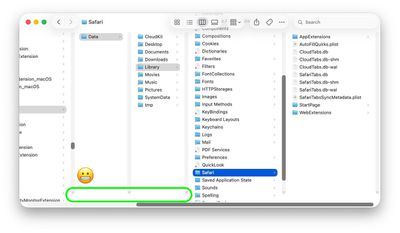
With the recent release of macOS 26.3, Apple attempted a fix. The vertical scrollers were shortened so the resizing widgets now sit above the horizontal bar and are technically clickable again. Unfortunately though, as Johnson points out, the horizontal scroll bar still overlaps file names in the view, causing it to regularly obscure content. Moreover, if you hide the path bar and status bar, the layout leaves a weird amount of empty space below the scrollers, making the whole thing look unfinished (see image below).
finder

Column resize handles suspended in mid-air (Original image: Jeff Johnson)

Johnson's take is basically that while the most disruptive bug is less bad now, the overall column view layout still feels half-baked – especially for anyone who keeps scroll bars always visible.

As Daring Fireball's John Gruber points out, it's an embarrassing fudge for a company that used to pride itself on pixel-perfect settings across its Mac operating system.

At this point, it's unclear when Apple will manage to iron out the UI irregularities introduced by Liquid Glass. macOS Tahoe‌ 26.4 is likely to be released in March or April, and could introduce some new Siri features, though at least some of the capabilities that we were expecting may have been delayed, depending on who you believe. The update is also expected to introduce new emoji characters.

Popular Stories

macbook air blue

What's Coming in the M5 MacBook Air

Thursday February 26, 2026 3:57 pm PST by
Along with the low-cost MacBook, Apple could introduce a refreshed version of the MacBook Air next week. Most of the focus will be on the new machine, but the MacBook Air is expected to get some useful internal updates. M5 Chip The next-generation MacBook Air will adopt the M5 chip, which Apple already introduced in the iPad Pro and MacBook Pro models that came out last year. Apple's M5...
ipad mini 7 1

Could Apple's OLED iPad Mini Finally Be a Kindle Killer?

Friday February 27, 2026 12:08 pm PST by
With a similar screen size and easy, one-handed grip, the iPad mini has always been the Apple device that overlaps most with dedicated e-readers. Now, amid rumors pointing to an OLED display for the next generation, could the iPad mini finally replace devices such as the Kindle and Kobo? The shift from LCD to OLED could make the iPad mini far more appealing as a reading device. OLED panels...
Apple Announces Special Event in New York Feature 1

Apple Teases 'A Big Week Ahead' With Announcements Starting Monday

Thursday February 26, 2026 6:06 am PST by
Apple CEO Tim Cook today teased "a big week ahead," with announcements starting Monday. His post included an #AppleLaunch hashtag with a colorful Apple logo, along with a short video that ultimately shows an Apple logo on the lid of a Mac. Apple is reportedly planning a three-day stretch of product announcements from Monday, March 2 through Wednesday, March 4, with up to five new products...

Top Rated Comments

AppleMatt Avatar
2 weeks ago
Once upon an Apple, they polished every last pixel. It’s very strange to witness the lack of care they have now.
Score: 75 Votes (Like | Disagree)
Populus Avatar
2 weeks ago
I completely agree. Liquid Glass on macOS Tahoe looks quite unfinished…

It’s like they focused mainly on iOS, as well as iPadOS, but macOS was rushed without a clear concept…

Let’s hope they focus a bit more on Mac’s Liquid Glass for macOS 27. The UI needs a lot of fixes and polish.
Score: 34 Votes (Like | Disagree)
cicalinarrot Avatar
2 weeks ago
My main concern about the new Finder is how ugly those huge rounded window corners are.
When Mac OS X came out, it was the first system with decent anti-aliasing that could afford slightly rounded corners to make windows feel more friendly.
Other developers started to imitate it, misunderstanding the whole intention of that solution and using comically large rounded corners. I remember how dumb Real Player felt, as an application that was supposed to show rectangles and put it inside a very rounded interface.

So how did we get here now?
Apple needed a different interface for iOS to differentiate it from Android with some useless graphic effects than could never be imitated on cheap Android phones.
Those glassy effects need rounded corners to look decent, and that's ok on phones where the interface already has the device's rounded corners on the screen and you click with your rounded fingertips.
macOS needed to feel consistent with iOS and just used the same solution that makes no sense on a computer.

Sorry for the off-topic rant.

Edit: thought my grumpy-old-man and off-topic rant would have been ignored but apparently many other people hate this too 😁
Score: 30 Votes (Like | Disagree)
2 weeks ago
It feels like macOS has become Apple’s lowest-priority product. Lately, many of the updates seem mostly cosmetic rather than meaningful improvements. In some cases, it even feels like stability has declined, with more bugs and small issues creeping in. Safari keeps crashing almost every day and some websites are not even working properly in Safari. Every Mac user needs Chrome installed as well as Sarfari is so useless following web-standards.

How about the bug where you save a file/screenshot on the desktop and the icon/file not appearing until you "Reboot" Finder och save another file to the desktop so it "refreshes" the view. Insane!

QuickTime is another example, it feels like a relic from decades ago. Why hasn’t Apple replaced it with a modern, unified “Video Player” app? What person born after year 2000 knows what "Quicktime" is? There are still many legacy elements throughout macOS that make the system feel dated, especially when compared to the polish and cohesion of iPadOS.
Score: 23 Votes (Like | Disagree)
2 weeks ago
Am I doing something wrong? I use column mode all the time but I don't have or need those resize handle, I can just grab the column anywhere and resize it...
Score: 18 Votes (Like | Disagree)
nortonandreev Avatar
2 weeks ago
Not just that, many minor UI inconsistencies here and there that make the UI look far from polished.
Score: 18 Votes (Like | Disagree)

🔗 Related Apple News & Rumors

Stay updated with the latest Apple ecosystem news and verified rumors