Precision Finding on Apple Watch Doesn't Work With the Original AirTag - MacRumorsOpen MenuShow RoundupsShow Forums menuVisit ForumsOpen Sidebar
Skip to Content

Precision Finding on Apple Watch Doesn't Work With the Original AirTag

A new Apple support document and our own testing has confirmed that Precision Finding on the Apple Watch Series 9 and later and Apple Watch Ultra 2 and later works with the AirTag 2, but the original AirTag is not supported.
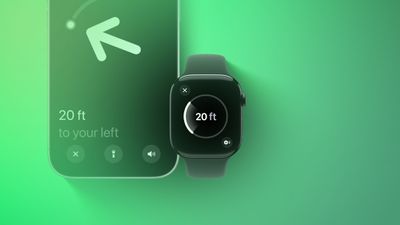
Precision Finding Apple Watch Feature
Apple has not indicated why this feature does not work with the original AirTag. However, the new AirTag is equipped with Apple's second-generation Ultra Wideband chip, while the original has Apple's first-generation Ultra Wideband chip.

Precision Finding can lead you to the exact location of an item with an AirTag attached to it, by showing you a directional arrow and your distance away from the item on a compatible iPhone, and now on a compatible Apple Watch too.

Precision Finding already existed on the above Apple Watch models for finding an iPhone 15 or newer, but there was no Precision Finding on the Apple Watch for finding an AirTag until now. As we confirmed, however, Precision Finding on the Apple Watch still does not work with the first-generation AirTag released in 2021.

To use Precision Finding to find a second-generation AirTag with a compatible Apple Watch, the watch must be running watchOS 26.2.1 or later.

How to set up the feature, according to Apple:

  1. On your Apple Watch, go to Control Center.
  2. Scroll to the bottom and tap Edit.
  3. Tap the Add button.
  4. Scroll down to Find Items.
  5. Tap Find Items, then tap Find AirTag.
  6. Tap Choose, then choose an item.
  7. Tap the Done button, then tap Done.

How to use the feature, according to Apple:

  1. On your Apple Watch, go to Control Center.
  2. Scroll down and tap the Find AirTag button.
  3. Follow the on-screen instructions and move around your space until your Apple Watch connects to your AirTag.
  4. Follow the distance and direction information on your Apple Watch. When you are close to your AirTag, the watch screen turns green.

If you have an original AirTag, you can still find it with Precision Finding on an iPhone 11 or newer.

With the AirTag 2, Precision Finding works at distances up to 1.5× farther away from an item compared to the original AirTag, but this longer range requires an iPhone 15 or newer, Apple Watch Series 9 or newer, or Apple Watch Ultra 2 or newer.

To learn more about the new AirTag, read our coverage of Apple's announcement.

Related Roundups: AirTag, Apple Watch 12
Related Forum: Apple Watch

Popular Stories

apple watch s12 ultra 4

Apple Watch Series 12, Ultra 4 Owners Report Skin Irritation

Wednesday October 7, 2026 12:02 pm PDT by
Some Apple Watch Series 12 and Ultra 4 owners have experienced unexpected skin irritation with the new models, according to reports on the MacRumors forums and Reddit. Affected users complain of a burning sensation and redness under the sensor area. The Apple Watch Series 12 and Ultra 4 measure heart rate every five seconds, and some people have wondered if that's the cause of the skin...


elevation lab airtag silencer

Elevation Lab Pulls AirTag Silencer After Stalking Concerns

Tuesday October 13, 2026 2:14 pm PDT by
Earlier this year, Elevation Lab announced the launch of a "Silencer" for AirTag meant to pierce the speaker on the device to disable the sound. Elevation Lab explained that it created the Silencer to keep thieves from detecting an AirTag on valuable products like bikes, but the company didn't think easy speaker removal would be problematic. The AirTag plays a sound when it is away from...
southern straps 3 1

MacRumors Giveaway: Win an Apple Watch Series 12 and a Nylon Band From Southern Straps

Friday October 9, 2026 10:20 am PDT by
For this week's giveaway, we've teamed up with Southern Straps to offer MacRumors readers a chance to win an Apple Watch Series 12 and a nylon band from Southern Straps to go along with it. Southern Straps is a California-based company that has been making high-quality bands for the Apple Watch since the device first launched in 2015, and the company's selection of bands offer a an...

Top Rated Comments

10 months ago

can someone explain why you'd use your watch and not your phone?
Your watch is on your actual wrist and with you at all times. That's like saying, "Why use an Apple Watch? Your phone tells the time."
Score: 14 Votes (Like | Disagree)
10 months ago
I wish I could say, if not a bug, I’m shocked. /s
But I’m not and you shouldn’t be either
Score: 7 Votes (Like | Disagree)
10 months ago

Your watch is on your actual wrist and with you at all times. That's like saying, "Why use an Apple Watch? Your phone tells the time."

Not everyone has an iPhone with an Ultra Wideband chip in it but many have an Apple Watch with it.

I’ve run into this scenario many times. Kids take the phone and I’m scrambling to find my AirTagged keys. HomePod is hit or miss so having the ability to use my Watch would be a plus with all our existing tagged items.
All good points - i guess since we never had the functionality, it seems strange to me.
Score: 4 Votes (Like | Disagree)
10 months ago
Got my new tag today.

Apple Watch and iPhone updated.

Precision finding works fine from iphone.

From an Apple Watch, if you find via the ‘find items” app then it doesn’t do precision find. If you use control center (add the option to find a tag) then it does.

I can’t help but think the watch update is a bit half baked.
Score: 3 Votes (Like | Disagree)
10 months ago

Not sure whether there is any relation between the new chip and software compatibility issues. However not surprised. It might be also that Apple wants customers to buy the newer version of AirTag.
Locking new software features behind hardware upgrades has been Apple's M-O forever.

Remember when pre-M1 iPads couldn't handle Stage Manager...until they could?

It's quite difficult to believe that the Apple Watch S9 and newer SoC that has the U2 UWB chip can work with second-generation AirTags with a simple software update, but that it can't be made to work with first-generation AirTags even though both have a UWB chip, 1st gen AirTag Precision Find My works with iPhones that only have a U1 chip, and the Watch and AirTag can receive firmware updates over the air.
Score: 3 Votes (Like | Disagree)
hagjohn Avatar
10 months ago
Probably because of the second-generation Ultra Wideband chip, is more precise.
Score: 3 Votes (Like | Disagree)
Latest Stories
Top Stories: Apple's Big MacBook Pro, iPad mini and iMac Updates
48 minutes ago
'Pluribus' Season 2 Reportedly Starts Production Today
7 hours ago
iPhone 18 Pro Sales Surge in China, Offsetting Decline in U.S. and Japan
8 hours ago
HomeView Software 27.2: Wallpapers, Control Center, and More
15 hours ago
Apple Alerts Stores to iPhone Duo's Display Cracking Issue
15 hours ago
iOS 27.3 Will Enable These Apple Intelligence Features in China
16 hours ago
Apple Says iOS 27.3 Beta Coming Next Week
16 hours ago
Apple's Flash Storage Suppliers Are Finally 'Getting Their Revenge'
17 hours ago
14 New Things Your iPhone Can Do in iOS 27.2
18 hours ago
iPhone Duo Review: One Week Later
19 hours ago
Samsung Mocks iPhone Duo Display Cracks in New Ad Campaign
20 hours ago
The MacRumors Show: OLED MacBook Pro, iPad Mini 8, and More
21 hours ago
MacBook Pro With Touch Display: 15 More Details Revealed
21 hours ago
Russia Places Apple on State Surveillance Registry
23 hours ago
Halloween Weekend Brings Discounts on Apple Accessories and Pre-Orders
23 hours ago
Apple Has Released More Than 25 New Products in the Past Two Months
1 day ago
Local Code Launches as Free, Private AI Assistant Tool for Mac
1 day ago
Apple Acquires Ascend.io
1 day ago
HomePod Mini 2 Launches Today: All the New Features
1 day ago
AirTag 2 4-Pack Drops to New Low Price of $69.99
1 day ago
Rian Johnson's iPhone Camera App Goes Viral
1 day ago
Where Did All the iPhone Duos Go? Mostly to Apple's Stores
1 day ago
Apple's Touchscreen MacBook Pro Could Ship 1.5M Units in 2027
1 day ago
New Apple TV 4K and iPad Mini: RAM Amounts Revealed
2 days ago
Apple Executive Comments on New iPad Mini Lacking 120Hz Display
2 days ago
Here's a Hands-On Look at HomePod Mini 2's New Two-Tone Colors
2 days ago
Apple Lowers App Store Fees in Taiwan Starting October 31
2 days ago
HomeView Pre-Order Returns to $289.99 on Amazon
2 days ago
Apple Avoids Showing Pinched Fingers on iPad Mini Page in South Korea
2 days ago
Old 'Popcorn Time' App Left Hundreds of Thousands of Macs at Risk
2 days ago

🔗 Related Apple News & Rumors

Stay updated with the latest Apple ecosystem news and verified rumors