

8 New Things Your iPhone Can Do in iOS 26.1 - MacRumorsOpen MenuShow RoundupsShow Forums menuVisit ForumsOpen Sidebar
Skip to Content

8 New Things Your iPhone Can Do in iOS 26.1

Apple has dropped iOS 26.1, the first major point release since iOS 26 was rolled out in September, and there are at least eight notable changes and improvements worth checking out. We've rounded them up below.
iOS 26
Apple rolled out iOS 26.1 and iPadOS 26.1 to compatible devices on Monday, November 3. If you haven't updated already, you can do so by going to Settings ➝ General ➝ Software Update.

Make Liquid Glass More Opaque
ios 26 1 liquid glass opaque
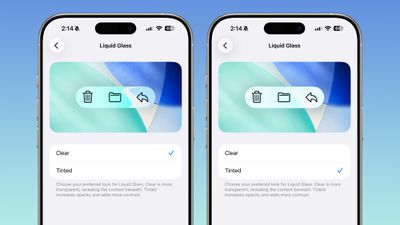
Apple has added a new Liquid Glass customization setting, letting you choose how translucent the interface appears. You can now switch between a Clear look – showing more of the background behind menus and buttons – or a Tinted look that adds opacity and contrast for a bolder appearance.

The option appears in Settings ➝ Display & Brightness on iOS and iPadOS, and System Settings ➝ Appearance on Mac. Apple says the change was inspired by beta tester feedback requesting a less transparent, higher-contrast version of Liquid Glass. The setting applies systemwide, affecting everything from app interfaces to Lock Screen notifications.

Turn Off Lock Screen Swipe-to-Camera Gesture
lock screen swipe disable camera
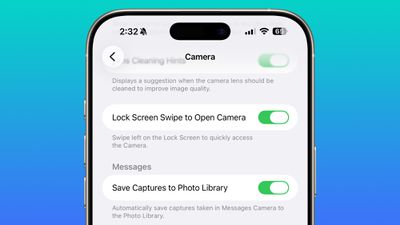
In iOS 26.1, Apple is introducing a welcome change for anyone who's ever accidentally launched the Camera app while pulling their iPhone out of their pocket or bag. For the first time, you can now disable the Lock Screen's swipe-to-open-camera gesture. In the Settings app, tap Camera, scroll down, and toggle off the switch next to "Lock Screen Swipe to Open Camera."

The Lock Screen camera gesture has been a staple ‌iPhone‌ feature for years, allowing you to quickly swipe left to capture spontaneous moments. But it's all too easy to trigger the Camera app unintentionally, potentially draining your battery or filling your Photos library with accidental shots of the inside of your pocket. Now you can avoid such potential accidents completely.

Slide to Stop Alarm

ios 26 1 slide to stop
Apple has changed how you dismiss iPhone alarms in iOS 26.1, and your morning muscle memory might need tweaking as a result. By default, the Clock app now requires a slide gesture to stop an alarm from the Lock Screen, replacing the previous tap-to-stop button that was redesigned in iOS 26. Snoozing still works with a simple tap, but turning off an alarm entirely demands the extra swipe motion.

The change appears designed to prevent accidental dismissals when you're reaching for your phone in the morning. By requiring a more deliberate action, you're less likely to silence your alarm when you meant to hit snooze. If you don't like the change, you can revert the alarm interface back to the previous Stop button, thanks to a new "Prefer Single-Touch Actions" toggle in Settings ➝ Accessibility ➝ Touch.

More Control Over Local Capture Recordings
local capture settings ios 26 1
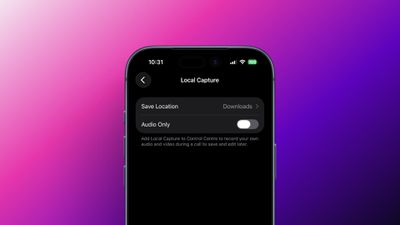
iOS 26 and iPadOS 26 introduced Local Capture, a new way to record video and audio directly on your device that's ideal for everything from quick clips to full podcast episodes. And with iOS 26.1, Apple is refining the experience even further.

A new Local Capture menu in Settings ➝ General gives you more control over how your recordings are handled. You can now choose a Save Location, allowing you to store captures anywhere you prefer instead of the default Downloads folder. There's also a new Audio Only toggle, which is handy if you want to focus purely on sound without recording video.

Create Custom Workouts
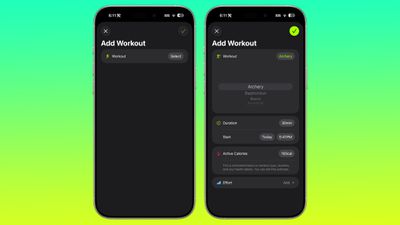
ios 26 1 custom workout
You can now design fully custom workouts right inside the Fitness app on iPhone. Whether you want to fine-tune your next run, strength routine, or yoga session, you can now choose everything – from workout type and duration to effort level, estimated Active Calories, and even start time.

Apple's Fitness app has supported workout creation before, but the options were fairly rigid. With iOS 26.1, those limits are gone, giving you the freedom to build workouts that match your exact training style and goals.

Swipe to Change Songs
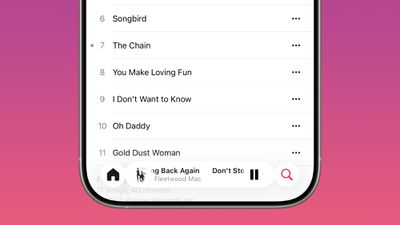
ios 26 1 apple music swipe
In iOS 26.1, Apple Music is getting a small but handy upgrade that should make listening even smoother. When the music player is minimized at the bottom of the screen, you can now swipe left or right to skip between songs, without having to open the full player. Whether you're jumping back to a favorite track or skipping ahead in a playlist, the change makes it feel more instant and natural.

Automatically Install Security Updates
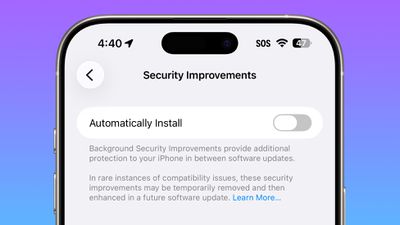
ios 26 1 security improvements
Apple is refining how iPhone users stay protected between major iOS updates with an evolution of its earlier Rapid Security Responses feature, which was introduced over two years ago. In iOS 26.1, a new option under Settings ➝ Privacy & Security ➝ Security Improvements introduces "Background Security Improvements." The feature automatically downloads and installs important security fixes as they become available, but does it silently on your device.

Previously, you had to download Rapid Security Responses through the Settings app just like a normal iOS update. The first and only Rapid Security Response release was in July 2023. That version broke support for some websites, forcing Apple to pull and reissue it. Apple will also be able to roll back a Background Security Improvement if it causes any problems.

iPad Slide Over Gesture
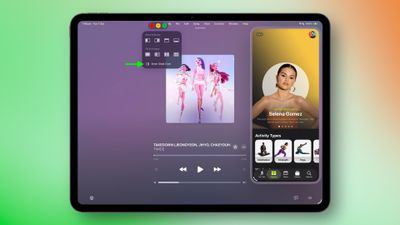
slide over ipados 26 1%402x
Slide Over, which allows users to quickly access a floating app window on top of their main workspace, is back after being removed in the initial iPadOS 26 release. The feature now works alongside the new window-based multitasking system introduced in iPadOS 26, letting users maintain multiple open windows while still being able to swipe in a Slide Over app for quick reference.

Users who have updated to iPadOS 26.1 can activate Slide Over by long pressing the window resizing icon that looks like traffic lights (revealed in fullscreen mode with a finger drag from the top of the screen) and selecting "Enter Slide Over" from the popover menu.


Related Roundups: iOS 26, iPadOS 26
Related Forum: iOS 26

Popular Stories

iOS 27 Feature Dark

Apple Now Pushing iPhone Users Still on iOS 26 to Install iOS 27

Thursday October 8, 2026 1:17 pm PDT by
Starting today, iPhone users still running iOS 26 will see iOS 27.0.1 as the prominent software update in the Settings app under General → Software Update, with iOS 26.7.1 now relegated to a smaller "Also Available" section at the bottom. iOS 27 was released on September 14, but until now that update and later iOS 27.0.1 were shown under the "Also Available" section, with iOS 26.7 and...

bug security vulnerability issue fix larry

Apple Fixes Possibly Exploited CoreGraphics Flaw on Older iPhones

Tuesday October 27, 2026 5:16 am PDT by
Among the flurry of iOS 27.2 releases on Monday, Apple also pushed a wave of software updates for its older operating systems, including a fix for a CoreGraphics vulnerability that Apple says may have been exploited in targeted attacks. The releases include iOS 26.7.2, iPadOS 26.7.2, iOS 18.7.11, iPadOS 18.7.11, macOS Tahoe 26.7.2, macOS Sequoia 15.8.2, and tvOS 26.6.1. iOS 18.7.11 and...
Apple MacBook Pro with PROLED XDR Display family lineup feature

Apple Announces OLED MacBook Pro With Touch Display

Wednesday October 28, 2026 10:11 am PDT by
Apple today announced a new high-end MacBook Pro, which is available in 14-inch and 16-inch sizes. The new device has a PROLED XDR display that supports touch gestures, and a glowing rear Apple logo. Pricing on the MacBook Pro starts at $2,899 for the 14-inch model and $3,399 for the 16-inch model. Apple says the MacBook Pro has the "world's best display in a pro laptop." The PROLED...
Latest Stories
Top Stories: Apple's Big MacBook Pro, iPad mini and iMac Updates
54 minutes ago
'Pluribus' Season 2 Reportedly Starts Production Today
7 hours ago
iPhone 18 Pro Sales Surge in China, Offsetting Decline in U.S. and Japan
8 hours ago
HomeView Software 27.2: Wallpapers, Control Center, and More
15 hours ago
Apple Alerts Stores to iPhone Duo's Display Cracking Issue
16 hours ago
iOS 27.3 Will Enable These Apple Intelligence Features in China
16 hours ago
Apple Says iOS 27.3 Beta Coming Next Week
16 hours ago
Apple's Flash Storage Suppliers Are Finally 'Getting Their Revenge'
17 hours ago
14 New Things Your iPhone Can Do in iOS 27.2
18 hours ago
iPhone Duo Review: One Week Later
19 hours ago
Samsung Mocks iPhone Duo Display Cracks in New Ad Campaign
21 hours ago
The MacRumors Show: OLED MacBook Pro, iPad Mini 8, and More
21 hours ago
MacBook Pro With Touch Display: 15 More Details Revealed
21 hours ago
Russia Places Apple on State Surveillance Registry
23 hours ago
Halloween Weekend Brings Discounts on Apple Accessories and Pre-Orders
23 hours ago
Apple Has Released More Than 25 New Products in the Past Two Months
1 day ago
Local Code Launches as Free, Private AI Assistant Tool for Mac
1 day ago
Apple Acquires Ascend.io
1 day ago
HomePod Mini 2 Launches Today: All the New Features
1 day ago
AirTag 2 4-Pack Drops to New Low Price of $69.99
1 day ago
Rian Johnson's iPhone Camera App Goes Viral
1 day ago
Where Did All the iPhone Duos Go? Mostly to Apple's Stores
1 day ago
Apple's Touchscreen MacBook Pro Could Ship 1.5M Units in 2027
1 day ago
New Apple TV 4K and iPad Mini: RAM Amounts Revealed
2 days ago
Apple Executive Comments on New iPad Mini Lacking 120Hz Display
2 days ago
Here's a Hands-On Look at HomePod Mini 2's New Two-Tone Colors
2 days ago
Apple Lowers App Store Fees in Taiwan Starting October 31
2 days ago
HomeView Pre-Order Returns to $289.99 on Amazon
2 days ago
Apple Avoids Showing Pinched Fingers on iPad Mini Page in South Korea
2 days ago
Old 'Popcorn Time' App Left Hundreds of Thousands of Macs at Risk
2 days ago

🔗 Related Apple News & Rumors

Stay updated with the latest Apple ecosystem news and verified rumors











































