

iPhone Feature for Tracking Lost Bags With AirTag Expands to JetBlue - MacRumorsOpen MenuShow RoundupsShow Forums menuVisit ForumsOpen Sidebar
Skip to Content

iPhone Feature for Tracking Lost Bags With AirTag Expands to JetBlue

JetBlue today announced that it now supports the iPhone feature that makes it easier to share the location of AirTag-equipped baggage at airports.
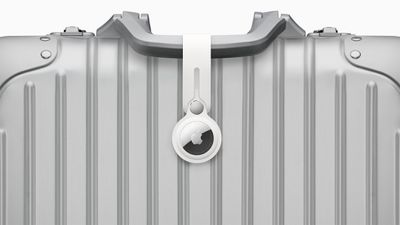
AirTag on Baggage
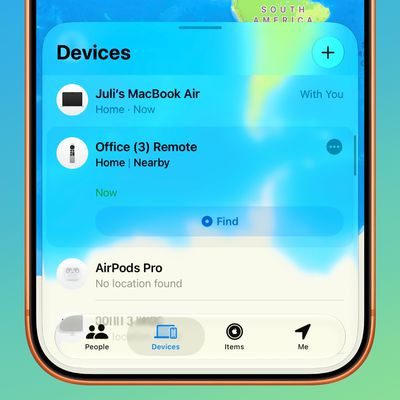
iOS 18.2 added a new feature to the Find My app that allows you to temporarily share the location of an AirTag-equipped item with others, including employees at participating airlines. This way, if you have put AirTags inside your bags, the airline can better help you find them in the event they are lost or delayed at the airport.

Here is how JetBlue explains the process:

Customers who place an Apple AirTag or Find My network accessory in their bag can now choose to securely share its location with JetBlue's Baggage Service team, helping the airline reunite customers with their belongings more quickly.

To share an item's location, customers can generate a Share Item Location link in the Find My app on their iPhone, iPad, or Mac. This link can be provided to JetBlue by scanning a QR code in the baggage claim area or by working with a crewmember at the airport's Baggage Service Office. JetBlue crewmembers will use the temporary link to help locate and retrieve bags found within JetBlue stations or other contracted facilities.

Other airlines that already offer the feature include American Airlines, Delta, United, Air Canada, Virgin Atlantic, Lufthansa, and more.
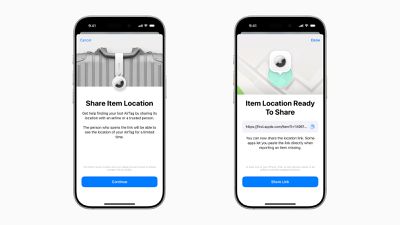
iOS 18 2 Share Item Location
iPhone, iPad, and Mac users running iOS 18.2, iPadOS 18.2, and macOS Sequoia 15.2 or later can generate a "Share Item Location" link in the Find My app. Anyone they share the link with can then view a web page with a location of the item on a map. The page will automatically update with the item's latest known location.

Apple said it worked directly with airlines to put systems in place to "privately and securely" accept the "Share Item Location" links. Access to each link is "limited to a small number of people," and airport employees are required to "authenticate" to view the link by signing into their Apple Account or partner email address.
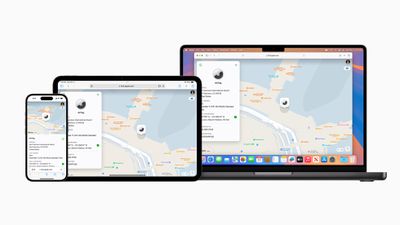
Apple Share Item Location iPhone iPad Mac
The item's location stops being shared "as soon as a user is reunited with their item," or automatically expires after seven days.
Related Roundup: AirTag
Buyer's Guide: AirTag (Buy Now)

Popular Stories

Apple Event Logo

Apple Working on All-New Operating System

Wednesday July 29, 2026 11:39 am PDT by
Apple is developing an all-new operating system that is essentially a mix of tvOS, watchOS, and iOS, according to Bloomberg's Mark Gurman. In a report this week, he said the operating system will feature a grid of icons, widgets, and apps, along with customizable clock faces. The new software platform is intended for Apple's long-rumored smart home hub. With built-in facial recognition,...
imac video apple feature

Apple Made Its Second-Biggest Acquisition Ever This Year

Wednesday July 29, 2026 12:03 pm PDT by
Apple this year acquired Israeli startup Q.ai for close to $2 billion, according to the Financial Times. That would make this Apple's second-biggest acquisition ever, after it paid $3 billion for the popular headphone maker Beats in 2014. This is also the largest known Apple acquisition since the company purchased Intel's smartphone modem business and patents for $1 billion in 2019. Q.ai...
Dynamic Island iPhone 18 Pro Feature

iPhone 18 Pro: Twelve Changes Coming to Apple's Next Flagship

Thursday July 30, 2026 3:43 am PDT by
We're less than two months out from the launch of Apple's premium next-generation smartphone lineup, and while we're not expecting a dramatic change in terms of functionality, there are still several enhancements rumored to be coming to the iPhone 18 Pro and iPhone 18 Pro Max. One thing worth noting is that Apple is reportedly planning a major change to its iPhone release cycle this year,...

Top Rated Comments

15 months ago
Good to see more airlines supporting this. Will be very useful if the checked in baggage ever gets lost. But it might be better to keep the AirTag inside the bag instead of just being strapped outside.
Score: 1 Votes (Like | Disagree)
vegetassj4 Avatar
15 months ago
Thanks JetBlue, now how long will I have to wait to actually get my bag back?


Attachment Image
Score: 1 Votes (Like | Disagree)
snak-atak Avatar
15 months ago
Wondering how many people place their AirTag on the outside of their bag as a luggage tag? Wouldn’t it be safer tucked inside their bag? Or does that make it harder to track?
Score: 1 Votes (Like | Disagree)

🔗 Related Apple News & Rumors

Stay updated with the latest Apple ecosystem news and verified rumors











































