

Google Maps Can Now Scan Your iPhone Screenshots for Places - MacRumorsOpen MenuShow RoundupsShow Forums menuVisit ForumsOpen Sidebar
Skip to Content

Google Maps Can Now Scan Your iPhone Screenshots for Places

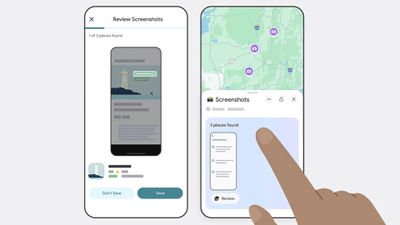
Google Maps has gained the optional ability to scan screenshots in your iPhone's photos and save any found locations to a dedicated list.
google maps
Powered by the company's Gemini AI, the new feature lets Google Maps search for any screenshots in your photos, such as social media posts, news articles, and travel blogs, and capture them in the app under a new Screenshots List under the You tab.

The feature scans for shots that include location information like names and addresses, and the app finds associated listings in Google Maps. Users can review those captures via a carousel, and Gemini will automatically identify the associated places and offer to save them with additional details.

The feature's Auto-scan option requires that Google Maps is given the "Allow Access to All Photos" permisssions, so it's not like your photos automatically get scanned. Alternatively, users can browse their photos and manually import screenshots to review. Here's how Google describes the steps involved to save screenshots in Google Maps:

  1. Navigate to the You tab.
  2. At the top of the You tab, you'll see a Screenshots list with a badge that says "Try it out!" Tap the badge. This will open a video showing you how the feature works — you'll even be able to test it out alongside the video.
  3. You'll see a request to allow Google Maps access to your photos. Choose when it has access. (There's also a manual option if you don't want to give Maps full access, more on that later.)
  4. Next time you take a screenshot that includes location information, head to Google Maps after.
  5. If Maps recognizes a place, a message will pop up telling you that it has places ready for you to review.
  6. Tap "review," and decide if you want to save the image to your screenshots list or not. (You can add these images to other lists later, too, if you want.)
  7. You also have the option to upload screenshots manually: When you're in the app select the Screenshots list under the You tab. From there, you can upload screenshots manually. The rest of the process is the same!
  8. You'll see the saved places directly on your map or can get to the list through You tab to access while you're on the go.

The new capability has rolled out to Google Maps for iOS (in U.S. English), and is likely to extend to other languages and regions soon.


Popular Stories

Apple Event Logo

Apple Working on All-New Operating System

Wednesday July 29, 2026 11:39 am PDT by
Apple is developing an all-new operating system that is essentially a mix of tvOS, watchOS, and iOS, according to Bloomberg's Mark Gurman. In a report this week, he said the operating system will feature a grid of icons, widgets, and apps, along with customizable clock faces. The new software platform is intended for Apple's long-rumored smart home hub. With built-in facial recognition,...


Four iPhone 18 Pro Colors Mock Feature

iPhone 18 Pro and iPhone Ultra: Pre-Orders and Release Date

Thursday July 30, 2026 6:12 am PDT by
Apple has yet to reveal when the iPhone 18 Pro and iPhone Ultra will be announced and released, but the dates usually follow a familiar pattern. Labor Day is September 7 this year. The last time the holiday fell on that day was in 2020, but the iPhone event that year was delayed until October due to the COVID-19 pandemic. So, the last time Labor Day was on September 7 in a normal year was in ...
Dynamic Island iPhone 18 Pro Feature

iPhone 18 Pro: Twelve Changes Coming to Apple's Next Flagship

Thursday July 30, 2026 3:43 am PDT by
We're less than two months out from the launch of Apple's premium next-generation smartphone lineup, and while we're not expecting a dramatic change in terms of functionality, there are still several enhancements rumored to be coming to the iPhone 18 Pro and iPhone 18 Pro Max. One thing worth noting is that Apple is reportedly planning a major change to its iPhone release cycle this year,...

Top Rated Comments

16 months ago
100% no thanks. Google not getting access to my full library.
Score: 28 Votes (Like | Disagree)
16 months ago
Absolutely NO NO NO.
Score: 18 Votes (Like | Disagree)
iMac The Knife Avatar
16 months ago
Yeah, I'm sure folks with iPhones are completely stoked on Google scanning their phones...😂
Score: 10 Votes (Like | Disagree)
Kirkster Avatar
16 months ago
Not if google were the last immigrant grocer on earth… Honey…
Score: 10 Votes (Like | Disagree)
16 months ago

The feature's Auto-scan option requires that Google Maps is given the "Allow Access to All Photos" permisssions
Nope!

This is probably the actual reason the whole feature was developed -- as bait to get someone lazy to just let Google run rampant through their entire photo album.
Score: 8 Votes (Like | Disagree)
16 months ago
AI will be scanning you’re entire device soon enough and who knows where that data will end up.

Got anything embarrassing, well it will be spewed out by an LLM soon enough 😂
Score: 7 Votes (Like | Disagree)

🔗 Related Apple News & Rumors

Stay updated with the latest Apple ecosystem news and verified rumors










































