

If you have updated your iPhone to iOS 18 or later and you want to downgrade to an earlier version of iOS 17 for whatever reason, keep reading to learn how.
If you are running any version of iOS 18 on your iPhone, you can't just downgrade to the most recent version of iOS 17 via Apple's typical device restore process using a PC or Mac. This is because Apple has only released IPSW files for devices that do not support iOS 18. (IPSW stands for iPhone Software Package – the file format used by Apple to distribute firmware updates for its devices.) However, the good news is that there's a workaround.
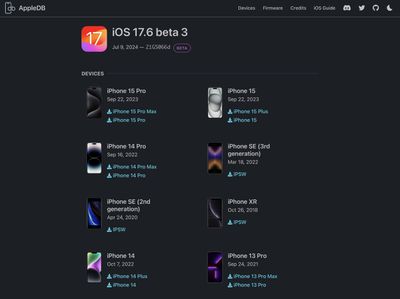
The workaround involves downloading the last signed beta version of iOS 17.6 (beta 3) as an IPSW file. By downloading and installing this beta, you will then be able to update your iPhone to Apple's latest iOS 17 point release, iOS 17.7.2, using Apple's over-the-air update mechanism. The steps further down on this page show you how it's done.
Important Note About Device Backups
Before following the steps below, it's important to understand that backups made on a higher iOS version (e.g., iOS 18) cannot be restored to a device running a lower iOS version (e.g., iOS 17.7.2). If you downgrade, you'll need to set up your device as new or restore from a backup made on the same or an earlier iOS version.
How to Downgrade From iOS 18 to iOS 17
macOS
- On your Mac, visit Appledb.dev and select the version of iOS 17.6 beta 3 that corresponds to your iPhone model to download the .ipsw file.

- Connect your iPhone to your computer, then navigate to your iPhone in Finder.
- Hold the Option or Alt key on your keyboard, and press "Restore."
- Select the .ipsw file that you downloaded.
- Wait for the restore to complete. (You may be prompted to turn off Find My for your device before the restore operation can complete.)
- Allow your device to reboot into the installed version of iOS.
Windows
- On your PC, visit Appledb.dev and select the version of iOS 17.6 beta 3 that corresponds to your iPhone model to download the .ipsw file.
- Install the latest version of iTunes from the Microsoft Store.
- Connect your iPhone to your PC.
- Open iTunes and navigate to your iPhone.
- Hold the Shift key on your keyboard and press "Restore."
- Select the .ipsw file that you downloaded.
- Wait for the restore to complete, and let your iPhone reboot.
Your iPhone should now be running a clean version of iOS 17.6 beta 3. From here you should be able to use Apple's over-the-air update system to update to iOS 17.7.2, which is the latest point release of iOS 17 prior to iOS 18. Head to Settings ➝ General ➝ Software Update and wait for the iOS 17.7.2 update to appear, then tap Install.
When you have successfully update to iOS 17.7.2, your iPhone will eventually show a badge notification for the Settings app on your Home Screen. An easy way to get rid of this notification within Settings is to set your General ➝ Software Update options to look for available Beta Updates (iOS 17 public or developer beta). You don't have to download the beta, but it will make the iOS 18 update reminder go away.













































