iPhone Mirroring in macOS Sequoia and iOS 18 Now Supports Jiggle Mode for Managing Home Screen - MacRumorsOpen MenuShow RoundupsShow Forums menuVisit ForumsOpen Sidebar
Skip to Content

iPhone Mirroring in macOS Sequoia and iOS 18 Now Supports Jiggle Mode for Managing Home Screen

With the latest betas of iOS 18 and macOS Sequoia, Apple added new functionality to iPhone Mirroring, the feature that lets you control your iPhone from your Mac. When iPhone Mirroring first debuted in the betas, there was no support for managing the Home Screen, but that's now changed.
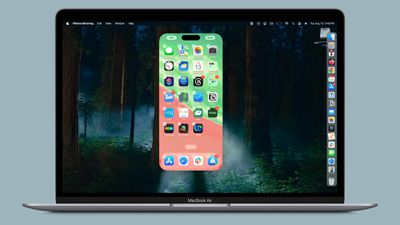
iphone mirroring jiggle mode
Apple added an option to get into jiggle mode, as noted by 9to5Mac. After activating the iPhone Mirroring app, you can click and hold on the iPhone's ‌Home Screen‌ to activate jiggle mode. In this mode, you can do everything you can in jiggle mode on the iPhone itself, from deleting and rearranging apps to managing widgets.

You can add widgets, change widget sizes, activate app long press functionality, turn on dark mode icons, or opt into icon tinting. There is no option to get to the Lock Screen or Control Center, though, and notifications can only be viewed through the Mac notification center.

Apple added the new jiggle functionality in the iOS 18, iOS 18.1, macOS 15, and macOS 15.1 betas, so if you have any of the developer or public betas, you should be able to use the new iPhone Mirroring functionality as of now.

Related Forums: iOS 18, iPadOS 18, macOS Sequoia

Popular Stories

Apple Event Logo

Apple Working on All-New Operating System

Wednesday July 29, 2026 11:39 am PDT by
Apple is developing an all-new operating system that is essentially a mix of tvOS, watchOS, and iOS, according to Bloomberg's Mark Gurman. In a report this week, he said the operating system will feature a grid of icons, widgets, and apps, along with customizable clock faces. The new software platform is intended for Apple's long-rumored smart home hub. With built-in facial recognition,...

Four iPhone 18 Pro Colors Mock Feature

iPhone 18 Pro and iPhone Ultra: Pre-Orders and Release Date

Thursday July 30, 2026 6:12 am PDT by
Apple has yet to reveal when the iPhone 18 Pro and iPhone Ultra will be announced and released, but the dates usually follow a familiar pattern. Labor Day is September 7 this year. The last time the holiday fell on that day was in 2020, but the iPhone event that year was delayed until October due to the COVID-19 pandemic. So, the last time Labor Day was on September 7 in a normal year was in ...

Dynamic Island iPhone 18 Pro Feature

iPhone 18 Pro: Twelve Changes Coming to Apple's Next Flagship

Thursday July 30, 2026 3:43 am PDT by
We're less than two months out from the launch of Apple's premium next-generation smartphone lineup, and while we're not expecting a dramatic change in terms of functionality, there are still several enhancements rumored to be coming to the iPhone 18 Pro and iPhone 18 Pro Max. One thing worth noting is that Apple is reportedly planning a major change to its iPhone release cycle this year,...

Top Rated Comments

26 months ago

I was going to ask a similar question... Can some of the folks who plan to use the iphone mirroring, tell us how/when you plan to use this feature? I can't think of any significant use case, however Apple seems to make it sounds like a big deal.
Interesting. I use my Mac for work and to know I can just see my iPhone by clicking a notification from it and type on my Mac with a full keyboard rather than picking up my phone will definitely make life easier and will make me use my phone much less. I would not be surprised if I use my iPhone much much less
Score: 9 Votes (Like | Disagree)
26 months ago
now this..... this is news.
Score: 5 Votes (Like | Disagree)
26 months ago
OMG I just spend 3 hours reorganizing my Home Screen last week
Score: 5 Votes (Like | Disagree)
CharlesShaw Avatar
26 months ago
I used to love using iTunes to arrange iPhone icons, as it was fumble proof.
Score: 3 Votes (Like | Disagree)
FloatingBones Avatar
26 months ago
When are we going to get iPad Mirroring?
When are we going to be able to mirror an iPhone on an iPad?
When we have iPhone-on-iPad mirroring, will you be able to see the iPhone screen when you mirror that iPad on a Mac?
Score: 3 Votes (Like | Disagree)
jo-1 Avatar
26 months ago

One thing for me is that WhatsApp Audio calls and messages will show up on the Mac notifications. Currently if my phone is in another room or face down I won't see the notifications until much later (I don't want to install the WhatsApp Mac app).

Also, some banking apps won't have a Mac version, so accessing those using via mirroring could be handy (one use-case I think I will use). I know some iPhone apps can be found in the Mac App Store but that's not the case if the developer forgoes this.
and to add to that List - there are many company APPs that won't run on my MAC - but if I could access than on my AVP or my MAC that would be a no-brainer since I can use my own machine and would not be forced to use the company phone
Score: 2 Votes (Like | Disagree)

🔗 Related Apple News & Rumors

Stay updated with the latest Apple ecosystem news and verified rumors









































