

Everything New in iOS 18.1 Beta 2 and iOS 18 Beta 6 - MacRumorsOpen MenuShow RoundupsShow Forums menuVisit ForumsOpen Sidebar
Skip to Content

Everything New in iOS 18.1 Beta 2 and iOS 18 Beta 6

Apple is beta testing iOS 18 and the first update to iOS 18 concurrently, and we got the second betas of iOS 18.1, iPadOS 18.1, and macOS Sequoia 15.1 today alongside the sixth betas of iOS 18, iPadOS 18, and macOS Sequoia 15.
iOS 18 on iPhone Feature
Many of the changes in iOS 18.1 are focused on bringing the .1 betas in line with the standard betas, which recently received updates to Photos and Safari, while updates in iOS 18 are to finalize features and prepare it for launch.

Photos Redesign (iOS 18.1)

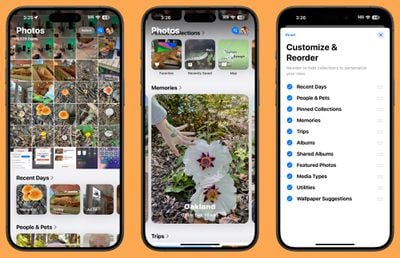
The redesigned ‌Photos‌ app in iOS 18 has proven to be not so popular with some users, so Apple streamlined it ahead of launch. The all-in-one design remains, but Apple removed the carousel to make the app less confusing and less repetitive. Apple introduced these design changes in the standard iOS 18 update last week, and has now brought them to iOS 18.1.
ios 18 photos app redesign
With prior versions of iOS 18, you could swipe left to right to get to various Collections, but now Collections are accessed solely by scrolling down from the main library view. Collections include your custom albums and content that was previously in the For You section, such as featured images, videos, favorites, memories, and more.

The Photo Library now displays more images at once in the photos grid, and Apple moved albums higher by default to make it easier for users to get to them. Recently Saved content has been integrated into Recent Days, so it's simpler to find too.

Distraction Control in Safari (iOS 18.1)

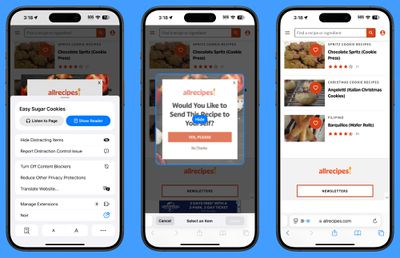
Distraction Control is a new Safari option that lets you hide distracting elements from webpages and articles. You can use the feature to get rid of sign-in windows, cookie preference popups, newsletter signup videos, GDPR banners, and autoplay videos, among other things.
ios 18 distraction control
What you can't use Distraction Control for is hiding ads. Apple has been clear that Distraction Control is not an ad removing tool, and while you can temporarily hide an ad, it pops right back when the ad or webpage refreshes. Distraction Control is designed for static content, not dynamic content, so anything that refreshes can't be hidden from view.

You can get to Distraction Control by opening up Safari, selecting the page settings, and tapping on Hide Distracting Items. From there, you can tap on an element on the page that you want to hide from view. If you're not seeing the Hide Distracting Items option, tap on the three dots in the settings and then choose Edit and you'll be able to add it to your quick access options.

What you've hidden will remain blocked from view as long as it's not dynamic content, but you can restore a webpage to default by going into the same options and tapping on Show Hidden Items.

Note that if you hide a cookie banner or GDPR popup, it is the same as closing the banner without submitting your website preferences. Distraction Control settings are on-device and will not sync from one device to another, so you will need to set it up on each of your devices.

Distraction Control was added to iOS 18 and iPadOS 18 last week, and now the feature is also in the .1 betas.

Photo App Collection (iOS 18 Beta 6)

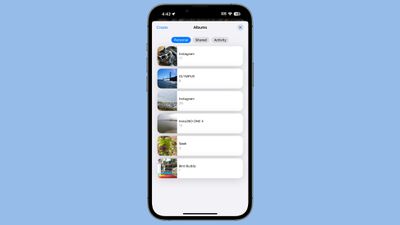
Apple has further tweaked the ‌Photos‌ app in iOS 18 beta 6, introducing a redesigned look for the Albums Collection. Each album has a separate card, with a main thumbnail on the left. Prior versions had the album name on the left and a collection of small thumbnails.
ios 18 beta 6 photos app updates

Control Center (All Betas)

In Control Center, there is a new toggle for turning Bluetooth on and off. It is separate from the general communication controls that are all lumped together, and it can be added to any Control Center page.
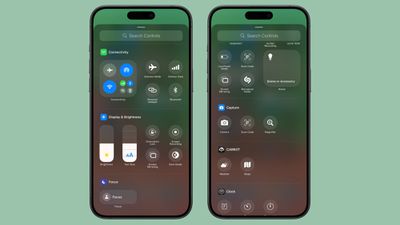
ios 18 beta 6 control center
You can also add the Bluetooth toggle to the Lock Screen in place of the Camera or the Flashlight or assign it to the Action Button on the iPhone 15 Pro and Pro Max.

There have been some tweaks to the way Control Center icons are organized in the gallery. A "Capture" section, for example, has Camera, Scan QR Code, and Magnifier options, and Silent Mode has been added under Sounds.

Dark Mode Notification Icons (All Betas)

When you have Dark Mode icons turned on, notifications that you receive from apps with a ‌Dark Mode‌ icon will show with that icon properly rather than showing with the Light Mode icon.
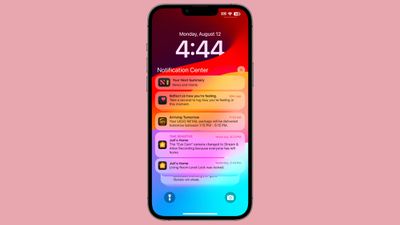
ios 18 dark mode notifications
Note that in iOS 18.1 beta 2, both ‌Dark Mode‌ and ‌Dark Mode‌ icons need to be turned on for notifications to have the darker icon. In iOS 18 beta 6, dark mode icons will show up with the darker icons turned on. ‌Dark Mode‌ is not required.

Splash Screens (All Betas)

As Apple prepares for the launch of iOS 18, there are new splash screens for ‌Photos‌, Translate, Podcasts, Home, Apple TV, Calculator, and Notes. The addition of splash screens suggests that we are nearing the end of planned changes for the base version of iOS 18, which will be installed on iPhone 16 models.
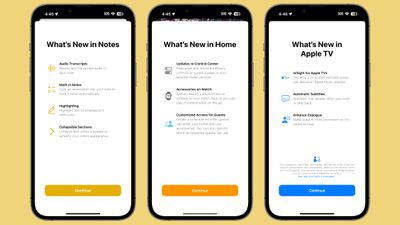
ios 18 splash screens

Apple Intelligence Localization (iOS 18.1)

Apple Intelligence includes new localized versions of English in the second 18.1 beta. Options include Canada, Ireland, New Zealand, South Africa, India, and Singapore, which are in addition to the previous U.S., UK, and Australia localization options.

No support for non-English languages has been added at this time, and Apple says that support for other languages will come later this year and in 2025.

Apple Intelligence in EU (iOS 18.1)

Multiple people located in the European Union have been able to turn on and use ‌Apple Intelligence‌ by setting their region to the United States and language to U.S. English.

Icon Tints (All Betas)

Tints that you apply to your icons to match wallpapers are now linked to that wallpaper rather than the system. When you change your wallpaper, your icons will change as well if you've tailored them to be tinted to a wallpaper color.
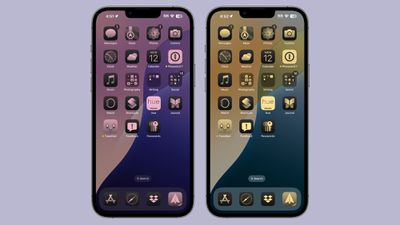
ios 18 tinted icons wallpapers

Apple Music (All Betas)

The Browse tab in Apple Music is now the "New" tab.
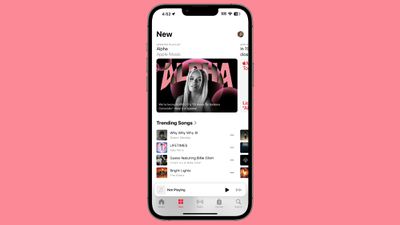
ios 18 6 music app

Lock Screen (iOS 18.1)

There is no longer an option to get to Spotlight search by swiping down from the Lock Screen in iOS 18.1 beta 2, but based on it being listed a known issue in the release notes, this is a bug.

Mail - Upgrade Warning

Apple says that developers who have iOS 18 beta 5 and who are thinking of upgrading to the iOS 18.1 beta might have all their mail redownloaded.

More Features

Know of something that we left out? Let us know in the comments below.

Related Forums: iOS 18, iPadOS 18

Popular Stories

Home Hub Command Center with Dome Base Feature

Apple Smart Home Hub to Feature iMac G4-Style Design

Wednesday September 30, 2026 4:36 am PDT by
Apple's long-rumored smart home hub will have an iMac G4-style design and a host of unique features, Bloomberg's Mark Gurman reports. The smart home hub is said to feature a square 6-inch display, with variants that can be placed on a countertop or mounted on a wall. It features a single FaceTime camera on the front, with microphones and speakers in its connected base. Gurman described the...

HomePod minis on gradient feature 1 1

Three New Apple Smart Home Products Coming on October 13

Wednesday September 30, 2026 4:04 am PDT by
Apple plans to introduce a series of new smart home products on Tuesday, October 13, according to Bloomberg's Mark Gurman. Apple reportedly plans to debut its long-awaited smart home hub device, a new HomePod mini, and a new Apple TV on the date. The new HomePod mini and Apple TV are set to retain their existing designs, but tout faster chips to support Siri AI. The new HomePod mini will...
Apple TV Sans Remote Feature

New Apple TV 4K Leaked

Friday September 25, 2026 8:16 am PDT by
MacRumors contributor Aaron Perris has uncovered an image file from Apple for an unreleased Apple TV 4K, suggesting that a new model will finally be released soon. The image is specifically for an "Apple TV 4K (4th generation)" model. Apple TV 4K (4th generation) image (on a gradient) The image reveals that the Apple TV will have the same external design as the current model, with all of its...

Top Rated Comments

28 months ago
I refuse to believe anyone likes this new look for the Photos app
Score: 24 Votes (Like | Disagree)
28 months ago
On the phone, in recent calls, they have changed again and now if we click on the name of a contact they call them directly. I think it was better in previous betas where it only showed contact when touched. Since this way we avoid calls by mistake
Score: 9 Votes (Like | Disagree)
alexandr Avatar
28 months ago

I refuse to believe anyone likes this new look for the Photos app
The look isn't that much different, but the way it works makes a lot more sense to me. I've been using it for about a week now and love it.
Score: 7 Votes (Like | Disagree)
alexandr Avatar
28 months ago

I know this is is just a beta cycle but this feels like an android software update lol

Idek what version of the beta I am because it’s so fragmented like android phones.
Extremely happy to say — I have no idea what android software updates are like)))
Score: 6 Votes (Like | Disagree)
SDJim Avatar
28 months ago
The removal of Spotlight from the lock screen better be a bug, or I'm throwing my iPhone in the trash.
(Or just not updating, whatever, we'll see how I'm feeling that day)
Score: 5 Votes (Like | Disagree)
Jetson Avatar
28 months ago
Does the Home Bar line at the bottom of every app qualify as a "distraction"?

Please give us a setting to turn that off.
Score: 4 Votes (Like | Disagree)
Latest Stories
Apple's Smart Home Hub: Everything We Know So Far
7 hours ago
Apple's Home Hub Borrows From the iPhone Duo's StandBy Mode
8 hours ago
Apple Invites App Updated With Three New Features
12 hours ago
Apple Event on October 13?
13 hours ago
Apple Watch SE 3 vs. Series 12 Buyer's Guide: Which Should You Buy?
14 hours ago
iPad Mini 8 to Offer These 10 New Features
15 hours ago
DoorDash Unveils AI Food Ordering Through Apple's Messages App
16 hours ago
Amazon Takes Up to $150 Off Select M5 MacBook Air Models
16 hours ago
Apple Still Plans to Release a New Full-Sized HomePod
18 hours ago
Apple Working to Expand HomeKit
19 hours ago
Apple Smart Home Hub to Feature iMac G4-Style Design
19 hours ago
Three New Apple Smart Home Products Coming on October 13
20 hours ago
Apple Pay Now Available in India With Axis Bank Cards
1 day ago
OpenAI Launches Always-On 'Dots' Agents to Rival Meta's Muse
1 day ago
AirPods 5 Teardown: Batteries Removable, Case Still Tough
1 day ago
iPhone 18 Pro Owners Complain of Speaker Crackling or Popping
1 day ago
You Can 'Get Ready' for iPhone Duo Pre-Orders on October 12
1 day ago
Apple Pay Reportedly Launching in India Today
1 day ago
Apple Releases New AirPods Beta Firmware
2 days ago
Apple Shares New Guide for Using iOS 27 Parental Controls
2 days ago
Apple Creator Studio and Final Cut Camera Get New Features
2 days ago
Apple Explains Why It Removed ICE Tracking Apps Last Year
2 days ago
Amazon Expands $779.99 Apple Watch Ultra 4 Deal to More Models
2 days ago
Switch Siri AI for ChatGPT on Your Mac
2 days ago
Apple Says Emergency SOS via Satellite Now Available in Norway
2 days ago
AppleCare Guide: Is it Worth Paying For?
2 days ago
Apple Reportedly Planned to Replace 5,000 Support Employees With AI
2 days ago
Apple Planning to Launch Products Faster and More Often
2 days ago
Amazon Discounting New Mac Mini and Mac Studio Alongside Early Prime Day Deals on Monitors
2 days ago
New Apple TV 4K Hinted at in Support Document
2 days ago

🔗 Related Apple News & Rumors

Stay updated with the latest Apple ecosystem news and verified rumors











































