Everything New in iOS 18 Beta 3 - MacRumorsOpen MenuShow RoundupsShow Forums menuVisit ForumsOpen Sidebar
Skip to Content

Everything New in iOS 18 Beta 3

With the third betas of iOS 18 and iPadOS 18 that Apple released today, there are additional tweaks to a number of features like Dark Mode icons, the Photos app, emoji in Messages, and more, with Apple appearing to be preparing for the launch of Apple Intelligence.
iOS 18 on iPhone Feature
Apple will continue updating iOS 18‌ over the course of the next couple of months, refining the beta prior to its launch. We've highlighted everything new in the third ‌iOS 18‌ beta.

Dark Mode Icons

There are now ‌Dark Mode‌ icons for many third-party apps like Facebook, Etsy, Telegram, Signal, Slack, Notion, YouTube, and more. Apple appears to be adding the ‌Dark Mode‌ icons automatically to apps that have icons with a handful colors.
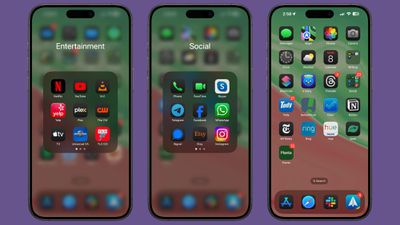
ios 18 dark mode third party icons
With some icons, the secondary color becomes the main color, while the background color is turned to black, and in others, a white icon background transitions to black.

Apps with complicated icon designs in many colors do not change to a ‌Dark Mode‌ color at this time, but Apple does tint them to be darker. When iOS 18 launches, app developers will be able to provide their own dark-tinted icons to be used in lieu of Apple's defaults.

Photos App

Apple added a Select button for choosing multiple images to the main ‌Photos‌ interface, so there is no longer a need to swipe down to get to the Select button.
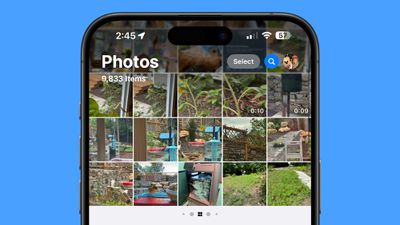
ios 18 photos select button
With this change, the Search button is now just a magnifying glass, but it is highlighted blue to make it stand out more.

Emoji

In Messages, emoji, Memoji, and stickers have all been combined into one interface, which can be navigated using the tiny icons at the bottom of the display. There are icons you can tap into to get to stickers or Memoji, and you can scroll through your Memoji to more quickly find specific characters and poses.
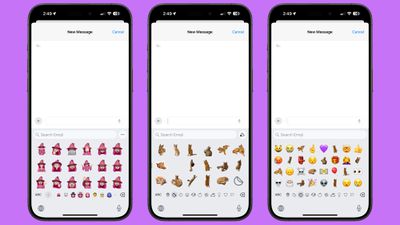
ios 18 emoji stickers memoji
You can create both stickers and Memoji from this interface, and you can use stickers right in your messages like you can use emoji. This works with non-moving stickers only, and those with animation from Live Photos will display in the larger attachment sticker size. The smaller stickers used as emoji are, however, hard to see.

Emoji are displayed larger than before, so you see more detail but fewer characters before having to scroll, and there are more emoji and stickers displayed at once in the Recent section.

Apple likely made these changes to prepare for the debut of ‌Apple Intelligence‌, Genmoji, and Image Playground.

Wallpaper

There is a dynamic version of the iOS 18 wallpaper that transitions through different colors based on the time of day.
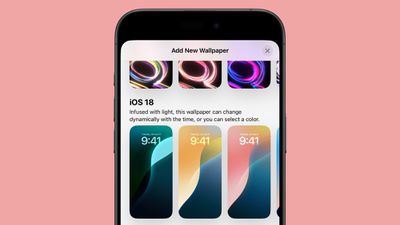
ios 18 dynamic wallpaper option

Flashlight Interface

When you activate the Flashlight, or tap on the controls from the Dynamic Island, there is a larger and more intuitive interface for changing the brightness and the spread of the LED Flash used for the Flashlight feature.
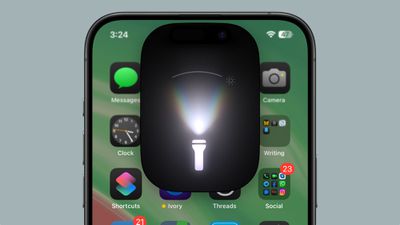
ios 18 flashlight refinement

Maps

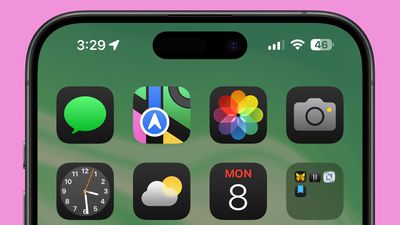
Apple has once again tweaked the colors of the Maps icon when ‌Dark Mode‌ is activated.

ios 18 maps dark mode color

RCS in Messages

The interface for RCS in the Messages section of the Settings app has changed. Rather than just showing up as an on/off toggle, it is now a tap-in menu that provides some additional context. Apple explains that sending and receiving messages with ‌RCS‌ uses wireless data, and cellular network identifiers may be shared with carriers and their partners.
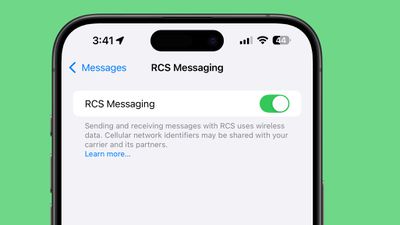
ios 18 beta 3 messages rcs toggle
Some iPhone users in Canada and other countries are also now seeing the ‌RCS‌ toggle, though it is unclear if ‌RCS‌ is working outside of the United States.

Apple Intelligence

There are some mentions of ‌Apple Intelligence‌ features in the code, further hinting at the upcoming addition of AI to the iOS 18 beta. Code references ‌Genmoji‌, ‌Image Playground‌, Writing Tools, Image Wand, and more.

More New Changes

Know of a new feature in iOS 18 beta 3 that we left out? Let us know in the comments below.

Related Forums: iOS 18, iPadOS 18

Popular Stories

iPhone Duo Display Cracking

Apple Alerts Stores to iPhone Duo's Display Cracking Issue

Friday October 30, 2026 3:20 pm PDT by
In a memo shared with Apple Stores and Apple Authorized Service Providers this week, and later obtained by MacRumors, Apple provided technicians with guidance on how to diagnose and address the iPhone Duo's inner display cracking issue. If a customer reports the issue, Apple advised technicians to inspect the iPhone Duo and repair or replace it in accordance with their standard procedures....
iPad mini OLED feature 1

Apple Executive Comments on New iPad Mini Lacking 120Hz Display

Thursday October 29, 2026 1:47 pm PDT by
While the new iPad mini has an OLED display, the device does not support ProMotion, meaning the display's refresh rate is limited to 60Hz instead of 120Hz. ProMotion support would have allowed for the iPad mini's refresh rate to automatically adjust from 10Hz to 120Hz depending on the content being displayed, but evidently Apple has kept the feature exclusive to the iPad Pro among iPad...
Pinched iPad Mini

Apple Avoids Showing Pinched Fingers on iPad Mini Page in South Korea

Thursday October 29, 2026 11:52 am PDT by
In the U.S. and most other countries, Apple's website shows the new iPad mini being held by pinched fingers, but this is not the case in South Korea. The new iPad mini shown with pinched fingers on Apple's website in the U.S. On its South Korean website, Apple simply shows an image of the iPad mini on its own. The new iPad mini shown without pinched fingers on Apple's website in South Korea ...

Top Rated Comments

ppdix Avatar
30 months ago
I am a photographer and use the Photos app constantly.
It's really confusing now. I really don't like it. The summary feature only works on albums and the summarized photos are square, which crop the image too much. There should be a square/normal toggle.

Also, when you click on a photo to view it and, if the photo is vertical, there is a rounded corner and the photo doesn't reach the edge of the display, making it smaller than necessary. If the photo is horizontal, the rounded corners are not there and the image reaches the edge of the display.
What are the designers doing?
Slightly disappointed to say the least...
Score: 21 Votes (Like | Disagree)
30 months ago
In the Photos app, you’re no longer forced to full-screen when zooming on a photo, you can zoom in just a little again. This was a HUGE peeve in b1 and b2, really glad they reversed it. 😂

Also, just spotted the emoji keyboard has changed, the keys are much larger.
Score: 12 Votes (Like | Disagree)
zorinlynx Avatar
30 months ago

I am a photographer and use the Photos app constantly.
It's really confusing now. I really don't like it. The summary feature only works on albums and the summarized photos are square, which crop the image too much. There should be a square/normal toggle.


Also, when you click on a photo to view it and, if the photo is vertical, there is a rounded corner and the photo doesn't reach the edge of the display, making it smaller than necessary. If the photo is horizontal, the rounded corners are not there and the image reaches the edge of the display.
What are the designers doing?
Slightly disappointed to say the least...
I have to agree. The Photos app changes are the biggest example of "change for the sake of change" I've ever seen. None of the changes make it easier to use. It's just different, for no real good reason, and requires a lot more swiping around whereas before you had the convenient "tabs" on the bottom.

Right now I'd be ecstatic if Apple abandoned the changes to the Photos app and just kept it the same as iOS 17. There was literally no reason to make these changes.
Score: 11 Votes (Like | Disagree)
30 months ago
Finally dark icons - Awesome!
Score: 9 Votes (Like | Disagree)
contacos Avatar
30 months ago
Thought I’d like the dark mode icons but to my own surprise I don’t. Makes it harder for me to find my apps. I am a person of habits I guess.
Score: 6 Votes (Like | Disagree)
30 months ago
The blue search button in Photos is giving me Mac OS X v10.4 Tiger vibes. :)
Score: 6 Votes (Like | Disagree)
Latest Stories
Apple Offers Steps to Fix Daylight Saving Time Bug on Apple Watch
4 hours ago
Apple Watch Ultra 4 Hits All-Time Low Price With Amazon's $99 Discount
22 hours ago
Reminder: Apple's Big Discount on Beats 360 Ear Cushions Ends Today
22 hours ago
Here's a New Tour of Apple's HomeView Software
22 hours ago
Apple Reveals New iPad Mini's Battery Capacity
1 day ago
Top Stories: Apple's Big MacBook Pro, iPad mini and iMac Updates
1 day ago
'Pluribus' Season 2 Reportedly Starts Production Today
1 day ago
iPhone 18 Pro Sales Surge in China, Offsetting Decline in U.S. and Japan
1 day ago
HomeView Software 27.2: Wallpapers, Control Center, and More
2 days ago
Apple Alerts Stores to iPhone Duo's Display Cracking Issue
2 days ago
iOS 27.3 Will Enable These Apple Intelligence Features in China
2 days ago
Apple Says iOS 27.3 Beta Coming Next Week
2 days ago
Apple's Flash Storage Suppliers Are Finally 'Getting Their Revenge'
2 days ago
14 New Things Your iPhone Can Do in iOS 27.2
2 days ago
iPhone Duo Review: One Week Later
2 days ago
Samsung Mocks iPhone Duo Display Cracks in New Ad Campaign
2 days ago
The MacRumors Show: OLED MacBook Pro, iPad Mini 8, and More
2 days ago
MacBook Pro With Touch Display: 15 More Details Revealed
2 days ago
Russia Places Apple on State Surveillance Registry
2 days ago
Halloween Weekend Brings Discounts on Apple Accessories and Pre-Orders
2 days ago
Apple Has Released More Than 25 New Products in the Past Two Months
2 days ago
Local Code Launches as Free, Private AI Assistant Tool for Mac
2 days ago
Apple Acquires Ascend.io
2 days ago
HomePod Mini 2 Launches Today: All the New Features
2 days ago
AirTag 2 4-Pack Drops to New Low Price of $69.99
2 days ago
Rian Johnson's iPhone Camera App Goes Viral
2 days ago
Where Did All the iPhone Duos Go? Mostly to Apple's Stores
2 days ago
Apple's Touchscreen MacBook Pro Could Ship 1.5M Units in 2027
2 days ago
New Apple TV 4K and iPad Mini: RAM Amounts Revealed
3 days ago
Apple Executive Comments on New iPad Mini Lacking 120Hz Display
3 days ago

🔗 Related Apple News & Rumors

Stay updated with the latest Apple ecosystem news and verified rumors