Belkin Releases MagSafe Mount for Using iPhone Camera With Apple TV - MacRumorsOpen MenuShow RoundupsShow Forums menuVisit ForumsOpen Sidebar
Skip to Content

Belkin Releases MagSafe Mount for Using iPhone Camera With Apple TV

Apple today began selling Belkin's new iPhone Mount with MagSafe for Apple TV 4K on its online store in the U.S. and other countries.
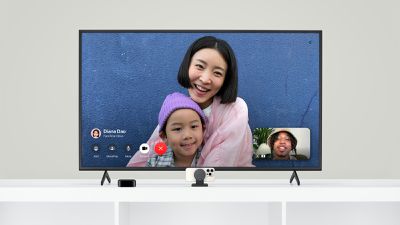
Belkin Apple TV MagSafe Mount
This accessory allows you to mount your iPhone to the top of your TV, or it can be placed on the stand below. Then, you can conveniently use your iPhone's rear camera for FaceTime video calls on any Apple TV 4K model running tvOS 17 or later.

Key features of the mount, as listed on Apple's online store:

Mount directly to your TV or display up to 4 inches (10.1 cm) in depth

Works as standalone mount on desktop or a TV stand

Tilt from –20 to +30 degrees to adjust to your environment

Easily flip iPhone orientation to stream or record in portrait or landscape

Keyhole mounts and mounting bracket included for added stability

Designed for Continuity Camera–supported apps

Belkin already offered a very similar version of this mount for use with the iMac and Apple's external displays, but it is currently listed as unavailable on Apple's online store. Apple continues to sell a version of the mount for MacBooks.

Priced at $49.95 in the U.S., the TV version of the mount ships in one business day.

Related Roundup: Apple TV
Tag: Belkin
Buyer's Guide: Apple TV (Don't Buy)

Popular Stories

tvOS 27 Feature

Apple Seeds tvOS 27 Beta 3 to Developers

Monday July 6, 2026 10:22 am PDT by
Apple today seeded the third beta of tvOS 27 to developers for testing purposes, with the update coming two weeks after Apple released the second beta. The beta can be downloaded and installed through the Settings app on the Apple TV. A free developer account is required. tvOS 27 has few new features compared to the other 27 software updates, but it does add a redesigned Podcasts app,...
General visionOS watchOS and tvOS Betas Feature Redux

Apple Releases Fourth watchOS 26.6, tvOS 26.6 and visionOS 26.6 Betas

Monday July 6, 2026 10:16 am PDT by
Apple today provided developers with the fourth betas of upcoming watchOS 26.6, tvOS 26.6, and visionOS 26.6 betas for testing purposes. The software comes a week after Apple seeded the third betas. The software updates are available through the Settings app on each device, and because these are developer betas, a free developer account is required. There's no word on what's in the...
New Apple TV Logo

Apple TV Earns Record 87 Emmy Nominations for 2026, Led by 'Pluribus' and 'Widow's Bay'

Wednesday July 8, 2026 10:37 am PDT by
Apple earned its highest number of Emmy nominations to date in 2026, with popular shows like Pluribus, Margo's Got Money Troubles, Widow's Bay, Shrinking, and Slow Horses earning the most nominations. New series Widow's Bay received 19 nominations, while Pluribus was second with 18 nominations. The five most highly nominated shows are up for best series in their respective categories, and...

Top Rated Comments

Joe Mac User Avatar
32 months ago

any Apple TV 4K model running tvOS 17 or later
Point of clarity: The Continuity Camera feature only works with 2nd Generation or Later Apple TV 4K models. I think the article should be clarified to reflect this, even if the PR doesn't have the info.

https://support.apple.com/guide/tv/use-facetime-atvb3cced7cd/tvos
Score: 8 Votes (Like | Disagree)
alexandr Avatar
32 months ago

So what happens when it goes to the lock screen?
You get up :)
Score: 6 Votes (Like | Disagree)
HobeSoundDarryl Avatar
32 months ago

Can people hear you if your TV is in a large room?
Start a video (selfie) recording, prop it against your TV now, get to where you would normally be for a FaceTime/Zoom call, pretending you are talking to someone by saying a few words, then go get your iDevice, play the video and hear for yourself. There's nothing like a real test to absolutely answer a question like this. Otherwise, you'll get a mix of "no problem for me" to "problem for me."

Note you can also use buds for the audio portion, just like FaceTiming on a computer.
Score: 4 Votes (Like | Disagree)
32 months ago

Wasn't there a rumour a few years ago that FaceTime would have an algorithm that makes it look as if the eyes of the person speaking were looking straight at you, even if that person was looking at the screen? The rumour just vanished?
That’s already built into iOS, but I’m not sure if it does on tvOS.

Attachment Image
Score: 3 Votes (Like | Disagree)
32 months ago
I found a really great little mount for like $25 that works on my TV, iMac and even MacBook:

https://www.amazon.com/dp/B0C1RHB3NQ?ref=ppx_yo2ov_dt_b_product_details&th=1

The larger body of it anchors it to a TV or desktop monitor (and will stand upright on a table) Then for a MacBook, you pop out the smaller part with the magnetic mount and just clip that onto the top of the display. Been using for a couple weeks now and it's really quite nicely made. Everything else I'd found were single-purpose mounts like this dumb Belkin thing, meaning you're supposed to buy a separate one for each device.

[edit: I just realized the magnetic mount can actually be swapped out for an Apple MagSafe charger if you want. Very cool.]

FaceTime over Apple TV is pretty fun. The Center Stage feature follows you around the room, and will even reframe if a second person enters the frame.
Score: 3 Votes (Like | Disagree)
HobeSoundDarryl Avatar
32 months ago

If FaceTime on ATV would work I could see this accessory working for some.
It does work with newer AppleTVs.
Score: 3 Votes (Like | Disagree)

🔗 Related Apple News & Rumors

Stay updated with the latest Apple ecosystem news and verified rumors














































