

iOS 17: How to Use iPhone as a FaceTime Camera on Apple TV - MacRumorsOpen MenuShow RoundupsShow Forums menuVisit ForumsOpen Sidebar
Skip to Content

iOS 17: How to Use iPhone as a FaceTime Camera on Apple TV

by

With ‌iOS 17‌ and tvOS 17, you can make ‌FaceTime‌ calls on ‌Apple TV‌ and use your iPhone or iPad as the front-facing camera. Here's how it works and how to use it.
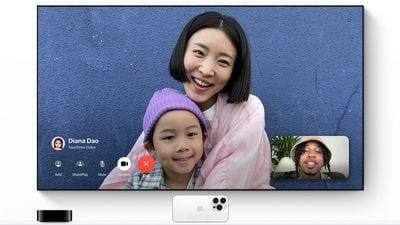
facetime apple tv
In tvOS 17, there's a new ‌FaceTime‌ app for ‌Apple TV‌, but to use it you need an iPhone running iOS 17 or an ‌iPad‌ running iPadOS 17. That's because the ‌Apple TV‌ doesn't have a camera or microphone, so the iPhone or ‌iPad‌ connects wirelessly and serves as the video camera and mic during the ‌FaceTime‌ call.

What You Need

‌FaceTime‌ on ‌Apple TV‌ requires an iPhone XS, iPhone XR, and later, iPad Pro 12.9-inch (3rd generation and later), ‌iPad Pro‌ 11-inch (1st generation and later), ‌iPad‌ (8th generation and later), iPad Air (3rd generation and later), and iPad mini (5th generation and later) with ‌Apple TV‌ 4K (2nd generation and later) running tvOS 17 or later.

Start a FaceTime Video Call on Apple TV

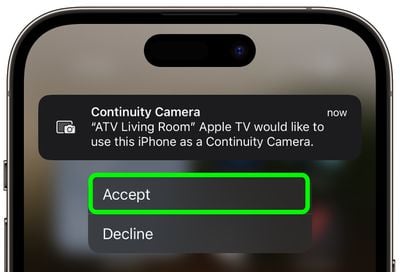
  1. On ‌‌Apple TV‌, select the ‌FaceTime‌ app, then select the user whose iPhone you want to use as the Continuity Camera.
  2. Tap the Continuity Camera alert on your iPhone, then tap Accept.
    apple tv facetime iphone

  3. Next, position your iPhone near the TV in landscape orientation with the rear camera facing you.
  4. With the iPhone camera in position and streaming to the ‌Apple TV‌, use your Siri Remote to select the options on the screen: choose Center Stage to keep you in the frame as you move around, Portrait to focus in on you and blur the background, and Reactions to let you trigger screen effects using physical gestures.
  5. When you're happy with the camera setup, select someone to call from the contacts list along the side of the TV screen.
When the person answers your call, they will appear fullscreen and your iPhone camera's stream will be minimized to the corner of the screen.

tvos 17 facetime
During the call, there are also screen options to Add another person to the call, start a SharePlay session, Mute the call, turn the Camera on/off, and End the call. Note that you can also handoff a call from the ‌‌Apple TV‌‌ to an iOS device if you need to move to another room, and vice versa.

Related Roundup: Apple TV
Buyer's Guide: Apple TV (Don't Buy)

Popular Stories

General visionOS watchOS and tvOS Betas Feature Redux

Apple Releases Second watchOS 26.6, tvOS 26.6 and visionOS 26.6 Betas

Monday June 15, 2026 10:06 am PDT by
Apple today provided developers with the second betas of upcoming watchOS 26.6, tvOS 26.6, and visionOS 26.6 betas for testing purposes. The software comes three weeks after Apple seeded the first betas. The software updates are available through the Settings app on each device, and because these are developer betas, a free developer account is required. There's no word on what's in the...

f 5d631a2d7714517b0b0137e38aadf744d175cb3e

Apple Releases First iOS 27, iPadOS 27, and macOS 27 Betas to Developers

Monday June 8, 2026 11:40 am PDT by
Following the WWDC 2026 keynote event, Apple has seeded the first betas of iOS 27, iPadOS 27, macOS 27, watchOS 27, tvOS 27, and visionOS 27 to developers for testing purposes. Registered developers can opt in to betas and download the software through the Settings app on each device. The software includes many of the new features that were shown off earlier today, though some of what...
Apple TV 2025 Thumb 2 Sans Text

Apple Announces tvOS 27 With These New Features

Monday June 8, 2026 2:00 pm PDT by
Apple barely touched on tvOS 27 during its WWDC 2026 keynote today, but the update exists, and it adds some new features to the Apple TV. In a slide that was shown very briefly during the keynote, Apple revealed some of tvOS 27's new features and enhancements: A redesigned Podcasts app Smoother app launches and animations Faster AirPlay connectivity with other Apple devices Smart ...

🔗 Related Apple News & Rumors

Stay updated with the latest Apple ecosystem news and verified rumors









































