

Apple Suggests Potential Fixes for Weather Complication Bug on Apple Watch - MacRumorsOpen MenuShow RoundupsShow Forums menuVisit ForumsOpen Sidebar
Skip to Content

Apple Suggests Potential Fixes for Weather Complication Bug on Apple Watch

Apple on Tuesday offered two potential fixes for the recently reported Apple Watch issue where watch face Weather complications fail to load data.
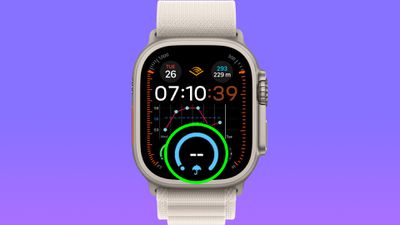
weather complications
Apple Watch owners have been complaining of malfunctioning Weather complications since the launch of watchOS 10, with both the initial launch and watchOS 10.0.1 affected. Those impacted are seeing a blank reading where the weather data should be, but tapping into the Weather app shows the expected information.

In a new support document titled "If the Apple Watch Weather complication isn't working," Apple suggests users affected by the issue try the following:

Reset iPhone Settings

  1. On your iPhone, open the Settings app, then tap Privacy & Security -> Location Services.
  2. Scroll down and tap Weather.
  3. Under Allow Location Access, tap Never, then tap your original setting.
  4. Check whether the issue is resolved.

If weather data still doesn't load, Apple suggests trying these steps:

  1. On your iPhone, open the Settings app, then tap General -> Transfer or Reset iPhone.
  2. Tap Reset -> Reset Location & Privacy.
  3. If prompted, enter your passcode and reset.
  4. Check whether the issue is resolved.

Apple on Tuesday also released a new watchOS 10.0.2 update, which was initially thought to resolve the Weather complication issue, but it seems that a number of users did not see any permanent resolution after updating.

Did either of Apple's suggested fixes work for you? Let us know in the comments.

Related Forum: Apple Watch

Popular Stories

3 4 24 Sport Band Refresh Feature

Sketchy Rumor Claims Apple Watch Series 12 Could Introduce Sensor in Band

Friday July 3, 2026 8:54 am PDT by
The Apple Watch Series 12 could ship with a new health sensor built directly into one of its bands, according to a sketchy rumor from a known leaker. The leaker known as "Kosutami" says the sensor will be injection-molded into a silicone band, and only a silicone band, apparently because Apple has not yet solved how to embed similar hardware in bands made from other materials. No detail was...


watchos 27

Siri AI Comes to Apple Watch in watchOS 27 Beta 3

Monday July 6, 2026 1:24 pm PDT by
With watchOS 27 beta 3, Apple added support for Siri AI and the Siri app, so Apple Watch users can now use the features right from their wrist. Apple said Siri AI would be coming to the watch back when watchOS 27 was first introduced, but the feature wasn't live until now. The Dynamic App Grid that pops up when the Digital Crown is pressed displays the Siri app in the center, and the...
Apple Watch Series 10 Jet Black

Apple Watch Series 13 Rumored to Mark the End of an Era

Wednesday July 8, 2026 1:29 pm PDT by
While the Apple Watch Series 12 is still a few months away, a new rumor suggests that next year's Apple Watch Series 13 will mark the end of an era. According to a recent post from a known leaker on the Chinese social media platform Weibo, the Apple Watch will be receiving a major redesign next year, and this will apparently include a new way of attaching bands to the watch. As a result, the ...

Top Rated Comments

vegetassj4 Avatar
37 months ago
POTENTIAL fixes? We don’t really know what’s going on, so throw some 💩at the board and see if it sticks.
Wow, just wow.
Score: 27 Votes (Like | Disagree)
bydandie Avatar
37 months ago
The second one worked for me, just a shame that it's been reported during the betas and they ignored it. That is the entire point of the betas to feedback and they waited until public release?
Score: 17 Votes (Like | Disagree)
WiiDSmoker Avatar
37 months ago
Why does Apple have so many issues with Weather?
Score: 15 Votes (Like | Disagree)
MrGimper Avatar
37 months ago
Go to settings > Privacy & Security > Locations Services. Tap the switch at the top to turn off ALL location services, wait a minute, and turn it back on.

Did this 2 days ago and my weather is all sorted. Even travelled to different locations and it’s all working fine.
Score: 11 Votes (Like | Disagree)
37 months ago
WOW never expected this kind of jank from an Apple support article. Do better Apple.
Score: 11 Votes (Like | Disagree)
G.Gleeson Avatar
37 months ago
The second set of steps worked for me.
Score: 8 Votes (Like | Disagree)

🔗 Related Apple News & Rumors

Stay updated with the latest Apple ecosystem news and verified rumors










































