

Here's What's New in the iOS 17 Podcasts App - MacRumorsOpen MenuShow RoundupsShow Forums menuVisit ForumsOpen Sidebar
Skip to Content

Here's What's New in the iOS 17 Podcasts App

Apple in iOS 17 has revised several elements of its stock apps, including the Podcasts app. There are a few noteworthy changes to the functionality and design of the app with the update, as detailed below.
podcasts app ios 17
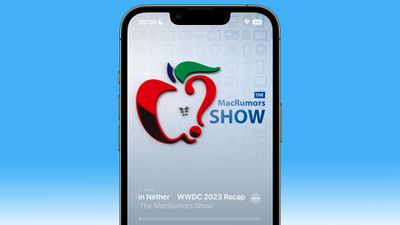
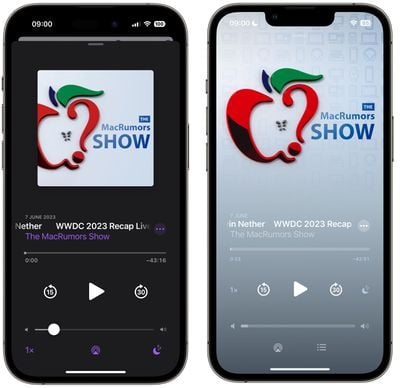
The biggest change is a slick new design for the Now Playing screen, which allows the podcast's full show page art – or any episode chapter images – to take over the entire screen.

The playback controls on the bottom half of the screen have also been rejigged. The play speed button has been moved from the bottom left corner of the screen and now sits next to the rewind button.
podcasts app ios 16 17 2

Podcasts app in iOS 16 (left) versus iOS 17

The sleep timer button has also been moved from the bottom right corner and is now located next to the fast-forward button, so the main bank of controls is more compact with five buttons in the row instead of just rewind, play, and fast-forward. Some buttons also now take on a neat new glow when activated.

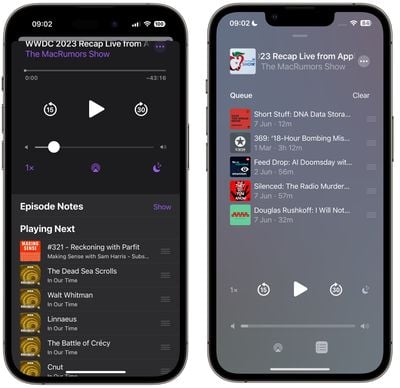
The queue interface has changed, too. Whereas previously you swiped up to see if anything was in the Playing Next list, now there's a dedicated queue button at the bottom next to the AirPlay icon.
podcasts app ios 16 17 3

Podcasts app in iOS 16 (left) versus iOS 17

Pressing it brings up a whole new screen showing any queued episodes as a list. You can swipe to remove an episode from the queue or clear the list, and if there are no episodes up next it will tell you that nothing is queued.

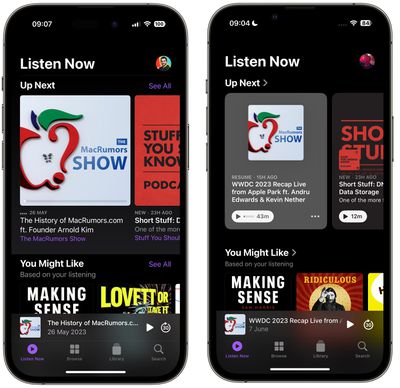
The Up Next carousel at the top of the Listen Now screen features redesigned cards that add a color shade to go with the podcast's art, and they feature a new three-dot options menu icon, a new compact playback indicator that shows if you have started a podcast but not finished it, as well as the episode's length.
podcasts app ios 16 17 1

Podcasts app in iOS 16 (left) versus iOS 17

The same indicator can also be found in the Up Next screen, where the "Play Next" and "Play Last" options have been replaced with "Add to Queue."

podcasts ios 16 17

Podcasts app in iOS 16 (left) versus iOS 17

In iOS 16, if you've completed an episode in a podcast's episodes list, it just says "Played" below the episode summary. In iOS 17, that's been replaced by a replay icon and the episode length. A checkmark now also sits next to the date above the episode title, indicating that you've listened to it.


Related Forums: iOS 17, iPadOS 17

Popular Stories

Apple Event Logo

Apple Working on All-New Operating System

Wednesday July 29, 2026 11:39 am PDT by
Apple is developing an all-new operating system that is essentially a mix of tvOS, watchOS, and iOS, according to Bloomberg's Mark Gurman. In a report this week, he said the operating system will feature a grid of icons, widgets, and apps, along with customizable clock faces. The new software platform is intended for Apple's long-rumored smart home hub. With built-in facial recognition,...
imac video apple feature

Apple Made Its Second-Biggest Acquisition Ever This Year

Wednesday July 29, 2026 12:03 pm PDT by
Apple this year acquired Israeli startup Q.ai for close to $2 billion, according to the Financial Times. That would make this Apple's second-biggest acquisition ever, after it paid $3 billion for the popular headphone maker Beats in 2014. This is also the largest known Apple acquisition since the company purchased Intel's smartphone modem business and patents for $1 billion in 2019. Q.ai...
Dynamic Island iPhone 18 Pro Feature

iPhone 18 Pro: Twelve Changes Coming to Apple's Next Flagship

Thursday July 30, 2026 3:43 am PDT by
We're less than two months out from the launch of Apple's premium next-generation smartphone lineup, and while we're not expecting a dramatic change in terms of functionality, there are still several enhancements rumored to be coming to the iPhone 18 Pro and iPhone 18 Pro Max. One thing worth noting is that Apple is reportedly planning a major change to its iPhone release cycle this year,...

Top Rated Comments

japanime Avatar
41 months ago
So, they moved everything around to make it a shiny new kind of confusing.
Score: 10 Votes (Like | Disagree)
ugahairydawgs Avatar
41 months ago

How is the syncing? I’m not too pleased with their current general release version as it doesn’t sync across devices like I think it should. The queues aren’t synched which means device to device, I’m not able to use the same play list.

Lines up with the poor syncing in Apple Books and the Want to Read list. Don't get why something basic like syncing in these two apps is so difficult for Apple when the syncing in most of their other apps is pretty rock solid (in my experience).

Score: 5 Votes (Like | Disagree)
jfim88 Avatar
41 months ago
Pocket Casts is my way to go
Score: 4 Votes (Like | Disagree)
Reason077 Avatar
41 months ago
Podcast makers will likely be pleased with the increased "branding" on the play screen, but I don't really like the reduced contrast of the controls. The "swipe down" bar to close the "now playing" screen is almost invisible in the screenshot above, for example.

Also, hopefully the slight UI rearrangement makes the "play speed" (1x 1.25x etc) button less easy to press accidentally? The number of times I've wondered why everyone's voice sounds funny because it accidentally got tapped either on my watch or phone screen...
Score: 4 Votes (Like | Disagree)
wanha Avatar
41 months ago
Overcast is the way to go when it comes to podcasts on Apple devices
Score: 4 Votes (Like | Disagree)
41 months ago
Small changes, mainly rearranging of buttons.
Score: 3 Votes (Like | Disagree)

🔗 Related Apple News & Rumors

Stay updated with the latest Apple ecosystem news and verified rumors










































