

These Gestures Are How You Control Apple Vision Pro - MacRumorsOpen MenuShow RoundupsShow Forums menuVisit ForumsOpen Sidebar
Skip to Content

These Gestures Are How You Control Apple Vision Pro

Apple Vision Pro, Apple's new "spatial computing" device, does not have a hardware-based control mechanism. It relies on eye tracking and hand gestures to allow users to manipulate objects in the virtual space in front of them. In a recent developer session, Apple designers outlined the specific gestures that can be used with Vision Pro, and how some of the interactions will work.
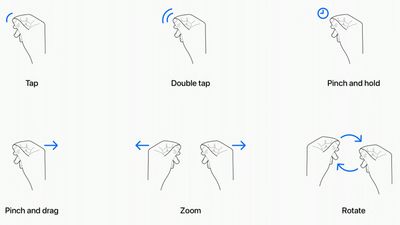
apple vision pro gestures

  • Tap - Tapping the thumb and the index finger together signals to the headset that you want to tap on a virtual element on the display that you're looking at. Users have also described this as a pinch, and it is the equivalent to tapping on the screen of an iPhone.
  • Double Tap - Tapping twice initiates a double tap gesture.
  • Pinch and Hold - A pinch and a hold is similar to a tap and hold gesture, and it does things like highlighting text.
  • Pinch and Drag - Pinching and dragging can be used to scroll and to move windows around. You can scroll horizontally or vertically, and if you move your hand faster, you'll be able to scroll faster.
  • Zoom - Zoom is one of two main two-handed gestures. You can pinch your fingers together and pull your hands apart to zoom in, and presumably zooming out will have a pushing sort of motion. Window sizes can also be adjusted by dragging at the corners.
  • Rotate - Rotate is the other two-handed gesture and based on Apple's chart, it will involve pinching the fingers together and rotating the hands to manipulate virtual objects.

Gestures will work in tandem with eye movements, and the many cameras in the Vision Pro will track where you are looking with great accuracy. Eye position will be a key factor in targeting what you want to interact with using hand gestures. As an example, looking at an app icon or on-screen element targets it and highlights it, and then you can follow up with a gesture.

Hand gestures do not need to be grand, and you can keep your hands in your lap. Apple is encouraging that, in fact, because it will keep your hands and arms from getting tired from being held in the air. You only need a tiny pinch gesture for the equivalent of a tap, because the cameras can track precise movements.

@macrumors Eye tracking and pinching is the interface on the new #AppleVisionPro and we could to try jt out! #Apple #VR #AR ♬ original sound - MacRumors

What you're looking at will let you select and manipulate objects that are both close to you and far from you, and Apple does anticipate scenarios where you might want to use larger gestures to control objects that are right in front of you. You can reach out and use your fingertips to interact with an object. For example, if you have a Safari window right in front of you, you can reach your hand out and scroll from there rather than using your fingers in your lap.

In addition to gestures, the headset will support hand movements such as air typing, though it doesn't seem like those who have received a demo have been able to try this feature as of yet. Gestures will work together, of course, and to do something like create a drawing, you'll look at a spot on the canvas, select a brush with your hand, and use a gesture in the air to draw. If you look elsewhere, you'll be able to move the cursor immediately to where you're looking.

While these are the six main system gestures that Apple has described, developers can create custom gestures for their apps that will perform other actions. Developers will need to make sure custom gestures are distinct from the system gestures or common hand movements that people might use, and that the gestures can be repeated frequently without hand strain.

To supplement hand and eye gestures, Bluetooth keyboards, trackpads, mice, and game controllers can be connected to the headset, and there are also voice-based search and dictation tools.

Multiple people who have been able to try the Vision Pro have had the same word to describe the control system - intuitive. Apple's designers seem to have created it to work similarly to multitouch gestures on the iPhone and the iPad, and so far, reactions have been positive.

MacRumors videographer Dan Barbera was able to try out the headset and he was impressed with the controls. You can see his full overview of his experience on our YouTube channel.
Related Roundup: Apple Vision Pro
Buyer's Guide: Vision Pro (Neutral)

Related Forum: Apple Vision Pro

Popular Stories

Vision Pro M5 Announcement

New Vision Pro Headset: Apple Considering Four Different Concepts

Monday September 28, 2026 3:52 am PDT by
Apple is working on a "completely revamped" Vision Pro headset that could go in any of four directions and likely won't arrive before late 2028 or early 2029, according to Bloomberg's Mark Gurman. Writing in his latest Power On newsletter, Gurman said Apple's Vision team is exploring four concepts for the device, codenamed N224, including designs that offload internal components in a similar ...
apple vision pro orange

Apple's Vision Pro Layoffs Were Broader Than First Reported

Tuesday September 1, 2026 4:18 am PDT by
Recent layoffs of Apple employees working on the Vision Pro were broader than previously thought, Bloomberg's Mark Gurman reports. Last month, Gurman said that Apple cut around 100 jobs from the Vision Products Group, with those cuts centered on the headset's gaming and immersive video teams. Gurman now says the layoffs also reached Vision Pro staff across the rest of the company, including ...
watchos 27

Apple Seeds watchOS 27, visionOS 27, and tvOS 27 Release Candidates

Wednesday September 9, 2026 12:06 pm PDT by
Apple today seeded the release candidate versions of watchOS 27, visionOS 27, and tvOS 27 to developers and public beta testers. The release candidates are the final versions of the updates that will be seeded to the public as long as no final bugs are found during this last round of testing. The updates can be installed through the Software Update section in the Settings app on each...

Top Rated Comments

MacWiz_007 Avatar
43 months ago
They forgot the "flipping the bird" gesture when your battery dies in less than two hours. 😁
Score: 21 Votes (Like | Disagree)
Piggie Avatar
43 months ago
This will be the hand gesture after you ask Siri to do something simple for the 8th time and you are hoping THIS TIME is actually gets it right ;)

apple vision pro gestures image
Score: 15 Votes (Like | Disagree)
vegetassj4 Avatar
43 months ago
They forgot Force Quit and responding to Siri when she asks for clarification:


Attachment Image

Attachment Image
Score: 11 Votes (Like | Disagree)
TheYayAreaLiving 🎗️ Avatar
43 months ago
We need a hand clap 👏🏻 gesture.
Score: 9 Votes (Like | Disagree)
MacWiz_007 Avatar
43 months ago

What about pinch to zoom?
Did you not see the one where it looks like you are pinching someone's nipples to zoom?
Score: 7 Votes (Like | Disagree)
43 months ago
that's seriously amazing. Im wayyyy to broke to afford it, and in all fairness it's not something meant for everyone i feel , but in spite of what reports claimed (that it wasnt ready) , the software appears to work really well and super intuintively (gosh i cannot write )
Score: 7 Votes (Like | Disagree)
Latest Stories
Apple's Smart Home Hub: Everything We Know So Far
7 hours ago
Apple's Home Hub Borrows From the iPhone Duo's StandBy Mode
8 hours ago
Apple Invites App Updated With Three New Features
12 hours ago
Apple Event on October 13?
13 hours ago
Apple Watch SE 3 vs. Series 12 Buyer's Guide: Which Should You Buy?
15 hours ago
iPad Mini 8 to Offer These 10 New Features
15 hours ago
DoorDash Unveils AI Food Ordering Through Apple's Messages App
17 hours ago
Amazon Takes Up to $150 Off Select M5 MacBook Air Models
17 hours ago
Apple Still Plans to Release a New Full-Sized HomePod
18 hours ago
Apple Working to Expand HomeKit
20 hours ago
Apple Smart Home Hub to Feature iMac G4-Style Design
20 hours ago
Three New Apple Smart Home Products Coming on October 13
20 hours ago
Apple Pay Now Available in India With Axis Bank Cards
1 day ago
OpenAI Launches Always-On 'Dots' Agents to Rival Meta's Muse
1 day ago
AirPods 5 Teardown: Batteries Removable, Case Still Tough
1 day ago
iPhone 18 Pro Owners Complain of Speaker Crackling or Popping
1 day ago
You Can 'Get Ready' for iPhone Duo Pre-Orders on October 12
1 day ago
Apple Pay Reportedly Launching in India Today
1 day ago
Apple Releases New AirPods Beta Firmware
2 days ago
Apple Shares New Guide for Using iOS 27 Parental Controls
2 days ago
Apple Creator Studio and Final Cut Camera Get New Features
2 days ago
Apple Explains Why It Removed ICE Tracking Apps Last Year
2 days ago
Amazon Expands $779.99 Apple Watch Ultra 4 Deal to More Models
2 days ago
Switch Siri AI for ChatGPT on Your Mac
2 days ago
Apple Says Emergency SOS via Satellite Now Available in Norway
2 days ago
AppleCare Guide: Is it Worth Paying For?
2 days ago
Apple Reportedly Planned to Replace 5,000 Support Employees With AI
2 days ago
Apple Planning to Launch Products Faster and More Often
2 days ago
Amazon Discounting New Mac Mini and Mac Studio Alongside Early Prime Day Deals on Monitors
2 days ago
New Apple TV 4K Hinted at in Support Document
2 days ago

🔗 Related Apple News & Rumors

Stay updated with the latest Apple ecosystem news and verified rumors










































