macOS Ventura Bug Spits Out Perpetual 'Background Items Added' Notifications at Login, Here's a Potential Fix - MacRumorsOpen MenuShow RoundupsShow Forums menuVisit ForumsOpen Sidebar
Skip to Content

macOS Ventura Bug Spits Out Perpetual 'Background Items Added' Notifications at Login, Here's a Potential Fix

Numerous Mac users are repeatedly encountering a bug in macOS Ventura that throws up Login Items notifications for various background app processes every time they start up their machine, even when the processes in question have been disabled.
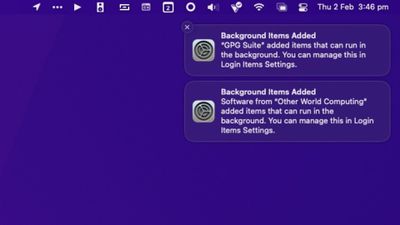
background items notifications
If notification previews are disabled (via System Settings -> Notifications -> Show Previews) the annoying notifications appear as "Login Items." If previews are enabled, the notifications are labelled "Background Items Added" and contain the message "[app/process name] added items that can run in the background. You can manage this in Login Items Settings."

Curiously, there is no option in System Settings -> General -> Login Items to remove background items added to macOS by installed apps. Users can only disable listed items by toggling switches. Doing this however seems to have no impact on the notifications, and in some cases can cause more to appear.

Complaints across Reddit, Twitter, Apple Support Community discussions, and various other app-specific forums repeatedly cite app processes such as Google Updater, Adobe CC Helper, and Dropbox as culprits, but these only appear to be referenced more often because they are popular apps with background processes. Almost any third-party background process can seemingly be referenced in the persistent Login Items notifications.


In all but a minority of cases, trashing or uninstalling the related apps does not fix the problem, and if the notifications do subsequently disappear, reinstalling the app usually brings them back. Some users have even erased their Mac and reinstalled macOS Ventura to defeat the bug, but are then hesitant to install the associated apps.

Only a few users have been successful at ridding their Mac of the notifications by carrying out the following actions, although caution should be applied and users do so at their own risk.

  1. Open Finder, then select Go -> Go to Folder... in the menu bar.
  2. Copy and paste the following address into the input field and press Enter: ~/Library/LaunchAgents
  3. A Finder window will open at the LaunchAgents folder. Show the items as a list organized by name, then search for the app or developer name associated with the process that's causing the Login Items notifications.
  4. Delete the .plist file, then empty the Trash.
  5. Restart your Mac.
  6. If the above steps don't work, look in the ~/Library/LaunchDaemons folder. If there are launch daemons in there associated with the app/developer, delete those too, empty Trash, and restart.

Based on reports, the bug has been around since early beta versions of macOS Ventura, but there have been more frequent incidences reported on Macs running macOS 13.1 and later. Apple is seemingly aware of the problem, but has not commented.


Have you been affected by the Login Items notifications bug? If so, have you found a solution that worked for you? Let us know in the comments.


Related Forum: macOS Ventura

Popular Stories

Four iPhone 18 Pro Colors Mock Feature

iPhone 18 Pro and iPhone Ultra: Pre-Orders and Release Date

Thursday July 30, 2026 6:12 am PDT by
Apple has yet to reveal when the iPhone 18 Pro and iPhone Ultra will be announced and released, but the dates usually follow a familiar pattern. Labor Day is September 7 this year. The last time the holiday fell on that day was in 2020, but the iPhone event that year was delayed until October due to the COVID-19 pandemic. So, the last time Labor Day was on September 7 in a normal year was in ...
Apple Event Logo

Apple Working on All-New Operating System

Wednesday July 29, 2026 11:39 am PDT by
Apple is developing an all-new operating system that is essentially a mix of tvOS, watchOS, and iOS, according to Bloomberg's Mark Gurman. In a report this week, he said the operating system will feature a grid of icons, widgets, and apps, along with customizable clock faces. The new software platform is intended for Apple's long-rumored smart home hub. With built-in facial recognition,...
Dynamic Island iPhone 18 Pro Feature

iPhone 18 Pro: Twelve Changes Coming to Apple's Next Flagship

Thursday July 30, 2026 3:43 am PDT by
We're less than two months out from the launch of Apple's premium next-generation smartphone lineup, and while we're not expecting a dramatic change in terms of functionality, there are still several enhancements rumored to be coming to the iPhone 18 Pro and iPhone 18 Pro Max. One thing worth noting is that Apple is reportedly planning a major change to its iPhone release cycle this year,...

Top Rated Comments

sw1tcher Avatar
46 months ago

Numerous Mac users are repeatedly encountering a bug in macOS Ventura that throws up Login Items notifications for various background app processes every time they start up their machine, even when the processes in question have been disabled.

Apple is seemingly aware of the problem, but has not commented.
An Apple spokesperson just acknowledged the issues and apologized


We are aware that a small number of users are having issues with their third-generation butterfly keyboard macOS 13 Ventura and for that we are sorry. The vast majority of Mac notebook macOS 13 Ventura customers are having a positive experience with the new keyboard macOS.
:p
Score: 16 Votes (Like | Disagree)
46 months ago
Remember when Apple used to run commercials against Microsoft for excessive prompts on Windows? My how the times have changed.
Score: 14 Votes (Like | Disagree)
ivan86 Avatar
46 months ago
Have this bug since day one on Ventura.

I am surprised that this pig slipped into 13.2.

For sure it will be gone in 13.3, since MacRumors made the whole post about it…)
Score: 13 Votes (Like | Disagree)
ratspg Avatar
46 months ago
This bug is probably the most annoying one I have dealt with. It's the gift that keeps on giving lol. Does. Not. Stop. Quality control for macOS sucks lately.
Score: 12 Votes (Like | Disagree)
46 months ago
edge is a nasty piece of crap. I just opened it to test this issue, and it kept trying to change my login settings and add stuff. That is it for me, Edge is going in the trash bin along with any other MS product.
Score: 12 Votes (Like | Disagree)
arkitect Avatar
46 months ago
👍
Thank you! Thank you!

Its been driving me nuts.

macos background items added notification bug image
Score: 10 Votes (Like | Disagree)

🔗 Related Apple News & Rumors

Stay updated with the latest Apple ecosystem news and verified rumors