

Apple has officially released iOS 16.2, the second major update to the iOS 16 operating system, which introduces a number of new features, functions, and customizations for iPhones, including a karaoke-style mode for Apple Music, end-to-end encryption for iCloud backups, new options for Live Activities, and more.
This article summarizes what's new and provides links to how-to articles that aim to help you make the most of all the new features. Keep reading to learn more.
Freeform App
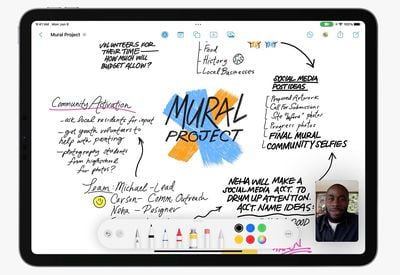
Freeform is a digital canvas app that is designed to let iPhone, iPad, and Mac users work together collaboratively in real time. Multiple people can contribute images, notes, scribbles, documents, web links, PDFs, and more, with content added visible to everyone.
Apple's Freeform app is designed to work with the Apple Pencil on iPad, and it can be used with FaceTime for visual feedback between Freeform participants.
Apple Music Sing
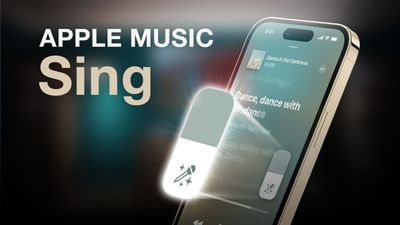
With the release of iOS 16.2, iPadOS 16.2, and tvOS 16.2, Apple is introducing Apple Music Sing, a new Karaoke experience for Apple Music subscribers that lets users sing along to their favorite songs by adjusting the volume of the vocals in tracks.
Available on iPhone, iPad, and Apple TV 4K (2022), Apple Music Sing works with Apple Music's real-time lyrics feature, and gives you control over a song's vocal levels. This means you can sing along with the original artist vocals or turn the vocals down and take the lead.
iCloud Enhanced Data Protection
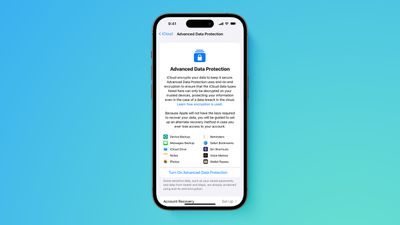
With the release of iOS 16.2 and macOS 13.1, Apple is introducing Advanced Data Protection for iCloud, which uses end-to-end encryption to provide Apple's highest level of cloud data security yet. iCloud already protects 14 sensitive data categories using end-to-end encryption by default, including passwords in iCloud Keychain and Health data. For users who enable Advanced Data Protection, the total number of data categories protected using end-to-end encryption rises to 23.
The new security feature ensures users now have the choice to protect more of their important iCloud data, including iCloud Backup, Photos, Notes, and more. Note that the feature is currently only available to users in the US. Apple says it will launch globally in early 2023, but a precise date is not known.
iPhone 14 Pro Always-On Display Customizations
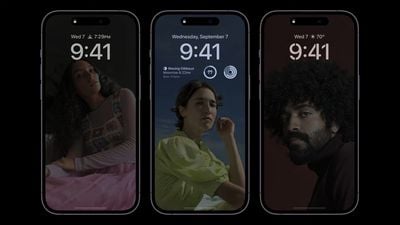
When Apple debuted iPhone 14 Pro and iPhone 14 Pro Max devices, some users criticized the Always-On Display's lack of customization options. For example, in iOS 16.1, there is no way to hide the wallpaper or notifications when an iPhone is locked and not in use.
Fortunately, Apple has listened to feedback, and in iOS 16.2 it has added options to let users adjust the level of detail presented on their iPhone 14 Pro's Always-On display.
iCloud Private Relay Temporary Bypass
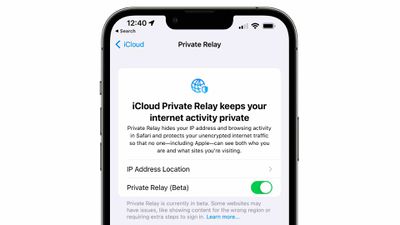
Apple's paid-for iCloud+ service includes a feature called iCloud Private Relay, which is designed to encrypt web traffic leaving your device so that no one can intercept it or read it.
Private Relay hides your IP address from websites in the process, but Apple realizes that there may be times when you actually want your IP address to remain visible in certain situations, which is why it has added a new temporary bypass option.
Live Activities Updates
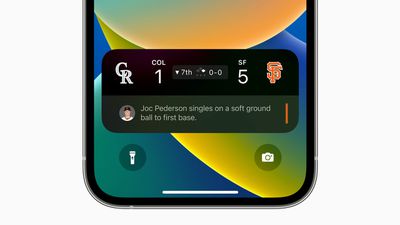
Despite the introduction of Live Activities support for third-party apps in iOS 16.1, Live Activities integration for select sports games via Apple's built-in TV app was pushed back to iOS 16.2. Now you can enable Live Activities for Apple's TV app, as well as opt to receive more frequent updates from the feature on a per-app basis.
- How to Enable Live Activities for the TV App
- How to Enable More Frequent Updates for Live Activities
Note that Live Activities in the TV app are available for MLB games for users in the U.S., Canada, Australia, U.K., Brazil, Mexico, Japan, and South Korea, in addition to NBA and Premier League games for users in the U.S. and Canada only. The feature will likely be expanded to other sports leagues in the future.





/https://forums.macrumors.com/attachments/2128165/)
/https://forums.macrumors.com/attachments/2128167/)













































