

With the release of iOS 16.2, Apple has added an extra level of customization to Live Activities with an option for more frequent updates. Keep reading to learn how it works.
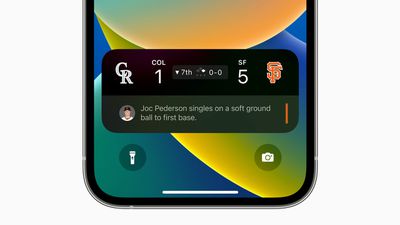
Introduced in iOS 16, Live Activities are lingering interactive notifications that stay up to date, allowing you to keep an eye on things happening in real time right from the Lock Screen. If you're following a sports game, for example, you can see the updated score on the Lock Screen, or if you're waiting for a Uber ride, you can watch for your driver to approach.
On the iPhone 14 Pro and Pro Max, Live Activities also integrate with the Dynamic Island. During a Premier League match, for example, the Dynamic Island shows a live-updating scoreboard with the number of goals scored by each club on either side of the True Depth camera pill. When long pressed, the Dynamic Island expands to show the time elapsed and play-by-play action.
With the release of iOS 16.2, Apple has added an option to allow Live Activities to update more frequently, although the setting will also drain an iPhone battery faster.
Despite the increased battery usage, the option is likely to be a welcome addition for users relying on apps that use Live Activities to relay up-to-date information about travel and transit times, for instance. Here's how you can enable it on a per-app basis.
Before you attempt to follow the steps below, check that you have enabled Live Activities on your iPhone. Also, make sure you've updated your iPhone to iOS 16.2. You can check if your device is up to date by going to Settings -> General -> Software Update.
- Open the Settings app on your iPhone.
- Select an app that includes support for Live Activities. Here, we're selecting the TV app.
- Tap Live Activities, and make sure the Live Activities toggle is turned on for the app.
- Toggle on the switch next to More Frequent Updates.
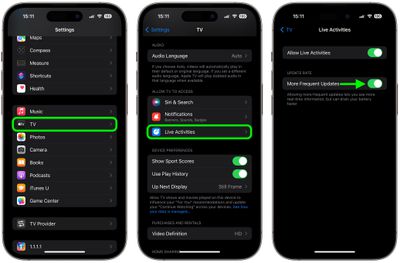
If you don't see the option for More Frequent Updates, it may be that the app you're trying to turn it on for has not yet been updated to support the feature, in which case it may be worth checking with the developer as to when they plan to implement it.














































