

macOS Ventura Tidbits: 'About This Mac' Redesigned, New Game Controller Menu, Background Sounds, and More - MacRumorsOpen MenuShow RoundupsShow Forums menuVisit ForumsOpen Sidebar
Skip to Content

macOS Ventura Tidbits: 'About This Mac' Redesigned, New Game Controller Menu, Background Sounds, and More

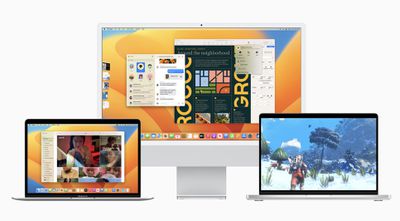
Apple seeded the first beta of macOS Ventura to developers yesterday for testing, and early adopters are beginning to discover smaller changes in the update. We've rounded up some of the more notable macOS Ventura tidbits that we have uncovered below.
macos ventura 1

"About This Mac" Redesigned

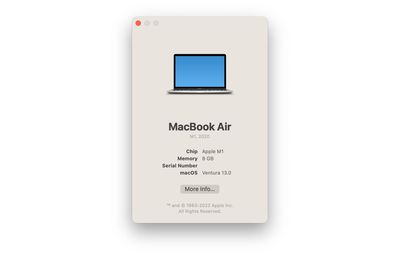
Apple has simplified the About This Mac window on macOS Ventura. The window still lists a Mac's type of processor, amount of memory, serial number, and the macOS version installed, but all other system information has been migrated to the System Settings app, which is a redesigned and renamed version of the former System Preferences app.
About This Mac macOS Ventura
Clicking on the "More Info" button at the bottom of About This Mac opens the General menu of System Settings, which itself contains a "System Report" button that leads to a more advanced overview of a Mac's hardware, software, networking, and more.

Game Controller Menu

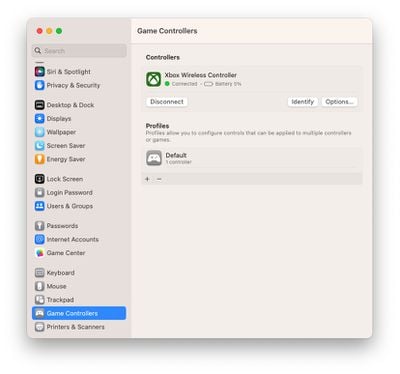
Speaking of System Settings, there is a new game controller menu in the app for managing game controllers connected to a Mac. The menu allows macOS Ventura users to map a controller's buttons and thumbsticks to a Mac's keyboard, adjust haptic feedback levels, create profiles with presets for multiple controllers, and more.
Game Controllers Menu macOS Ventura
macOS Ventura features newly added support for some of the most popular racing wheels, pedals, and shifters for use in racing games on the Mac, including Logitech's G920 and G29 racing wheels, according to Apple's developer website. Apple also says that macOS Ventura supports many additional Bluetooth and USB game controllers, with users discovering that this includes the Nintendo Switch's Joy-Cons and Pro Controller.

Background Sounds

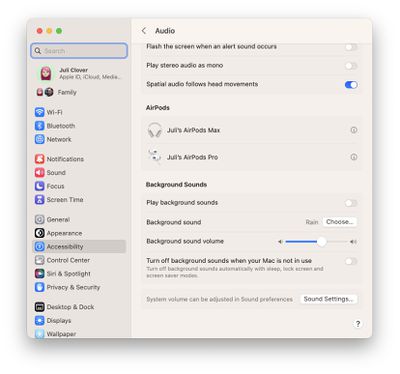
macOS Ventura brings preinstalled background sounds to the Mac. Apple says this feature allows calming sounds, such as ocean or rain, to mask unwanted environmental noise and help minimize distractions. The background sounds feature first launched on the iPhone and iPad with the release of iOS 15 and iPadOS 15 last year.
macOS Ventura Background Sounds
Background sounds on the Mac can be turned on in the System Settings app under Accessibility > Audio. In this menu, you can choose which background sound to play, adjust the background sound volume separate from system volume, and optionally turn off background sounds when your Mac is asleep or in screensaver mode.

Other Features and Tidbits

  • macOS Ventura adds Clock and Weather apps to the Mac.
  • In the Photos app, the Hidden and Recently Deleted albums are now locked by default and can be unlocked using your Mac's password or Touch ID.
  • Playlists have improved sorting options in the Music app.
  • Siri has received a slight redesign with a focus on simplicity and "more focused" results.

macOS Ventura will be released to all users in the fall — likely around October. Apple said a public beta will be available starting in July.

Image Sources: MacRumors Forums and Reddit

Related Forum: macOS Ventura

Popular Stories

Apple Event Logo

Apple Working on All-New Operating System

Wednesday July 29, 2026 11:39 am PDT by
Apple is developing an all-new operating system that is essentially a mix of tvOS, watchOS, and iOS, according to Bloomberg's Mark Gurman. In a report this week, he said the operating system will feature a grid of icons, widgets, and apps, along with customizable clock faces. The new software platform is intended for Apple's long-rumored smart home hub. With built-in facial recognition,...
imac video apple feature

Apple Made Its Second-Biggest Acquisition Ever This Year

Wednesday July 29, 2026 12:03 pm PDT by
Apple this year acquired Israeli startup Q.ai for close to $2 billion, according to the Financial Times. That would make this Apple's second-biggest acquisition ever, after it paid $3 billion for the popular headphone maker Beats in 2014. This is also the largest known Apple acquisition since the company purchased Intel's smartphone modem business and patents for $1 billion in 2019. Q.ai...
Dynamic Island iPhone 18 Pro Feature

iPhone 18 Pro: Twelve Changes Coming to Apple's Next Flagship

Thursday July 30, 2026 3:43 am PDT by
We're less than two months out from the launch of Apple's premium next-generation smartphone lineup, and while we're not expecting a dramatic change in terms of functionality, there are still several enhancements rumored to be coming to the iPhone 18 Pro and iPhone 18 Pro Max. One thing worth noting is that Apple is reportedly planning a major change to its iPhone release cycle this year,...

Top Rated Comments

ct2k7 Avatar
54 months ago
I prefer the old 'About this Mac'
Score: 28 Votes (Like | Disagree)

Apple Knowledge Navigator Avatar
54 months ago
Don't understand why they put background sounds in Accessibility. You don't need to have additional needs in order to benefit from some choice of background noise, they should have put into Control Centre (unless it's been overlooked).
Score: 15 Votes (Like | Disagree)
jav6454 Avatar
54 months ago
Some of these reskins are pointless.
Score: 12 Votes (Like | Disagree)
54 months ago
It's giving me some old-school OS X vibes...


Attachment Image
Score: 8 Votes (Like | Disagree)
TheYayAreaLiving 🎗️ Avatar
54 months ago
Does it look like "True Tone" is on or am I tripping? The screen looks too yellow.
Score: 7 Votes (Like | Disagree)
54 months ago

Don't understand why they put background sounds in Accessibility. You don't need to have additional needs in order to benefit from some choice of background noise, they should have put into Control Centre (unless it's been overlooked).
Accessibility settings in MacOS, iOS and iPadOS have become a dumping ground for settings that have nothing to do with physical accessibility. Clearly, Apple is trying to score political points by moving settings from application/hardware preferences and burying them in Accessibility, in order to inflate the number of available settings. Apple wants to say "Look at us, we have this Accessibility thing with all these settings" when many of those settings should be located in more appropriate places.

MacOS

On a Mac laptop, trackpad scrolling speed is not located in trackpad preferences, but is buried in Accessibility (even though mouse scrolling speed is located in mouse preferences).

Mouse pointer size is not located in mouse preferences, but is buried in Accessibility.

To turn off spring loaded folders in the Finder, you don't go to Finder Preferences. Instead, that setting is buried in Accessibility.

iPhone/iPad

On iPhone and iPad if you go to Settings >Display & Brightness, there is no setting to control auto brightness. Instead, you have to go to Accessibility.

On iPads that have Touch ID, the setting to unlock by pressing the home button once and leaving your finger on the button is not located in Touch ID settings, but is buried in Accessibility.

Dynamic head tracking for Spatial Audio is not located in the Spatial Audio setting, but is buried in Accessibility.

Moving settings from the application/hardware preferences and burying them in Accessibility is not helpful at all. It just causes more irritation because people now have to look in two places to find things: the application/hardware preferences and Accessibility. Accessibility has become as convoluted as iTunes and this helps no one.
Score: 5 Votes (Like | Disagree)

🔗 Related Apple News & Rumors

Stay updated with the latest Apple ecosystem news and verified rumors












































