

Apple Music on iOS 16 Introduces Playlist Sorting and Ability to Add Favorite Artists - MacRumorsOpen MenuShow RoundupsShow Forums menuVisit ForumsOpen Sidebar
Skip to Content

Apple Music on iOS 16 Introduces Playlist Sorting and Ability to Add Favorite Artists

Although Apple didn't focus on Apple Music during its WWDC keynote yesterday, there are a few changes coming to the app in iOS 16.

Lock Screen Player

The changes to ‌Apple Music‌ start on the new iOS 16 Lock Screen, where the ‌Apple Music‌ Now Playing widget is now located at the bottom of the display. This falls in line with iOS 16's new focus on de-cluttering the Lock Screen and pushing all notifications to the bottom portion of the screen, where you can choose to hide them throughout the day if you get too many.
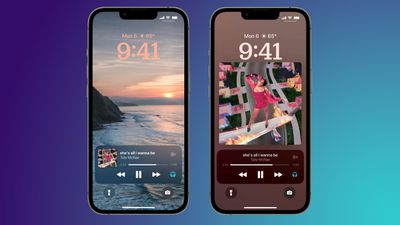
ios 16 apple music lock screens
For ‌Apple Music‌, the Lock Screen player has all of the expected controls for playback and connecting AirPods or other headphones. You can also expand the controls to a full screen view, which will enlarge the album artwork of the currently playing song and become your new iPhone Lock Screen image.

This is part of iOS 16's new "Live Activities" feature, which aims to help people stay on top of things happening in real time through various app widgets placed directly on the Lock Screen. This includes tracking live updates from sports games, workouts, ride share apps, food delivery orders, and more.

Favorite Artists

You can now add artists to your "Favorite Artists" list by navigating to their artist profile on ‌Apple Music‌ and tapping a new star button at the top of the page. After doing this, Apple says that you'll get better recommendations and notifications about new releases from that artist.
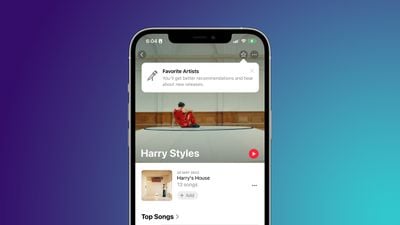
apple music fav artist zoom
‌Apple Music‌ originally had a similar feature where you could follow artists, and you'd receive updates about their music and sometimes updates about upcoming releases. The new Favorite Artists feature seems more streamlined and focused on improving push notifications and recommendations surrounding your favorite artists.

Playlist Sorting

‌Apple Music‌ in iOS 16 lets you sort playlists by a few different orders: regular Playlist Order, Title, Artist, Album, or Release Date. Furthermore, you can choose ascending or descending order for each of these categories.
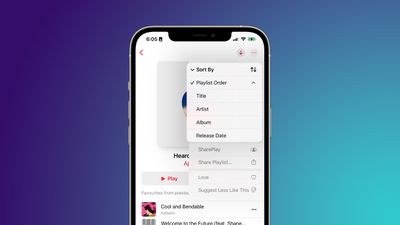
apple music ios 16 sorting
This is a notable addition given that ‌Apple Music‌ doesn't have any automatic sorting options. Any time you add a new song into a playlist, it's dropped to the bottom of the list, with the oldest songs remaining at the top. If you want to sort it, you have to manually drag it to where you want it to go.

With the new feature, you can choose to reverse the traditional Playlist Order so that new songs appear at the top. These sorting features are found in the ellipsis menu in the top right corner of the playlist screen on iOS 16.

UI Changes

Lastly are a few very slight UI changes that can be found within the full screen player in the ‌Apple Music‌ app. Apple has subtly updated the UI to feature slightly thicker playback and volume bars, among other small tweaks.
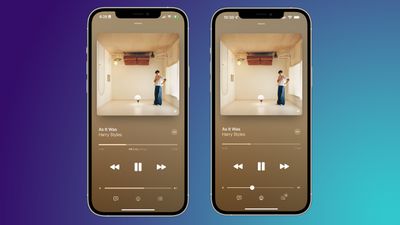
apple music player ios 16

‌Apple Music‌ on iOS 16 (left) vs on iOS 15.5 (right)

We've been recapping all of the latest news from WWDC, including iOS 16 tidbits and improvements coming to tvOS 16. For a full recap, check out our video that breaks down everything Apple announced during its WWDC 2022 keynote in 13 minutes.

Related Forum: iOS 16

Popular Stories

Apple Music iPod Page Not Found

Apple Music Has a Hidden iPod You Can Play With

Friday October 23, 2026 7:11 am PDT by
Apple Music has a 404 page easter egg on the web: a functional iPod that appears when you load a page that does not exist, such as music.apple.com/macrumors. "Page Not Found," says Apple. "Give this a spin instead." Apple is clever with this. If you navigate to music.apple.com/ipod instead, the page says "Looking for something?" instead of "Page Not Found." The easter egg is only...
Apple Music New Branding

Apple Music's New Look Officially Announced

Wednesday October 21, 2026 9:06 am PDT by
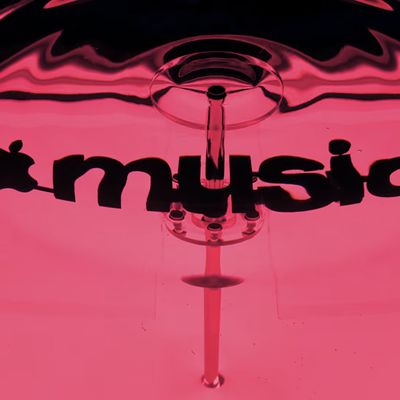
Following the introduction of a new Apple Music logo and app icon earlier this month, Apple today officially introduced Apple Music's new brand identity. In a YouTube video shared today, Apple said the new Apple Music visuals were "made by sound." More specifically, Apple said it played a sound through a container of water, resulting in the liquid moving at the frequency of the notes. Apple...
apple music new logo red

Apple Music Is Getting a New Logo

Tuesday October 6, 2026 4:06 am PDT by
Apple appears to be rolling out a new logo for Apple Music in its upcoming set of software updates. The logo has been spotted in both macOS 27.2 beta 3 and iOS 27.2 beta 3, and it's identical to the one that Apple used in its Apple Music Hall announcement last month. When Apple used the logo in the venue's press materials and on its new official website, it wasn't clear if this was a one-off ...

Top Rated Comments

nortonandreev Avatar
58 months ago
The bare minimum… The Music team has been lazy.
Score: 26 Votes (Like | Disagree)

58 months ago
Whole Music UI is a mess. No back button, convoluted menus, unreliable saving, too many clicks... need an entire rethink.
Score: 13 Votes (Like | Disagree)
58 months ago
Favourite artists for recommendations is welcomed, but the ability to block certain artists from being included in playlists would massively appreciated!

This feature works very well with Spotify, and is one of the main things keeping me there. Even if an artist I don't want to hear from appears on Discover Weekly or similar, it just skips that song without me knowing. The only sign that the artist was on a playlist is the greyed out song in the list.
Score: 10 Votes (Like | Disagree)
58 months ago
How about adding a line of code to the "randomizing" algorithm like

IF nextrack LASTPLAY = <5 days THEN skip

Tired of hearing the same 12 tracks over and over again in a playlist of over 300
Score: 8 Votes (Like | Disagree)
211 Avatar
58 months ago
Still too much space wasted to have to hide other options like Shuffle, Repeat, Like/Dislike.
Score: 8 Votes (Like | Disagree)
DanteHicks79 Avatar
58 months ago
apple music on ios 16 image
Score: 6 Votes (Like | Disagree)
Latest Stories
Apple Watch Ultra 4 Hits All-Time Low Price With Amazon's $99 Discount
13 hours ago
Reminder: Apple's Big Discount on Beats 360 Ear Cushions Ends Today
13 hours ago
Here's a New Tour of Apple's HomeView Software
13 hours ago
Apple Reveals New iPad Mini's Battery Capacity
14 hours ago
Top Stories: Apple's Big MacBook Pro, iPad mini and iMac Updates
15 hours ago
'Pluribus' Season 2 Reportedly Starts Production Today
22 hours ago
iPhone 18 Pro Sales Surge in China, Offsetting Decline in U.S. and Japan
23 hours ago
HomeView Software 27.2: Wallpapers, Control Center, and More
1 day ago
Apple Alerts Stores to iPhone Duo's Display Cracking Issue
1 day ago
iOS 27.3 Will Enable These Apple Intelligence Features in China
1 day ago
Apple Says iOS 27.3 Beta Coming Next Week
1 day ago
Apple's Flash Storage Suppliers Are Finally 'Getting Their Revenge'
1 day ago
14 New Things Your iPhone Can Do in iOS 27.2
1 day ago
iPhone Duo Review: One Week Later
1 day ago
Samsung Mocks iPhone Duo Display Cracks in New Ad Campaign
1 day ago
The MacRumors Show: OLED MacBook Pro, iPad Mini 8, and More
2 days ago
MacBook Pro With Touch Display: 15 More Details Revealed
2 days ago
Russia Places Apple on State Surveillance Registry
2 days ago
Halloween Weekend Brings Discounts on Apple Accessories and Pre-Orders
2 days ago
Apple Has Released More Than 25 New Products in the Past Two Months
2 days ago
Local Code Launches as Free, Private AI Assistant Tool for Mac
2 days ago
Apple Acquires Ascend.io
2 days ago
HomePod Mini 2 Launches Today: All the New Features
2 days ago
AirTag 2 4-Pack Drops to New Low Price of $69.99
2 days ago
Rian Johnson's iPhone Camera App Goes Viral
2 days ago
Where Did All the iPhone Duos Go? Mostly to Apple's Stores
2 days ago
Apple's Touchscreen MacBook Pro Could Ship 1.5M Units in 2027
2 days ago
New Apple TV 4K and iPad Mini: RAM Amounts Revealed
2 days ago
Apple Executive Comments on New iPad Mini Lacking 120Hz Display
2 days ago
Here's a Hands-On Look at HomePod Mini 2's New Two-Tone Colors
2 days ago

🔗 Related Apple News & Rumors

Stay updated with the latest Apple ecosystem news and verified rumors











































