

iOS 16 Tidbits: Built-In Currency Converter, Undo for Photo Edits, and More - MacRumorsOpen MenuShow RoundupsShow Forums menuVisit ForumsOpen Sidebar
Skip to Content

iOS 16 Tidbits: Built-In Currency Converter, Undo for Photo Edits, and More

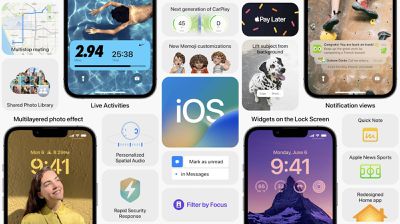
iOS 16 is a significant release with major changes across the board, from an entirely redesigned and customizable Lock Screen to updates to Focus mode, CarPlay, and more.
f1654537364
Outside the major changes, there are plenty of smaller changes and new features Apple is introducing this year. While there will be many more to discover over the next several weeks and months, we've compiled a few notable ones below.

Built-In Currency Converter
ios 16 currency converrison
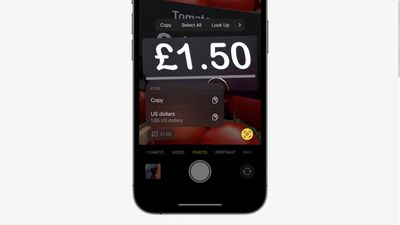
With iOS 16, Apple is giving Live Text, introduced last year, some new tricks. Within the Camera app on iOS 16, point your iPhone camera to a price tag and Live Text will offer a currency conversion in the bottom left-hand corner.

Live Text and Quick Actions now also support translation within the Camera app. The Translate app is also gaining a new Camera mode dedicated to picture-to-text translation.

Undo and Redo for Photo Edits
ios 16 photo undo redo
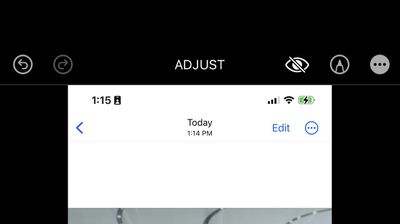
The Photos app on iOS 16 and iPadOS 16 is gaining undo and redo abilities, meaning if you accidentally make a change to your photo you may not like, you can easily undo or redo.

Notfications for Shared Reminders List

With the Reminders app on iOS 16, users who are in a shared list with friends and family will now receive a notification when a specific task is marked as complete or when a new task is added.

Disable Spotlight Home Screen Shortcut
ios 16 home screen search shortcut
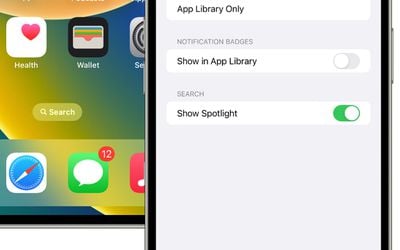
On iOS 16, by default, the home screen page indicators right above the dock on the Home Screen serves as a Spotlight Search shortcut. Some users may not like this, and thankfully, Apple has provided an option to turn it off in Settings under ‌Home Screen‌.

The first betas of iOS 16 and iPadOS 16 are currently available to developers with a public beta planned for July. Find a cool tidbit or feature on iOS 16? Let us know down in the comments or mention us on Twitter @MacRumors.


Related Forum: iOS 16

Popular Stories

Apple Event Logo

Apple Working on All-New Operating System

Wednesday July 29, 2026 11:39 am PDT by
Apple is developing an all-new operating system that is essentially a mix of tvOS, watchOS, and iOS, according to Bloomberg's Mark Gurman. In a report this week, he said the operating system will feature a grid of icons, widgets, and apps, along with customizable clock faces. The new software platform is intended for Apple's long-rumored smart home hub. With built-in facial recognition,...


imac video apple feature

Apple Made Its Second-Biggest Acquisition Ever This Year

Wednesday July 29, 2026 12:03 pm PDT by
Apple this year acquired Israeli startup Q.ai for close to $2 billion, according to the Financial Times. That would make this Apple's second-biggest acquisition ever, after it paid $3 billion for the popular headphone maker Beats in 2014. This is also the largest known Apple acquisition since the company purchased Intel's smartphone modem business and patents for $1 billion in 2019. Q.ai...
Dynamic Island iPhone 18 Pro Feature

iPhone 18 Pro: Twelve Changes Coming to Apple's Next Flagship

Thursday July 30, 2026 3:43 am PDT by
We're less than two months out from the launch of Apple's premium next-generation smartphone lineup, and while we're not expecting a dramatic change in terms of functionality, there are still several enhancements rumored to be coming to the iPhone 18 Pro and iPhone 18 Pro Max. One thing worth noting is that Apple is reportedly planning a major change to its iPhone release cycle this year,...

Top Rated Comments

Shanghaichica Avatar
54 months ago
Currency converter is very useful.
Score: 7 Votes (Like | Disagree)
DanteHicks79 Avatar
54 months ago
That any program in this world lacks undo/redo is criminal. It's like a basic function, going all the way back to the first Macintosh.
Score: 5 Votes (Like | Disagree)
Justin Cymbal Avatar
54 months ago
I really wish that Apple would bring back the battery percentages for iOS devices in the ‘Find My’ app - preferably leave it on no matter what the percentage is - something that is very much technologically feasible as Google Maps already has this feature for family members

Up until a few years ago, if you or your family’s devices had less than 20%, it would indicate the exact percentage of battery remaining but Apple has since gotten rid of that and now there is no way for a user to tell whether that device is 20% or 1% because the red indicator is the same for both

If Apple is for some reason choosing this route for aesthetic reasons alone, which they often do, then Apple should at least do what they used to do and indicate battery percentage once the device goes below 20% or whatever percentage that Apple deems reasonable - Any indicator, even 5% is better than nothing and can allow family members to let their parents or whomever know that their phone is about to die so that they can either conserve power with low power mode, put it in airplane mode or turn their phone off

We’ll have to wait and see if this is included in iOS 16 - maybe someone running the beta can let us know
Score: 5 Votes (Like | Disagree)
SmugMaverick Avatar
54 months ago
Really pleased with the live currency converter and the ability to remove that crappy spotlight button.
Score: 3 Votes (Like | Disagree)
54 months ago
Thanks for the instructions! Initially, I couldn’t figure out how to get rid of search on the home screen since I never use Spotlight. It’s finally gone now.
Score: 3 Votes (Like | Disagree)
54 months ago

Good job Sami and the rest of the MacRumors team! You guys are doing a great job handling all these updates/posts.
Thank you! 🥺
Score: 2 Votes (Like | Disagree)

🔗 Related Apple News & Rumors

Stay updated with the latest Apple ecosystem news and verified rumors









































