

Apple Improves Focus Modes With Filters, Linked Lock Screens, and Set Up Enhancements - MacRumorsOpen MenuShow RoundupsShow Forums menuVisit ForumsOpen Sidebar
Skip to Content

Apple Improves Focus Modes With Filters, Linked Lock Screens, and Set Up Enhancements

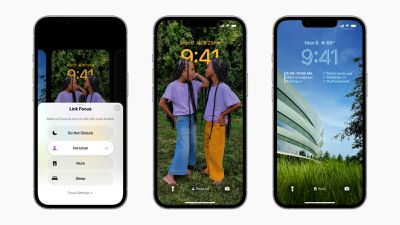
Apple unveiled a host of improvements to Focus modes at WWDC this week, including set up suggestions, linked custom Lock Screens and watch faces, Focus filters, and more.
ios 16 focus lock screen
Focus modes were introduced with iOS 15 last year and have been expanded and refined in iOS 16, iPadOS 16, watchOS 9, and macOS Ventura. Accompanying the redesigned customizable Lock Screen in iOS 16, each Focus mode now has a linked Lock Screen. In addition to all of the pre-existing ways to activate a Focus mode, such as in Control Center or via automations, iPhone users can swipe between Lock Screens to enable a corresponding Focus. Users can also directly tie an Apple Watch face to a specific Focus.

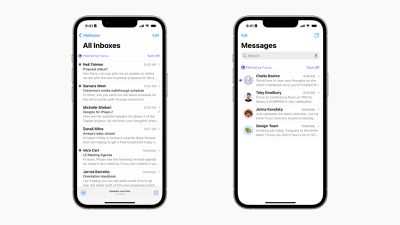
One of the biggest additions to Focuses in iOS 16 is Focus filters. Focus filters allow users to set boundaries within apps like Calendar, Mail, Messages, and Safari to only display relevant content, such as a particular Tab Group in Safari, set of calendars in the Calendar app, or email accounts in Mail. With a new Focus filter API, developers can build this functionality into their apps and change content based on a user's current Focus.
ios 16 focus filters
The process of setting up Focus modes has also been improved with a personalized setup experience for each option. Now, iOS suggests a relevant set of Home Screens and Lock Screens for each Focus mode with relevant apps, wallpapers, and widgets. There are also more configurable options inside Focus modes, with a new ability to silence notifications from apps and people, effectively adding the ability to exclude notifications rather than only include as is the case in iOS 15.

iOS 16, iPadOS 16, watchOS 9, and macOS Ventura are currently undergoing beta testing to give Apple time to perfect the updates and address any bugs, as well as allow developers to prepare their apps. Beta versions of the updates are currently available to developers with compatible devices now and a public beta will become available in July.


Related Forum: iOS 16

Popular Stories

iOS 27 Next to iPhone

Here's When iOS 27 Rolls Out Today in Every Time Zone [Update: It's Out]

Sunday September 13, 2026 3:00 am PDT by
Update 10:04 a.m.: iOS 27 is rolling out now, though it may take a bit for all users to see it, so keep checking! Apple is about to release iOS 27, which will finally deliver more advanced Siri AI capabilities as well as a variety of other refinements, improvements, and new features to iPhones. It's Apple's biggest software update of the year, and Apple announced at Wednesday's iPhone event...

deep black iphone 18 pro

Apple Says iPhone 18 Pro Max Sold in U.S. Differs in One Way

Saturday September 12, 2026 3:27 pm PDT by
As noted by Nicolas Lellouche, who writes for the French tech website Numerama, Apple has updated its tech specs pages for the iPhone 18 Pro and iPhone 18 Pro Max to clarify which models are equipped with its new C2 cellular modem and where. Apple now says the iPhone 18 Pro has a C2 modem worldwide, while the iPhone 18 Pro Max uses the chip in every country except for the U.S. According...
iOS 27 Icon iPhone

iOS 27 Available Today With These 8 New Features

Monday September 14, 2026 12:00 am PDT by
Update: Apple has released iOS 27. During its iPhone 18 Pro and iPhone Duo event last week, Apple announced that iOS 27 will be released widely on Monday, September 14. iOS 27 should be available around 10 a.m. Pacific Time / 1 p.m. Eastern Time today via the Settings app, under General → Software Update. Below, we have highlighted eight new features and changes coming with iOS...

Top Rated Comments

56 months ago
Apple listened to feedback. There now seems to be an option to 'silence notifications from...' in addition to 'allow notifications from...'

This is much more convenient. Now I can create a 'Personal' focus mode which allows notifications from all apps except Teams, Outlook and others which I only use for work.
Score: 14 Votes (Like | Disagree)
56 months ago
What I would really like is a "blacklist" so that I can easily mute all my work apps after hours and on weekends. Slack lets you do it natively, but Gmail doesn't. Would just be cleaner to set it at the OS level.

[edit: I now see from @Saturnine's comment above that they're doing this now. Great addition!]
Score: 4 Votes (Like | Disagree)
contacos Avatar
56 months ago
Can you finally share your actual Focus status? I guess not, that would make too much sense.

There is a difference between „Sleeping“ and thus, not responding at all and „Working“ which may simple cause a delay in replies
Score: 3 Votes (Like | Disagree)
56 months ago
Definitely some improvements. Excluding notifications is a big change.
Score: 2 Votes (Like | Disagree)
Abazigal Avatar
56 months ago
If you need to use this convoluted filter functionality on a phone, you're either doing life wrong or are the most (self) important person on Earth.
I use it on my iPad to turn off notifications and present a custom homescreen when I am using it to teach in class. This way, my screen isn’t interrupted my incoming email / telegram notifications, students aren’t distracted by my media consumption page, and I have the apps I typically use in class at my fingertips.

So far haven’t found a way to make it work on my iPhone though, but I am thinking along the like of custom homescreens for differing use cases.

Still tinkering. [emoji846]
Score: 2 Votes (Like | Disagree)
x-evil-x Avatar
56 months ago
Is there a focus mode like the old do not disturb?
I want to just have the notification be silent and not light up the phone but still be on the Lock Screen when I tap it.
it’s one feature they got rid of when they released focus mode i think last year.
Score: 2 Votes (Like | Disagree)

🔗 Related Apple News & Rumors

Stay updated with the latest Apple ecosystem news and verified rumors











































