

Pixelmator Pro 2.4 Adds New Layer Types, Vector Shapes, M1 Ultra Support, More - MacRumorsOpen MenuShow RoundupsShow Forums menuVisit ForumsOpen Sidebar
Skip to Content

Pixelmator Pro 2.4 Adds New Layer Types, Vector Shapes, M1 Ultra Support, More

Pixelmator Pro 2.4 "Odesa" went live on the Mac App Store today, and the latest major update to the popular image editing app brings new layer types, new vector shapes, enhanced support for Apple’s M1 Ultra chip, and other notable additions.
Pixelmator Pro 2

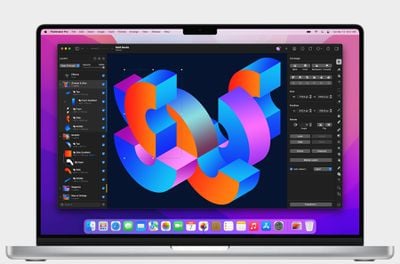
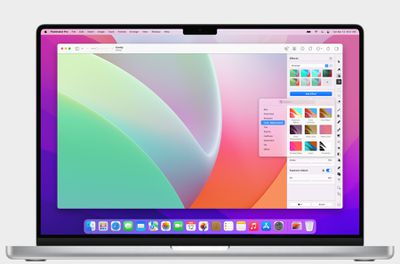
The new color adjustments and effects layers let users nondestructively adjust colors and apply effects to entire layered compositions. With a single color adjustments layer, users can now change the look of a composition no matter how many layers the picture has.

The new layer types work just like other layers, and can be masked, hidden, rearranged, and more. It's also possible to apply selective edits by using colors adjustments and effects layers with masks.

"One of the things that users love most about Pixelmator Pro is how it makes advanced layer-based image editing incredibly easy," said Simonas Bastys, lead developer at the Pixelmator Team. "And with the addition of color adjustments and effects layers, layer-based editing in Pixelmator Pro becomes even more powerful, enabling all-new workflows, such as advanced selective editing of photos."
Pixelmator Pro 2

To accommodate the new layer types, the layers sidebar has been redesigned and given a fresh new look. Different layer types, such as images, shapes, text, RAW layers, groups, and other layers, are now more easily recognizable. In addition, layers now also feature informative subtitles that show the most relevant information about a layer at a glance.

Elsewhere, Pixelmator Pro 2.4 also adds over 200 new, artist-designed vector shapes in categories like science, activities, and symbols. The vector shapes are resolution-independent, so they can be used freely in any design or illustration, and their vector points align to pixel boundaries, eliminating any unwanted blurring that can often be found when using vector elements in pixel designs.

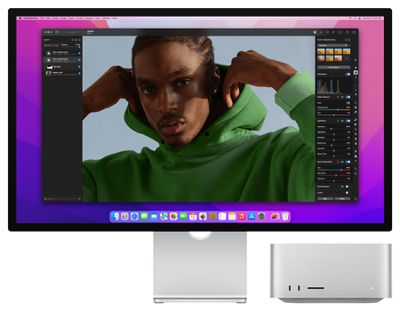
This update also includes support for Apple's ‌M1 Ultra‌ processor and machine learning model optimizations, making automatic background removal, super resolution, and photo enhancement up to 1.7 times faster on ‌M1 Ultra‌ compared to M1 Max, according to the developers.
Pixelmator Pro 2

Other new features include a Scrubby Zoom mode, the ability to unlink layer masks, and a wide range of smaller improvements. Pixelmator Pro 2.4 Odesa is available from the Mac App Store as a free update for existing users and $39.99 for everyone else.


Popular Stories

Apple Event Logo

Apple Working on All-New Operating System

Wednesday July 29, 2026 11:39 am PDT by
Apple is developing an all-new operating system that is essentially a mix of tvOS, watchOS, and iOS, according to Bloomberg's Mark Gurman. In a report this week, he said the operating system will feature a grid of icons, widgets, and apps, along with customizable clock faces. The new software platform is intended for Apple's long-rumored smart home hub. With built-in facial recognition,...
Four iPhone 18 Pro Colors Mock Feature

iPhone 18 Pro and iPhone Ultra: Pre-Orders and Release Date

Thursday July 30, 2026 6:12 am PDT by
Apple has yet to reveal when the iPhone 18 Pro and iPhone Ultra will be announced and released, but the dates usually follow a familiar pattern. Labor Day is September 7 this year. The last time the holiday fell on that day was in 2020, but the iPhone event that year was delayed until October due to the COVID-19 pandemic. So, the last time Labor Day was on September 7 in a normal year was in ...
Dynamic Island iPhone 18 Pro Feature

iPhone 18 Pro: Twelve Changes Coming to Apple's Next Flagship

Thursday July 30, 2026 3:43 am PDT by
We're less than two months out from the launch of Apple's premium next-generation smartphone lineup, and while we're not expecting a dramatic change in terms of functionality, there are still several enhancements rumored to be coming to the iPhone 18 Pro and iPhone 18 Pro Max. One thing worth noting is that Apple is reportedly planning a major change to its iPhone release cycle this year,...

Top Rated Comments

Sandstorm Avatar
56 months ago
Love the version name Odesa 🇺🇦
Score: 7 Votes (Like | Disagree)
nortonandreev Avatar
56 months ago
I'm glad they're making improvements to the Layers (such as the addition of the new Add Empty Layer button, among others). Pixelmator is a great piece of software and I always give it as an example what one could achieve by following the best practices and utilising Apple SDKs and frameworks provided to the developers.
Score: 5 Votes (Like | Disagree)
bchery21 Avatar
56 months ago
Great app, use it frequently.
Score: 3 Votes (Like | Disagree)
quatermass Avatar
56 months ago
Love Pixelmator more and more as they update it - which is pretty frequently. I now only open Photoshop for a couple of filters and plugins, as PMP is now superior for everything else I do. Get this and Affinity Designer, and you're sorted!

Odessa - spot on! 🇺🇦
Score: 2 Votes (Like | Disagree)
54 months ago
FYI - Pixelmator Pro has been discounted down to $19.99.
Score: 1 Votes (Like | Disagree)
HobeSoundDarryl Avatar
56 months ago

So apps have to be recompiled for each variant? What happens if it’s not recompiled?
It runs as it has been running, but not necessarily taking advantage of whatever a new compile might do... and not delivering new features associated with the new version. For example, I just migrated from a aging Intel Mac to a new Mac Studio Ultra. I still had Pixelmator "1" on that Intel Mac and it moved to the Ultra (running in Rosetta 2). It runs as it did on the Intel Mac even without being native.

Yes, I'll upgrade it to this native "pro" version soon- just haven't got there yet.

Score: 1 Votes (Like | Disagree)

🔗 Related Apple News & Rumors

Stay updated with the latest Apple ecosystem news and verified rumors






































