

WhatsApp Stops Auto-Saving Media From Disappearing Messages on iPhone - MacRumorsOpen MenuShow RoundupsShow Forums menuVisit ForumsOpen Sidebar
Skip to Content

WhatsApp Stops Auto-Saving Media From Disappearing Messages on iPhone

WhatsApp is changing the way the platform handles media sent over chats with disappearing messages enabled, reports WABetaInfo.

Whatsapp Feature

Going forward, WhatsApp will no longer automatically save images and other visual media to your iPhone’s Photos library if they appear within a chat thread that has disappearing messages turned on. The "Save to Camera Roll" option is now automatically turned off for disappearing chats, meaning images, videos, and GIFs won't be saved even if the general auto-save setting is enabled.

The previous default of saving images from disappearing chats to the Photos app was a discrepancy given the privacy focus of disappearing messages, so the change is likely to be welcomed by those who depend on the feature to share sensitive media.

Having said that, WhatsApp users can still manually save media that appears in disappearing chats they’ve received, or even take a screenshot of the chat thread, so what you send using the feature can still be potentially saved by the recipient after the message has disappeared.
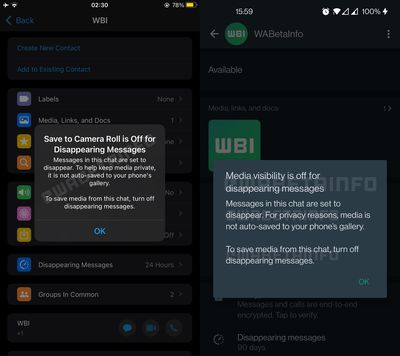
whatsapp media disappearing messages no longer saved

In another change coming to WhatsApp and highlighted by WABetaInfo, the drawing interface is being tweaked so that the blur tool appears at the bottom of the screen, where it will sit alongside two new drawing pencils.

The change to the way WhatsApp handles media in disappearing messages is rolling out now to all users on iOS, but it’s not clear when the drawing interface tweaks will come out of beta and be made available to the chat platform’s wider user base.


Popular Stories

Whatsapp Feature

WhatsApp Beta Adds Green Dot to Show Who's Online

Monday July 6, 2026 3:56 am PDT by
WhatsApp appears to be introducing a new visual indicator that shows when a contact is online, according to WaBetaInfo. The feature adds a small green circle to a contact's profile photo when they're active in the app, and which disappears the moment they leave, all updated in real time. The indicator is now being tested for the WhatsApp iPhone app in TestFlight after it debuted on Android...


Whatsapp Feature

WhatsApp Beta Reveals iCloud Backup Alternative for iPhone

Tuesday July 14, 2026 3:06 am PDT by
WhatsApp is developing a first-party cloud storage option for chat backups on iPhone, providing users with an alternative to iCloud for the first time, according to app tinkerer WABetaInfo. Code found in the WhatsApp beta for iOS (version 26.28.10.16), available through TestFlight, suggests that users will eventually be able to pick their preferred backup destination directly from the app's...
Whatsapp Feature

WhatsApp Begins Rolling Out New Username Feature

Friday July 17, 2026 5:32 am PDT by
WhatsApp has started rolling out its new username feature, reports WABetaInfo. Some users who reserved their username have started receiving a notification that their username is active, and that they can now use it to send and receive messages to other users without revealing their phone number. When someone creates a username, WhatsApp will notify people who already have an active chat with...

Top Rated Comments

Danfango Avatar
56 months ago

This is an example of a privacy-friendly feature, though.
No it's not. It's not even remotely privacy oriented. I prefer to refer to it as digital flashing. For the disempowered at the receiving end it allows people to send stuff to them with no evidence that it was ever sent. For those who can take a screenshot on their phone, it completely removes the privacy stance of it. Thus it's stupid and it's not privacy friendly.


Apple needs to have a look at WhatsApp and steal how they handle attachments. It is such a mess on iMessage, especially with iCloud Messages enabled. I also hate how it doesn’t automatically save photos to the photo library (shared with you just isn’t the same).

I delete a photo right from the messaging app and it sometimes appears again after closing the app (or it just doesn’t let me delete it at all). I delete an image but somehow they still appear under iPhone storage, i delete all photos in iPhone storage yet it still shows photos in the messaging app. I delete every single photo but iCloud claims i have 3GB of iMessage attachments, yet there is NOTHING. Or I delete all iMessage photos on my iPhone but my Mac shows me images that do not appear for the same conversation on my iPad or iPhone whatsoever.

there isn’t even a button to remove all attachments at once! You literally have to tap on each individually because for some reason swipe to select doesn’t work either, unlike the photos app
You just tap to save the ones you want. I'm not sure what the issue is. Literally I don't want my photos library cluttered with every meme my kids send me. If you delete the conversation then the attachments go with it. I have about 6Gb in iMessage at the moment. It's mostly a non-issue for me as I've saved everything worth keeping as I go.
Score: 8 Votes (Like | Disagree)
sw1tcher Avatar
56 months ago

There is no valid usage for "this message will self destruct" that I can think of.
Jim Phelps would disagree. :p


Attachment Image
Score: 5 Votes (Like | Disagree)
chucker23n1 Avatar
56 months ago

No it's not. It's not even remotely privacy oriented. I prefer to refer to it as digital flashing. For the disempowered at the receiving end it allows people to send stuff to them with no evidence that it was ever sent. For those who can take a screenshot on their phone, it completely removes the privacy stance of it. Thus it's stupid and it's not privacy friendly.
That's quite a cynical read. I imagine such scenarios happen, but "I want to share something but with a time limit" has tons and tons of users who aren't malicious like that at all; they really just want stuff to remain private.


Score: 3 Votes (Like | Disagree)
contacos Avatar
56 months ago
Apple needs to have a look at WhatsApp and steal how they handle attachments. It is such a mess on iMessage, especially with iCloud Messages enabled. I also hate how it doesn’t automatically save photos to the photo library (shared with you just isn’t the same).

I delete a photo right from the messaging app and it sometimes appears again after closing the app (or it just doesn’t let me delete it at all). I delete an image but somehow they still appear under iPhone storage, i delete all photos in iPhone storage yet it still shows photos in the messaging app. I delete every single photo but iCloud claims i have 3GB of iMessage attachments, yet there is NOTHING. Or I delete all iMessage photos on my iPhone but my Mac shows me images that do not appear for the same conversation on my iPad or iPhone whatsoever.

there isn’t even a button to remove all attachments at once! You literally have to tap on each individually because for some reason swipe to select doesn’t work either, unlike the photos app
Score: 3 Votes (Like | Disagree)
sos47 Avatar
56 months ago
i turned disappearing messages on a while ago because i dont wont that others flood my iphone with their attachments. i can’t understand why i should automatically save content to my photos lib. even if i get some nice family pics the resolution is really bad, i always demand sending interesting content with iMessage
Score: 1 Votes (Like | Disagree)
56 months ago

There is no valid usage for "this message will self destruct" that I can think of.
Well, if you can’t think of it, I guess it doesn’t exist ;)
Score: 1 Votes (Like | Disagree)

🔗 Related Apple News & Rumors

Stay updated with the latest Apple ecosystem news and verified rumors






































