macOS Monterey 12.3 Beta 3 Makes Accessing Universal Control Settings Easier - MacRumorsOpen MenuShow RoundupsShow Forums menuVisit ForumsOpen Sidebar
Skip to Content

macOS Monterey 12.3 Beta 3 Makes Accessing Universal Control Settings Easier

In the third beta of macOS Monterey that Apple released to developers today, there is a small Universal Control update that is designed to make it easier to access the various ‌Universal Control‌ settings that you might need when using the feature to control multiple Macs and iPads with a single mouse/trackpad and keyboard.
universal control 1
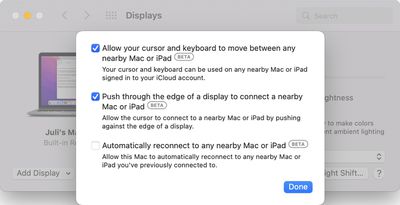
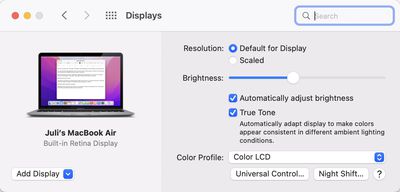
If you open up the Displays section of System Preferences after updating to the new software, there is a new "‌Universal Control‌..." button that was first noticed by 9to5Mac. The ‌Universal Control‌ button goes directly to the three ‌Universal Control‌ settings that are available.

universal control 2
Prior to this beta, the ‌Universal Control‌ options were located under the now-removed "Advanced" tab, and were just a bit harder to get to.

The ‌Universal Control‌ settings have not changed, even though their location has been updated. The first two settings are enabled by default and allow ‌Universal Control‌ to work, while the third is optional and can be toggled on to allow you to automatically reconnect to any nearby Mac or iPad you've previously connected to.

‌Universal Control‌ is live in the macOS Monterey 12.3 and iPadOS 15.4 betas available to developers and public beta testers, and it is working well even in a beta capacity. The feature will be available to everyone when the updates see a public release, which could perhaps come in March following Apple's planned March 8 event.


Related Forum: macOS Monterey

Popular Stories

Apple Event Logo

Apple Working on All-New Operating System

Wednesday July 29, 2026 11:39 am PDT by
Apple is developing an all-new operating system that is essentially a mix of tvOS, watchOS, and iOS, according to Bloomberg's Mark Gurman. In a report this week, he said the operating system will feature a grid of icons, widgets, and apps, along with customizable clock faces. The new software platform is intended for Apple's long-rumored smart home hub. With built-in facial recognition,...
imac video apple feature

Apple Made Its Second-Biggest Acquisition Ever This Year

Wednesday July 29, 2026 12:03 pm PDT by
Apple this year acquired Israeli startup Q.ai for close to $2 billion, according to the Financial Times. That would make this Apple's second-biggest acquisition ever, after it paid $3 billion for the popular headphone maker Beats in 2014. This is also the largest known Apple acquisition since the company purchased Intel's smartphone modem business and patents for $1 billion in 2019. Q.ai...
Dynamic Island iPhone 18 Pro Feature

iPhone 18 Pro: Twelve Changes Coming to Apple's Next Flagship

Thursday July 30, 2026 3:43 am PDT by
We're less than two months out from the launch of Apple's premium next-generation smartphone lineup, and while we're not expecting a dramatic change in terms of functionality, there are still several enhancements rumored to be coming to the iPhone 18 Pro and iPhone 18 Pro Max. One thing worth noting is that Apple is reportedly planning a major change to its iPhone release cycle this year,...

Top Rated Comments

58 months ago

Handoff is a bit of a different animal, isn't it. Universal Control involves mouse and cursor control across different Apple devices, whereas Handoff involves passing clipboard data (among other things?) to other Apple devices.


Handsoff is part of/required by UC. You can't turn it off while turning UC on.

UC is the ultimate solution that Apple has imagined, combining Handsoff and AirDrop with the soft-KVM, it makes multiple devices feel like one. So far the experience is so great that I couldn't live without when I have multiple Macs around. I sometime forgot that I'm using multiple Macs now and would try to drag an application window from one to another. Hopefully they can make applications work across devices someday.
Score: 3 Votes (Like | Disagree)
TheYayAreaLiving 🎗️ Avatar
58 months ago

I’m really looking forward to this feature. It’s a great innovation by Apple, and I’m glad they’re taking their time to get it right.
I agree. It’s worth the long wait. Highly anticipated. It’s definitely magical. I seriously can’t wait.
Score: 3 Votes (Like | Disagree)
58 months ago
As I recalled right before the update, the “Advanced” button was in the same spot the “Universal Control” button is now.
Score: 3 Votes (Like | Disagree)
58 months ago
Welcome changes. Looking forward to seeing it in the final version.
Score: 2 Votes (Like | Disagree)
symphony Avatar
58 months ago
I set the third option back to off, because you can't change the side of your other device automatically.

And when I took my iPad to another room and tried to use the cursor gesture to show apps in slide over, I didn't realize my cursor went to my Mac, which made me lose the cursor due to how massive my iMac screen is. I was so confused about what happened to my iPad cursor.
Score: 2 Votes (Like | Disagree)
jchap Avatar
58 months ago

Well, those three checkboxes are all that matters, and they are turned on by default iirc. Moving its location hardly matters, and unlike disastrous handoff, this one at least can’t get triggered randomly easily so I’m fine.
Handoff is a bit of a different animal, isn't it. Universal Control involves mouse and cursor control across different Apple devices, whereas Handoff involves passing clipboard data (among other things?) to other Apple devices.
Score: 2 Votes (Like | Disagree)

🔗 Related Apple News & Rumors

Stay updated with the latest Apple ecosystem news and verified rumors