Can't Get Used to Your MacBook Pro's Notch? These Apps Will Hide It for You - MacRumorsOpen MenuShow RoundupsShow Forums menuVisit ForumsOpen Sidebar
Skip to Content

Can't Get Used to Your MacBook Pro's Notch? These Apps Will Hide It for You

If you bought a new MacBook Pro and you're having a hard time acclimatizing to the notch at the top of the screen in the middle of the menu bar, there's an app for that.
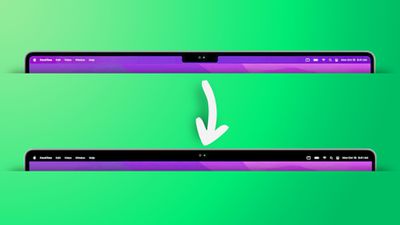
remove notch app feature2
The inclusion of a display notch on the redesigned MacBook Pros was a surprise to most observers and was one of the few last-minute rumors that surfaced ahead of their unveiling.

Some have since criticized Apple's design choice of adding a notch, but Apple has pushed back against criticism by saying that it's a "smart way" of giving users more room for their content, because it allowed the bezels to be made thinner for added screen real estate.

If that logic doesn't pass your scrutiny, the following apps are available. While they don't outright cancel the notch, they at least make its existence less obvious by forcing a black menu bar, similar to how macOS Monterey adds a black bezel to the top of the display when apps are in fullscreen mode, only by adapting your chosen wallpaper instead, like so.

remove notch app
Forehead (free): Besides letting you switch between your default wallpaper and a black notchless one, Forehead includes options to round the corners of the screen, similar to the rounded top corners of the new MacBook Pros. The ability to simulate a notch on older Macs is coming in an update.

TopNotch (free): Offers the same features as Forehead, and also supports Dynamic Wallpapers, works with multiple displays and spaces, and remains in the background and detects for wallpaper changes.

De-Notch-ifier (€9.95): Offers the same features as TopNotch, just in the form of a dropdown menu in the menu bar. De-Notch-ifier isn't a completely new app, rather it's a pre-configured version of Boring Old Menu Bar that gives you a boring old non-transparent menu bar on macOS Big Sur and later. If you buy one app, you get the other for free.

Own a new MacBook Pro? What do you think of the notch now that you've spent some time with it? Let us know in the comments.

Related Roundup: MacBook Pro
Buyer's Guide: MacBook Pro (Buy Now)

Related Forum: MacBook Pro

Popular Stories

TMRS 201 MacBook Ultra Thumb

The MacRumors Show: Goodbye MacBook Pro? MacBook Ultra Is Coming

Friday July 10, 2026 9:12 am PDT by
On this week's episode of The MacRumors Show, we discuss the future of Apple's increasingly tangled high-end MacBook lineup, including the entry-level MacBook Pro and the rumored "MacBook Ultra." Subscribe to The MacRumors Show YouTube channel for more videos Apple's chip roadmap for the Mac is reportedly set to take an unusual turn over the next year. The company is said to be skipping the...
M6 Pro M6 Max Mockup

Here's Why Apple is Reportedly Skipping M6 Pro and M6 Max Chips

Sunday July 12, 2026 8:12 am PDT by
According to Bloomberg's Mark Gurman, Apple will be releasing a regular M6 chip, but it has no plans to offer higher-end M6 Pro and M6 Max chips. In his Power On newsletter today, he said the reason for this break in tradition is AI. "Apple had been planning major neural-processing upgrades for the M7 family and ultimately decided those improvements were important enough to justify...
apple silicon mac lineup 2024 feature purple

Apple to Overhaul Mac Lineup With 11 New Models

Wednesday July 22, 2026 8:13 am PDT by
Apple is preparing to refresh every Mac it sells over the next two years, according to Bloomberg's Mark Gurman. The plans come amid a Mac resurgence, with sales projected to climb for a third consecutive year, partly thanks to a growing following among users who lean on the machines for demanding, agent-based AI workloads. The wave of new Macs will begin this fall with a refreshed...

Top Rated Comments

sniffies Avatar
62 months ago
Honestly, much ado about notching
Score: 44 Votes (Like | Disagree)
Havalo Avatar
62 months ago
There's an easier solution, go with the previous gen and also save lots of bucks. Win-win... :)
Score: 25 Votes (Like | Disagree)
contacos Avatar
62 months ago
I tried one of them but I actually prefer the notch. Seeing the black bar at all time makes the screen appear smaller for some reason. Trick to the brain?maybe because this way you will have the actual bezel + the black „digital bezel“ from the menu bar so it ends up looking like one big bezel. I prefer seeing the wallpaper behind the menu bar

Attachment Image
Score: 24 Votes (Like | Disagree)
62 months ago
The notch is not a feature, it is a compromise. Very sad what Apple is becoming.
Score: 24 Votes (Like | Disagree)
ProfessionalFan Avatar
62 months ago
Just use the computer and you will quickly realize the notch is a complete non-issue.
Score: 22 Votes (Like | Disagree)
frifra Avatar
62 months ago
But are these apps top-notch?
Score: 19 Votes (Like | Disagree)

🔗 Related Apple News & Rumors

Stay updated with the latest Apple ecosystem news and verified rumors