

New macOS 'Compatibility Mode' Options Let Developers Decide How Fullscreen Apps Handle the Notch - MacRumorsOpen MenuShow RoundupsShow Forums menuVisit ForumsOpen Sidebar
Skip to Content

New macOS 'Compatibility Mode' Options Let Developers Decide How Fullscreen Apps Handle the Notch

While users and developers come to terms with the fact that the last-minute notch rumor for the new MacBook Pros was true, Apple has released new Human Interface Guidelines explaining how developers can make the best use of the extended screen areas around the camera housing if they think their app would benefit from it.
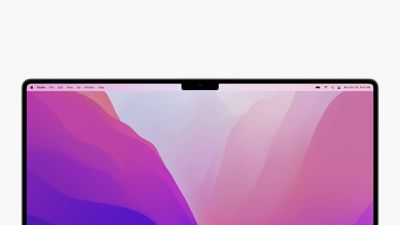
macbook pro 2021 notch
According to the new documentation, the fullscreen mode in macOS Monterey features a "compatibility mode" that automatically accounts for the camera housing by placing a black bar across the top of the screen to hide the notch and prevent app content from being placed there.

However, macOS also includes a new "NSPrefersDisplaySafeAreaCompatibilityMode" property list key that lets developers specify whether their apps should conform to compatibility mode or if their apps can expand to use the space on either side of the notch.

On Macs that include a camera housing in the screen bezel, the system provides a compatibility mode to prevent apps from unintentionally putting content in the region the housing occupies. When this mode is active, the system changes the active area of the display to avoid the camera housing. The new active area ensures your app's contents are always visible and not obscured by the camera housing.

macos notch new macbook pros
On Macs that have a notch, the Finder automatically adds a checkbox to an app's Get Info panel that can be used to manually enable or disable the new compatibility mode. Alternately, developers can force compatibility mode on or off using new code properties that define the safe area of the screen and allow them to make use of the areas on either side of the notch for active content.

Developers should confirm that their app layouts do not overlap with the notch area before setting the NSPrefersDisplaySafeAreaCompatibilityMode key to "false" to bypass compatibility mode.

The inclusion of a notch allowed Apple to make the bezels on the new 14-and 16-inch MacBook Pros considerably thinner compared to the previous 13-inch and 16-inch models. The new Liquid Retina XDR displays also feature ProMotion technology, which allows the screen to run at as high as 120Hz, and as low as 24Hz, similar to the iPad Pro.

The new MacBook Pros are available to order now and begin shipping next week, but delivery dates for various MacBook Pro configurations have already slipped, with some of the 16-inch ‌MacBook Pro‌ models now listing delivery dates ranging from November 2 to November 16, up from the original October 26 delivery date.

Update: This article was updated to clarify how the property list key for compatibility mode functions.


Related Roundup: MacBook Pro
Buyer's Guide: MacBook Pro (Caution)

Related Forums: MacBook Pro, macOS Monterey

Popular Stories

MacBook Pro Ultra Feature 1

Apple to Launch Touchscreen OLED MacBook Pro and OLED iPad mini on October 27

Thursday October 8, 2026 1:31 pm PDT by
Apple will introduce new OLED touchscreen MacBook Pro models and an OLED iPad mini "on or around" Tuesday, October 27, reports Bloomberg. The launch will also include an M6 14-inch MacBook Pro and an M6 iMac. The October 27 follows Apple's October 13 debut of a new smart home hub, a revamped Apple TV 4K, and a refreshed HomePod mini. Earlier this month, MacRumors reported that Apple would do ...
M5 MacBook Pro

Apple Plans Two-Day Event to Showcase Trio of New Macs and iPad Mini

Monday October 12, 2026 9:15 am PDT by
Apple is planning to invite content creators to a two-day product showcase in Los Angeles on October 27 and October 28, according to Bloomberg's Mark Gurman. Do not expect a traditional Apple Event with a live-streamed video on either of those days, as Gurman said that these will be "experiences" for content creators, similar to one that Apple is holding in New York this Tuesday, October 13. ...
Black Apple Event Logo

Apple Now Inviting Media to October 28 'Launch Experience'

Thursday October 15, 2026 4:13 am PDT by
Apple has begun inviting selected members of the media to a product launch experience in Los Angeles on Wednesday, October 28, according to Bloomberg's Mark Gurman. In a post on X, Gurman described the gathering as an "all-day product launch experience" for touchscreen MacBooks, a new iPad mini, and Macs equipped with M6 chips. Gurman previously reported that Apple would introduce the...

Top Rated Comments

Prabas Avatar
65 months ago
People don't realize that the notch area is extra screen space.

Attachment Image
Score: 66 Votes (Like | Disagree)
Mockletoy Avatar
65 months ago

I feel like this is such a clunky solution for something that we didn't really need? Is this to house a single webcam? In full screen mode your screen size is smaller than it could've been…
It’s really not. In full screen mode your screen is the same size and aspect ratio it would have otherwise been.

In regular desktop mode, you get extra space, bringing the aspect ratio from 16:10 to something much closer to 3:2.

The thing most people seem to be forgetting is that on PC laptops that have have razor thin bezels, no notch, and a webcam, the cam is either in a weird place or it’s a piece of low-res garbage (with a tiny sensor).

I really do not understand why people are so up in arms about this. It makes the screen bigger in one mode, the same size in the other, and the camera vastly better.
Score: 54 Votes (Like | Disagree)
65 months ago
What a relief. I was worried I wouldn't be able to see the notch when using full screen mode.
Score: 36 Votes (Like | Disagree)
Mockletoy Avatar
65 months ago

Let's be clear here: this upper space is NOT an "extended screen area", right? The notch cut's into the regular screen resolution, right? The Finder configuration option therefore cut's away display space and will downscale the full screen app, is it?
That is all entirely wrong.

It is an extended space. In fullscreen, with the notch area blacked out, the screen is regular old Apple 16:10 that it’s always been.

In regular desktop mode, you get extra space for the menu bar and below that is the same old Apple 16:10 rectangle.

So, in desktop mode you get more space for content because the menu bar has been pushed up into the area previously occupied by the bezel, and the overall aspect ratio is closer to 3:2 than 16:10.

You lose nothing, in either mode.
Score: 30 Votes (Like | Disagree)
Mockletoy Avatar
65 months ago
I cannot begin to fathom why people cover their MacBook webcams with tape, for so many reasons.

1) The camera cannot physically activate without turning on the LED. It just can’t. If the camera has power, the LED has power.

2) If someone has so thoroughly owned your computer that they can spy on you through your webcam, then they already have total access to your system and you’re screwed anyway, so worrying that they’re going to catch you picking your nose while they riffle through every file on your system seems a bit hysterical to me.

3) How do you disable the microphones? Or do you just take extra care to never say anything sensitive within earshot of your MacBook?

It’s all quite silly, isn’t it?
Score: 26 Votes (Like | Disagree)
BvizioN Avatar
65 months ago

A larger bezel would be a much much better solution
For you I guess, for many others not. I would rather have a "bezel" I can use for menu icons rather than a dead frame. And lets be honest, not many people are fan of thick bezels. Just the way it is.
Score: 20 Votes (Like | Disagree)
Latest Stories
Oops, Apple's Website Just Hinted at iPad Mini 8
9 hours ago
OLED MacBook Pro Won't Get M7 Chips Until Late 2027
11 hours ago
Apple Pledged $25 Million to Trump's White House Ballroom
12 hours ago
Touchscreen MacBook Pro Could Launch on November 6
14 hours ago
New Withings Users Must Pay $99/Year for Apple Health Syncing
14 hours ago
Meta and Apple Bring Muse Spark Open AI Model to Mac Studio
15 hours ago
iPad Mini 8: Apple Has Tested Both 60Hz and 120Hz ProMotion Displays
16 hours ago
Apple TV 4K 2022 vs. 2026 Buyer's Guide: All Differences Compared
17 hours ago
Apple CEO John Ternus on Early Foldables: 'Kind of Cheap and Crappy'
18 hours ago
Greg Joswiak Says Apple Isn't Focused on Making AI for 'Lunatic Fringe'
18 hours ago
Amazon Offers $120 Discount on AirPods Max 2, $50 Off AirPods Pro 3
19 hours ago
Apple CEO John Ternus Featured on Cover of TIME Magazine: 'New Era'
19 hours ago
Apple Announces Deadline to 'Get Ready' to Pre-Order the iPhone Duo
20 hours ago
MKBHD is 'Not Convinced' About Apple's New HomeView, Here's Why
20 hours ago
Apple's Wall-Mounted HomeView Ships Without a Power Adapter
21 hours ago
Rare Apple-1 With Steve Jobs Letter Sells for $1.15 Million
21 hours ago
Apple Now Inviting Media to October 28 'Launch Experience'
22 hours ago
iPhone Duo's A20 Pro Chip Benchmarked Ahead of Launch
1 day ago
10 HomeView Features You Might Have Missed
1 day ago
Apple Becomes Second Company to Close Above $5 Trillion
1 day ago
Which Apple Home Devices Get Siri AI, and When
2 days ago
Apple's Long-Delayed HomeView Was Already Being Tested in 2024
2 days ago
Apple Intelligence Coming to China in December With iOS 27.3
2 days ago
Apple Invites App Updated With Two New Features
2 days ago
OpenAI Says Ex-Employee Showed Its Device Plans to Apple
2 days ago
Discover the Best Cases and Screen Protectors for Your New iPhone Duo
2 days ago
Apple Store Near Los Angeles Closed Due to 'Events Beyond Our Control'
2 days ago
No, HomePod Mini 1 Won't Support Siri AI as CNET Reported
2 days ago
iPhone Duo Compromises: Everything You Have to Give Up
2 days ago
Apple HomeView Has These 15 Apps, Some CarPlay Apps and Widgets Also Supported
2 days ago

🔗 Related Apple News & Rumors

Stay updated with the latest Apple ecosystem news and verified rumors








































