macOS Monterey Beta 3: Apple Redesigns Safari Tab Interface Following Complaints - MacRumorsOpen MenuShow RoundupsShow Forums menuVisit ForumsOpen Sidebar
Skip to Content

macOS Monterey Beta 3: Apple Redesigns Safari Tab Interface Following Complaints

In the third developer beta of macOS Monterey, which came out this morning, Apple has overhauled the design of Safari, making the tab bar more similar to the current tab bar in macOS Big Sur.

macos monterey safari beta 3
The prior Safari design did away with the dedicated URL and search interface, instead allowing any individual tab to be used for navigation input. Tabs were also all arranged at the top of the display to minimize the space taken up at the top of a Safari window.

In macOS Monterey, Apple has walked this back. There's a dedicated URL/search bar at the top of the Safari window, with the tabs arranged below it. Clicking on a tab makes it the active window and it's easier to drag tabs for rearranging or opening in a new window.

It's still quite far off from the current Safari design in macOS Big Sur, but it's certainly an improvement over the initial macOS Monterey design.

The new and separate tab bar is enabled by default when upgrading to macOS Monterey beta three, but Apple has included an option to revert to the original Monterey design. If you to go View and toggle off "Show Separate Tab Bar," you can use the original design.

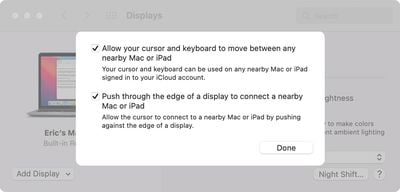
macOS Monterey beta 3 also appears to lay the groundwork for Universal Control. Under System Preferences -> Displays -> Add Display -> Advanced, there are now preferences that can be selected for the ‌Universal Control‌ feature.

universal control settings monterey
Unfortunately, ‌Universal Control‌ is not functional and we'll have to wait for a later beta to experience a working version.

Tag: Safari
Related Forum: macOS Monterey

Popular Stories

safari notify macos 27

New Safari Can Monitor a Webpage and Notify You of Updates

Monday June 8, 2026 11:04 am PDT by
Apple's new version of Safari browser in macOS 27 and iOS 27 can be tasked to monitor a webpage and notify you of any changes, thanks to a new built-in feature. With "Notify Me," Safari can keep checking a website on your behalf – such as a product you've been watching for when it comes back in stock – and alert you when a change occurs. In other upcoming feature additions, using the ...
safari tab groups apple intelligence

Apple Brings AI Tab Organization and AI-Generated Extensions to Safari

Monday June 8, 2026 1:18 pm PDT by
Apple today unveiled a raft of Safari upgrades powered by Apple Intelligence, including automatic tab organization, AI-generated custom extensions, and new privacy-first browsing tools. The centerpiece feature is automatic tab organization, which uses Apple Intelligence to group a user's open tabs into relevant topics without any manual intervention. If someone is planning a weekend trip,...

Apple Acquires Award Winning App Play Feature

Apple Acquires Award-Winning App 'Play'

Monday June 29, 2026 7:39 am PDT by
In February, Apple notified the European Commission that it would be acquiring certain assets from and have the right to hire certain employees from Rabbit 3 Times, the company behind the award-winning app design tool Play. The notification was published on the European Commission's website this week, following a four-month waiting period. Play was a Mac and iPhone app that allowed designers ...

Top Rated Comments

65 months ago
I feel like I’m the only person that liked the change! Oh well, not a big deal to me at the end of the day as I’m one to never really have more than 5 tabs open and close them as soon as I’m done. I mostly appreciated how the interface stayed thin with more than one tab open. Oh well, can’t please everyone!

edit: as others have pointed out, there’s a choice between the two styles! Happy day :)
Score: 56 Votes (Like | Disagree)
grmlin Avatar
65 months ago
This looks like crap. So much wasted vertical space. 🤢
Score: 24 Votes (Like | Disagree)
sniffies Avatar
65 months ago
Thank god it can be disabled. The new tabs look too much like the search/address bar, which is visually confusing.
Score: 22 Votes (Like | Disagree)
65 months ago
Not sure how this is an improvement...
Score: 21 Votes (Like | Disagree)
MrGimper Avatar
65 months ago
Well done Apple for reversing that total cluster-f
Score: 17 Votes (Like | Disagree)
65 months ago
Geez. What is going on.

Now the tabs and address bar having same general shape in different rows just looks odd and is wasting even more space than Safari in Big Sur.

Score: 13 Votes (Like | Disagree)

🔗 Related Apple News & Rumors

Stay updated with the latest Apple ecosystem news and verified rumors