

Hands-On With iOS 14 Widgets, Custom Icons, and Home Screen Setup - MacRumorsOpen MenuShow RoundupsShow Forums menuVisit ForumsOpen Sidebar
Skip to Content

Hands-On With iOS 14 Widgets, Custom Icons, and Home Screen Setup

Apple with iOS 14 introduced widgets on the Home Screen, leading to unprecedented levels of customization for the iPhone. Combined with Shortcuts that let you change an app's icon, iOS 14 lets you create a whole new look for your ‌Home Screen‌.


We've been following along with some of the creative alternative Home Screen designs that MacRumors readers have come up with and thought we'd even try to build out a custom app icon and home screen setup to mimic an old school Mac design. In the video up above, you can check out our superficial attempt at making iOS 14 look like Mac OS X Aqua, arguably one of the most iconic Mac looks.

Widgets are simple enough to use and hundreds of apps are now updating with innovative widgets that you can add to the Today Center and the ‌Home Screen‌ with just a few taps. ‌Widgets‌ run the gamut from weather to fitness to finance and travel, so there's a good chance most of your favorite apps have widgets you can incorporate into a design.

There are also apps that are dedicated just to making different customizable widgets with unique styles and functions, such as Widgetsmith, or Widgeridoo, which are essential to custom designs. We've used Widgetsmith for our OS X setup because it lets us create widgets with custom graphics.

‌Widgets‌ are simple enough to use, but taking a ‌Home Screen‌ design to the next level requires custom icons, something possible through Apple's Shortcuts app. Custom icons are more pretty than useful, and everything you create a custom icon for will route through the Shortcuts app, which is less than ideal.
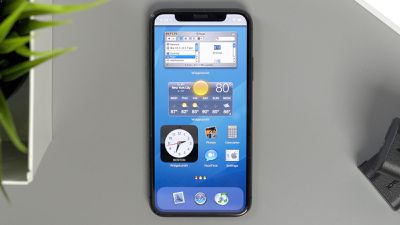
iOS 14 home screen
We've seen custom designs that have taken hours upon hours to create, and even our own Aqua theme took quite some time to complete, so expect to invest some time if you want a unique iPhone ‌Home Screen‌. Our setup looks fantastic and is reminiscent of an old-school Mac, but it's worth noting that it's not particularly functional. Most of our widgets are really just for show, so creating a design that's nice looking and useful is a real effort.

If you want to recreate our "Mac OS X Aqua theme" for the iPhone, we've got a link to the assets available here. All the elements, however, are really just a carefully crafted illusion. But we'd love to see a developer build functional Mac OS X Dashboard styled widgets, and for Apple to allow for transparency in icons and widgets.

Wondering how to set it all up? Just check out our how to on using Home Screen widgets and our how to on customizing app icons using Shortcuts.

Have you made an awesome ‌Home Screen‌ setup that you want to share? Post it down below in the comments, and feel free to share your icon skins, wallpapers, and widget setups.


Related Forum: iOS 14

Popular Stories

Apple Event Logo

Apple Working on All-New Operating System

Wednesday July 29, 2026 11:39 am PDT by
Apple is developing an all-new operating system that is essentially a mix of tvOS, watchOS, and iOS, according to Bloomberg's Mark Gurman. In a report this week, he said the operating system will feature a grid of icons, widgets, and apps, along with customizable clock faces. The new software platform is intended for Apple's long-rumored smart home hub. With built-in facial recognition,...


imac video apple feature

Apple Made Its Second-Biggest Acquisition Ever This Year

Wednesday July 29, 2026 12:03 pm PDT by
Apple this year acquired Israeli startup Q.ai for close to $2 billion, according to the Financial Times. That would make this Apple's second-biggest acquisition ever, after it paid $3 billion for the popular headphone maker Beats in 2014. This is also the largest known Apple acquisition since the company purchased Intel's smartphone modem business and patents for $1 billion in 2019. Q.ai...
Dynamic Island iPhone 18 Pro Feature

iPhone 18 Pro: Twelve Changes Coming to Apple's Next Flagship

Thursday July 30, 2026 3:43 am PDT by
We're less than two months out from the launch of Apple's premium next-generation smartphone lineup, and while we're not expecting a dramatic change in terms of functionality, there are still several enhancements rumored to be coming to the iPhone 18 Pro and iPhone 18 Pro Max. One thing worth noting is that Apple is reportedly planning a major change to its iPhone release cycle this year,...

Top Rated Comments

Harvey Zoltan Avatar
77 months ago
Looks awful, I'm surprised Apple allows this.
Score: 12 Votes (Like | Disagree)
pdaholic Avatar
77 months ago
I would love it if Apple would just let us place icons wherever we want instead of making them snap to the upper left corner of the screen. 14 operating systems later and we still can’t position icons on the bottom of the screen (easier to reach one-handed) without putting apps above them to push them down.
Score: 11 Votes (Like | Disagree)
SDJim Avatar
77 months ago
Gotta be honest - that home screen is hideous. Why would I regress to iOS 3?
Score: 11 Votes (Like | Disagree)
JGIGS Avatar
77 months ago

Looks awful, I'm surprised Apple allows this.
Man are people so brainwashed by Apple these days that they feel like Apple should restrict and decide every aspect of what we can do with our own devices that we pay money for? If this is the case things really need to change. Mindsets need to change.
Score: 10 Votes (Like | Disagree)
rafark Avatar
77 months ago
Wonder what would Jobs think of this
Score: 9 Votes (Like | Disagree)
Tsuki415 Avatar
77 months ago
The whole “opening Shortcuts” for each app seriously turns me off. Everyone is so on board but loading Shortcuts to load an app isn’t a great implementation. I’m surprised that people enjoy doing this. But hey, to each their own...
Score: 8 Votes (Like | Disagree)

🔗 Related Apple News & Rumors

Stay updated with the latest Apple ecosystem news and verified rumors










































