

Apple today released macOS Catalina 10.15.5, the fifth update to the macOS Catalina operating system that was released in October 2019. macOS Catalina 10.15.5 comes two months after the launch of macOS Catalina 10.15.4, which introduced Screen Time Communication Limits.

macOS Catalina 10.15.5 is a free update that can be downloaded from the Mac App Store using the Update feature in the System Preferences app.
The macOS Catalina 10.15.5 update introduces a new Battery Health Management feature for Mac notebooks. Battery Health Management is meant to extend the overall lifespan of a Mac's battery by reducing the rate of chemical aging.
Battery Health Management analyzes the battery health of a laptop and its charging pattern, and in some cases, it will preserve battery longevity and health by not charging a MacBook to its full capacity. Keeping a MacBook charged at its full capacity at all times can reduce battery health.
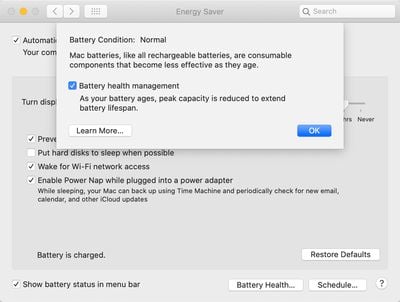
When a Mac is used plugged in and the battery is kept full all the time, the Battery Health Management feature will kick in and stop short of a full charge.
Battery Health Management is an optional feature that can be disabled through the System Preferences app, with instructions available in our how to.
The macOS Catalina 10.15.5 update also addresses an issue that caused large data transfers to RAID volumes to freeze up the Finder app. With the update, large data transfers will no longer cause Finder to become unresponsive.
After installing macOS Catalina 10.15.4, some Mac users began experiencing occasional system crashes, primarily caused by large file transfers. The new update should successfully fix the problem. Apple's full release notes for macOS Catalina 10.15.5 are below.
macOS Catalina 10.15.5 introduces battery health management in the Energy Saver settings for notebooks, an option to control automatic prominence of video tiles on Group FaceTime calls, and controls to fine-tune the built-in calibration of your Pro Display XDR. The update also improves the stability, reliability, and security of your Mac.
Battery Health Management
- Battery health management to help maximize battery lifespan for Mac notebooks
- Energy Saver preference pane now displays battery condition and recommends if the battery needs to be serviced
- Option to disable battery health management
- For more information, please visit https://support.apple.com/kb/HT211094FaceTime Prominence Preference
- Option to control automatic prominence on Group FaceTime calls so video tiles do not change size when a participant speaksCalibration Fine-Tuning for Pro Display XDR
- Controls to fine-tune the built-in calibration of your Pro Display XDR by adjusting the white point and luminance for a precise match to your own display calibration targetThis update also includes bug fixes and other improvements.
- Fixes an issue that may prevent Reminders from sending notifications for recurring reminders
- Addresses an issue that may prevent password entry on the login screen
- Fixes an issue where System Preferences would continue to show a notification badge even after installing an update
- Resolves an issue where the built-in camera may not be detected when trying to use it after using a video conferencing app
- Addresses an issue for Mac computers with the Apple T2 Security Chip where internal speakers may not appear as a sound output device in Sound preferences
- Fixes a stability issue with uploading and downloading media files from iCloud Photo Library while your Mac is asleep
- Resolves a stability issue when transferring large amounts of data to RAID volumes
- Fixes an issue where the Reduce Motion Accessibility preference did not reduce the speed of animations in a FaceTime group call



















































