How to Turn Off Battery Health Management in macOS Catalina 10.15.5 - MacRumorsOpen MenuShow RoundupsShow Forums menuVisit ForumsOpen Sidebar
Skip to Content

How to Turn Off Battery Health Management in macOS Catalina 10.15.5

by

Apple in the second macOS Catalina 10.15.5 beta added a new Battery Health Management feature for Macs, which is designed to prolong the battery life and battery health of modern Mac notebooks (aka those with Thunderbolt 3 ports) by reducing the rate of chemical aging.
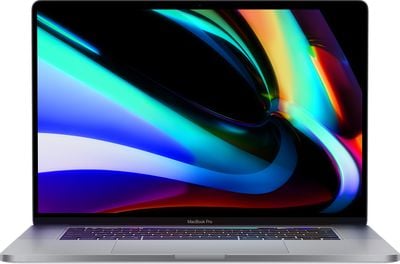
16inchmacbookpromain
Battery Health Management is an intelligent feature that analyzes the battery status of a Mac notebook and its charging pattern, and based on this information, it may preserve battery health by not charging a MacBook to full capacity.

Charging a MacBook to 100 percent and then letting it sit plugged in without draining the battery through use can lead to reduced battery life, which is what Apple is aiming to avoid. Macs that are often used plugged in and with the battery full may have the Battery Management feature kick in to stop charging short of a full charge.

Battery Health Management is entirely opt-in and can be disabled for those who do not want to use the feature. Protecting battery health will be useful for most Mac users, but there may be some situations where Battery Health Management is not ideal, such as if you're about to leave the house and need maximum battery life, so it's worth knowing how to turn it off and on.

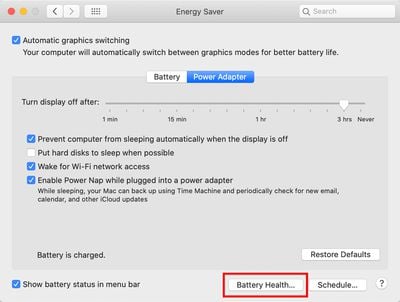
All Battery Health Management controls can be found in the Energy Saver section of System Preferences, as outlined below.

  1. Open the System Preferences app.
  2. Choose the Energy Saver section, which is denoted by a light bulb.
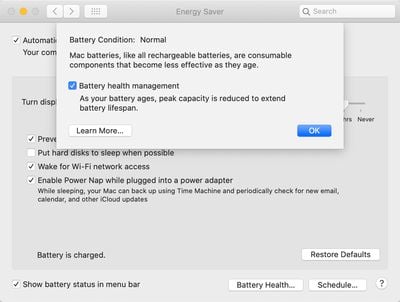
  3. Select the Battery Health section. batteryhealthmac1
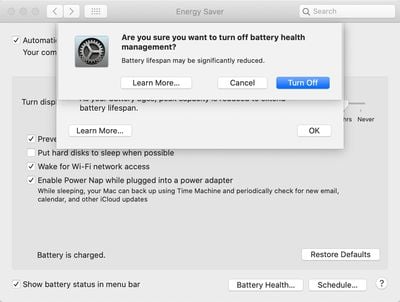
  4. Click the box next to Battery Health Management to deselect it. batteryhealthmac2
  5. Click Turn Off to confirm. batteryhealthmac3

When upgrading to macOS Catalina 10.15.5, Battery Health Management will be enabled by default and will need to be manually turned off by those who don't want to use it.

macOS Catalina 10.15.5 is limited to developers at the current time, but will see a public release in the not too distant feature, bringing Battery Health Management to all users with a 2016 or later MacBook Pro and 2018 or later MacBook Air.


Related Forum: macOS Catalina

Top Rated Comments

zorinlynx Avatar
84 months ago
Why the hell are they limiting this to 2016 and newer Macs? Older Macs can benefit from this too.

Score: 10 Votes (Like | Disagree)
84 months ago

Perhaps I'm being dense, but what would be the benefit of turning it off?
Not being trolled in the media for forcing customers to update their machines when their batteries naturally degrade. Providing the choice mitigates the perception of control and is probably more of a sociopolitical decision than a technical one.
Score: 7 Votes (Like | Disagree)
_torgo_ Avatar
84 months ago
Perhaps I'm being dense, but what would be the benefit of turning it off?
Score: 4 Votes (Like | Disagree)
84 months ago
More battery life? I got 5 years on my first one without it
Score: 4 Votes (Like | Disagree)
Natzoo Avatar
84 months ago
I think I’ll just stick with Mojave
Score: 3 Votes (Like | Disagree)
Fusionskies Avatar
84 months ago

No need to do anything if it's excellent. Or just Option-click the battery in the menu bar and see what it says for the condition.
Condition: Normal

Crazy to think its 7 years old and still running fine.
Score: 3 Votes (Like | Disagree)

Popular Stories

iOS 27 Next to iPhone

Here's When iOS 27 Rolls Out Today in Every Time Zone [Update: It's Out]

Sunday September 13, 2026 3:00 am PDT by
Update 10:04 a.m.: iOS 27 is rolling out now, though it may take a bit for all users to see it, so keep checking! Apple is about to release iOS 27, which will finally deliver more advanced Siri AI capabilities as well as a variety of other refinements, improvements, and new features to iPhones. It's Apple's biggest software update of the year, and Apple announced at Wednesday's iPhone event...
iOS 27 Icon iPhone

iOS 27 Available Now With These 8 New Features

Monday September 14, 2026 9:00 am PDT by
Update — 10 a.m. Pacific Time: Apple has released iOS 27. During its iPhone 18 Pro and iPhone Duo event last week, Apple announced that iOS 27 will be released widely on Monday, September 14. iOS 27 should be available around 10 a.m. Pacific Time / 1 p.m. Eastern Time today via the Settings app, under General → Software Update. Below, we have highlighted eight new features and...
Apple iCloud Plus expansion hero

iCloud+ Now Includes Apple TV, Apple Arcade, and Curated Apple Music Stations in Over 100 Countries

Tuesday September 15, 2026 1:43 am PDT by
Apple today announced a new subscription initiative that turns paid iCloud+ subscriptions into a broader services bundle in more than 100 countries. In select countries, Apple says every paid iCloud+ plan, including the cheapest 50GB tier, now includes Apple TV and Apple Arcade "at no additional cost," while family sharing extends the storage, TV and Arcade access to up to five people....

🔗 Related Apple News & Rumors

Stay updated with the latest Apple ecosystem news and verified rumors