

Procreate 5 for iPad Brings New Animation Assist, Brush Studio, Color Harmony, and More - MacRumorsOpen MenuShow RoundupsShow Forums menuVisit ForumsOpen Sidebar
Skip to Content

Procreate 5 for iPad Brings New Animation Assist, Brush Studio, Color Harmony, and More

by

Procreate 5 for iPad got its official release today, introducing a completely rebuilt graphics engine and several notable new features.
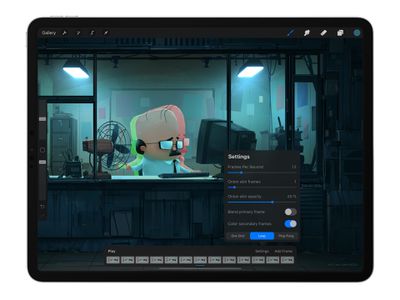
procreate 5 animation assist
Under the hood, the new Valkyrie graphics engine takes full advantage of Apple's Metal architecture and is designed to get maximum performance out of ‌iPad‌, utilizing new sophisticated shaders and running at 120fps on supported devices.

On the feature front, an all-new Animation Assist toolset aims to make the creation of animatics, looping GIFs and storyboards an easier process for newcomers and more streamlined for experts. Meanwhile, the same applies to custom brush creation thanks to the powerful new Brush Studio, which allows finer control over every aspect of how brushes look, react and behave.
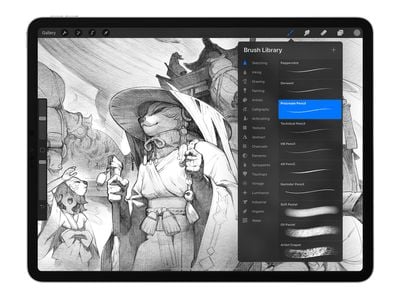
procreate 5 brush studio
Procreate 5's new Clone tool allows you to use any brush style to give a cloned area the look of that brush, or to lock the clone area in place to plaint with a multicolored brush based on your selection. The Color Panel can also now be detached and minimized into a new Mini Color Panel, for moving it out of areas that you want to work on.

Elsewhere, new Color Dynamics offer tactile control of hue, saturation, brightness and more to a brush, through the tilt or pressure of the Apple Pencil. There are also 18 individual sliders to allow for more control.

This version also includes new importable CMYK and RGB ICC profiles for print-based users, a new Photoshop Brush Import feature for using Photoshop brushes in the app, a new Color Harmony section in the Color Panel for easily picking complimentary colors, and a new 10-step Color History palette.
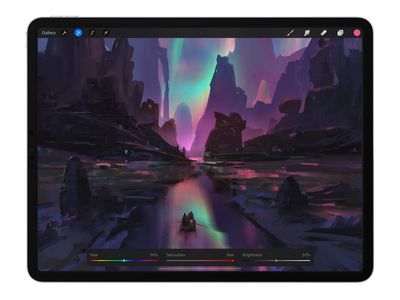
procreate 5 interface
Lastly, the Procreate 5 interface has been refined and improved to make it more accessible and unobtrusive, while retaining the familiarity of previous versions.

Procreate 5 for ‌iPad‌ can be purchased on the App Store from today for a one-time payment of $10. [Direct Link]

Top Rated Comments

jonnyb098 Avatar
87 months ago
Meanwhile over at Adobe......


Attachment Image
Score: 9 Votes (Like | Disagree)
sfwalter Avatar
87 months ago
It really puts Adobe to shame. To add insult to injury it can import Photoshop brushes. Plus it cost less than a single months subscription to Alfresco.
Score: 7 Votes (Like | Disagree)
chrono1081 Avatar
87 months ago

I'm curious what they mean by 'sophisticated shaders'. Shaders here seems to me an ambiguous word. Well understood in 3D applications of course, but in a 2D painting app, I'm not sure what they mean by it.

In the past, shaders meant one thing (how light is calculated on the surface of a 3D object), now they can mean multiple things. In modern graphics pipelines there are "compute shaders" that exist solely to perform complex calculations on the GPU that don't necessarily have to do with graphics, they could be using these to generate texture data used by the brushes (like wet edges, etc).


Seeing this post (and one on MacStories) made me wonder, how does Procreate compare to Pixelmator? I already have Pixelmator as an attempted PS substitute, but I find it to be designed somewhat awkwardly and counterintuitively.

My iPad Pro is my primary device, but I learned most of my image editing on PS. I tried the PS app, but Adobe continues to suck, full stop, and releasing a beta with what, a quarter of the full features is brain meltingly awful.

Most of what I need this kind of application for is resizing, editing, and light design (making components for flyers and sometimes assembling posters and such.) Frequently it involves finding something online to use as a template to build off of. Canva gets some of the job done, but not all of it. I can usually get the job done with Pixelmator but it takes twice as long as it would with Photoshop.

Loooong story short, opinions as to Pixelmator v Procreate?
Do you have Pixelmator or Pixelmator Pro? Pixelmator Pro for iPad is really good for image editing, the regular Pixelmator on iPad, not so much. Procreate isn't an image editor but rather a drawing/painting software.
Score: 3 Votes (Like | Disagree)
sfwalter Avatar
87 months ago

Seeing this post (and one on MacStories) made me wonder, how does Procreate compare to Pixelmator? I already have Pixelmator as an attempted PS substitute, but I find it to be designed somewhat awkwardly and counterintuitively.

My iPad Pro is my primary device, but I learned most of my image editing on PS. I tried the PS app, but Adobe continues to suck, full stop, and releasing a beta with what, a quarter of the full features is brain meltingly awful.

Most of what I need this kind of application for is resizing, editing, and light design (making components for flyers and sometimes assembling posters and such.) Frequently it involves finding something online to use as a template to build off of. Canva gets some of the job done, but not all of it. I can usually get the job done with Pixelmator but it takes twice as long as it would with Photoshop.

Loooong story short, opinions as to Pixelmator v Procreate?
ProCreate is more of a painting program, and the the line gets blurred sometimes. You won't find curves, levels, etc. If your primary goal is to edit photos then I would stick with Pixelmator.
Score: 2 Votes (Like | Disagree)
87 months ago
I have procreate but if this is not an update I might buy it just because it’s NOT a subscription.
Score: 2 Votes (Like | Disagree)
CarlJ Avatar
87 months ago
Procreate 5 for iPad can be purchased on the App Store from today for a one-time payment of $10. [Direct Link]

The only link I see in that sentence, in the original article, is "App Store", which just explains what the App Store is. No link to Procreate itself.
Score: 2 Votes (Like | Disagree)

Popular Stories

Apple Event Logo

Apple Working on All-New Operating System

Wednesday July 29, 2026 11:39 am PDT by
Apple is developing an all-new operating system that is essentially a mix of tvOS, watchOS, and iOS, according to Bloomberg's Mark Gurman. In a report this week, he said the operating system will feature a grid of icons, widgets, and apps, along with customizable clock faces. The new software platform is intended for Apple's long-rumored smart home hub. With built-in facial recognition,...
Four iPhone 18 Pro Colors Mock Feature

iPhone 18 Pro and iPhone Ultra: Pre-Orders and Release Date

Thursday July 30, 2026 6:12 am PDT by
Apple has yet to reveal when the iPhone 18 Pro and iPhone Ultra will be announced and released, but the dates usually follow a familiar pattern. Labor Day is September 7 this year. The last time the holiday fell on that day was in 2020, but the iPhone event that year was delayed until October due to the COVID-19 pandemic. So, the last time Labor Day was on September 7 in a normal year was in ...
Dynamic Island iPhone 18 Pro Feature

iPhone 18 Pro: Twelve Changes Coming to Apple's Next Flagship

Thursday July 30, 2026 3:43 am PDT by
We're less than two months out from the launch of Apple's premium next-generation smartphone lineup, and while we're not expecting a dramatic change in terms of functionality, there are still several enhancements rumored to be coming to the iPhone 18 Pro and iPhone 18 Pro Max. One thing worth noting is that Apple is reportedly planning a major change to its iPhone release cycle this year,...

🔗 Related Apple News & Rumors

Stay updated with the latest Apple ecosystem news and verified rumors













































