

Everything New in iOS 13 Beta 4: Quick Action Updates, Share Sheet Changes and More - MacRumorsOpen MenuShow RoundupsShow Forums menuVisit ForumsOpen Sidebar
Skip to Content

Everything New in iOS 13 Beta 4: Quick Action Updates, Share Sheet Changes and More

Apple this morning released the fourth beta of iOS 13 for developers, introducing bug fixes and adding and refining iOS 13 features.

Now that we're into the fourth beta, changes and updates are getting more minor, but there are still some small but notable tweaks that are worth highlighting in today's beta.

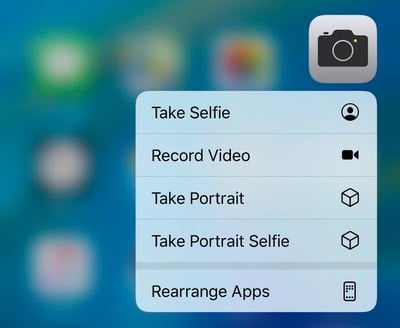
- Quick Actions - There's a refreshed look for Quick Actions on the Home screen, which adds a new "Rearrange Apps" option that lets you quickly get to the wiggle mode that allows apps to be moved around.
ios13rearrangeapps
- Quick Actions Menu Size - The menu that pops up when using a Quick Action is also smaller in size with less obtrusive icons that have also been relocated to the right side of the menu interface.

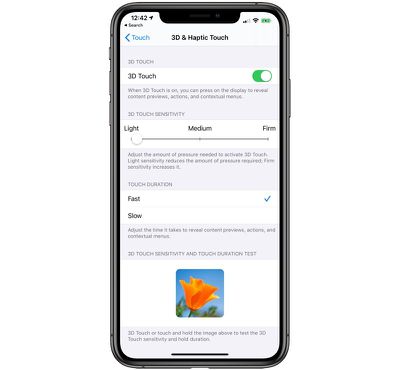
- 3D Touch Settings - In the Accessibility section of the Settings app, there are new options for 3D Touch in the 3D & Haptic Touch section (which was previously just ‌3D Touch‌). There's a new "Touch Duration" section alongside the sensitivity slider. The Touch Duration option changes the amount of time it takes to reveal content previews, actions, and contextual menus.
3dtouchsettings
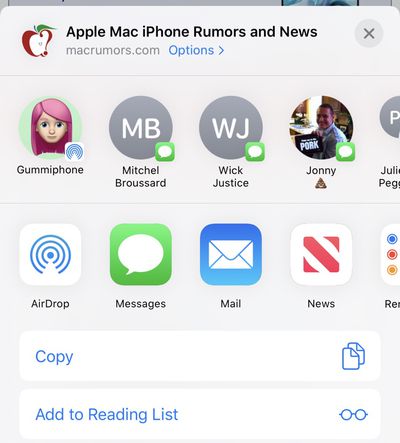
- Share Sheet - Some minor design changes have been made to the Share Sheet in iOS 13, tweaking the colors and adding some transparency.
sharesheetchanges
- Voice Messages - When using the option in Messages to record a voice-based message, there's a new icon for the option. It's now a waveform rather than a microphone icon.

messageswaveform
- Widgets - When editing Widgets in the Today View, you'll see a new look for the edit button, which is now pill-shaped rather than circular.

widgetseditbutton
Know of a feature that's new in iOS 13 beta 4 that we left out? Make sure to let us know in the comments and we'll update this article.


Related Forum: iOS 13

Popular Stories

Apple Event Logo

Apple Working on All-New Operating System

Wednesday July 29, 2026 11:39 am PDT by
Apple is developing an all-new operating system that is essentially a mix of tvOS, watchOS, and iOS, according to Bloomberg's Mark Gurman. In a report this week, he said the operating system will feature a grid of icons, widgets, and apps, along with customizable clock faces. The new software platform is intended for Apple's long-rumored smart home hub. With built-in facial recognition,...
imac video apple feature

Apple Made Its Second-Biggest Acquisition Ever This Year

Wednesday July 29, 2026 12:03 pm PDT by
Apple this year acquired Israeli startup Q.ai for close to $2 billion, according to the Financial Times. That would make this Apple's second-biggest acquisition ever, after it paid $3 billion for the popular headphone maker Beats in 2014. This is also the largest known Apple acquisition since the company purchased Intel's smartphone modem business and patents for $1 billion in 2019. Q.ai...
Dynamic Island iPhone 18 Pro Feature

iPhone 18 Pro: Twelve Changes Coming to Apple's Next Flagship

Thursday July 30, 2026 3:43 am PDT by
We're less than two months out from the launch of Apple's premium next-generation smartphone lineup, and while we're not expecting a dramatic change in terms of functionality, there are still several enhancements rumored to be coming to the iPhone 18 Pro and iPhone 18 Pro Max. One thing worth noting is that Apple is reportedly planning a major change to its iPhone release cycle this year,...

Top Rated Comments

Frank in NL Avatar
92 months ago
I really hate the share sheet
I am a fan of the new share sheet. I find it a lot more useful.
Score: 27 Votes (Like | Disagree)
92 months ago
We need a "Touch Duration: off" option for 3D Touch enabled devices…
Score: 16 Votes (Like | Disagree)
92 months ago
I really hate the share sheet
Score: 14 Votes (Like | Disagree)
hourglass111 Avatar
92 months ago
I really hate the share sheet
As an introvert, it’s irking me to have all my contacts right there. It sounds a bit bad, but what can I say! I don’t need to see them to think of them when sending something. This Share Sheet is made for extroverts.


I’ve been playing around with the beta. The vertical options is a curveball. It remains to be seen if it’ll be equally or more effective than the current horizontal panel, or if it will be as cumbersome as it appears…

That said, it appears there are suggestions based of usage history, and that could be useful.
Score: 13 Votes (Like | Disagree)
92 months ago
As an introvert, it’s irking me to have all my contacts right there. It sounds a bit bad, but what can I say! I don’t need to see them to think of them when sending something. This Share Sheet is made for extroverts.

I’ve been playing around with the beta. The vertical options is a curveball. It remains to be seen if it’ll be equally or more effective than the current horizontal panel, or if it will be as cumbersome as it appears…

That said, it appears there are suggestions based of usage history, and that could be useful.
As an introvert myself it doesn’t bother me in the slightest. There are still a few people I keep in contact with and this makes it a lot easier to share.
As another introvert, I like this share sheet because it removes a step from sending something to my wife or daughter.
Score: 8 Votes (Like | Disagree)
DarkCole Avatar
92 months ago
As an introvert, it’s irking me to have all my contacts right there. It sounds a bit bad, but what can I say! I don’t need to see them to think of them when sending something. This Share Sheet is made for extroverts.
As an introvert myself it doesn’t bother me in the slightest. There are still a few people I keep in contact with and this makes it a lot easier to share.
Score: 7 Votes (Like | Disagree)

🔗 Related Apple News & Rumors

Stay updated with the latest Apple ecosystem news and verified rumors










































