

How the 'Find My' App in iOS 13 and macOS Catalina Works - MacRumorsOpen MenuShow RoundupsShow Forums menuVisit ForumsOpen Sidebar
Skip to Content

How the 'Find My' App in iOS 13 and macOS Catalina Works

Apple at WWDC unveiled a new "Find My" app, which is available across its Mac and iOS platforms. ‌Find My‌ on iOS replaces ‌Find My‌ Friends and ‌Find My‌ iPhone, and on Mac, it introduces a native "Find" app for the first time as an alternative to using iCloud on the web.

‌Find My‌ has a useful feature that's designed to let you locate your lost devices even when they're not connected to WiFi or a cellular network by leveraging nearby Bluetooth devices. Your lost iPhone, iPad, or Mac will be able to communicate via Bluetooth with any nearby Apple device, relaying its location right back to you.
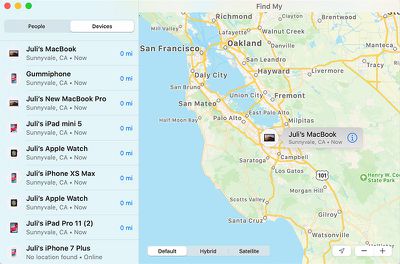
findmymacoscatalina
Apple described the feature on stage on Monday, but today provided additional details to WIRED for those interested in an overview of just how it works.

Apple designed the ‌Find My‌ feature with privacy in mind. It uses an encryption system that prevents people from abusing it for tracking purposes, making your personal location unavailable to people aiming to intercept your device's Bluetooth signal and from Apple itself.

Apple's encryption solution requires "‌Find My‌" users to have at least two Apple devices. As relayed by Apple to WIRED, each device emits a constantly changing public key that nearby Apple devices use to encrypt and upload your geolocation data. Only other Apple devices that you own (and that are linked to your Apple ID and protected with two-step authentication) are able to decrypt those locations.

Because only your own devices can decrypt the encrypted location signal that's being sent from a lost device, no one, not even Apple, can intercept it and locate you or your devices.

Apple says that "‌Find My‌" uses just tiny bits of data piggybacked on existing network traffic so there's no impact on device battery life, data usage, or privacy. WIRED has a specific set of steps on how ‌Find My‌ works, from setup to what happens when a device is lost, which is worth checking out for those interested.

Basically, when a device you own goes missing, it's going to broadcast the aforementioned public key, which can be picked up by any other Apple device owned by anyone.

Say someone steals your MacBook. Even if the thief carries it around closed and disconnected from the internet, your laptop will emit its rotating public key via Bluetooth. A nearby stranger's iPhone, with no interaction from its owner, will pick up the signal, check its own location, and encrypt that location data using the public key it picked up from the laptop. The public key doesn't contain any identifying information, and since it frequently rotates, the stranger's iPhone can't link the laptop to its prior locations either.

The stranger's iPhone then uploads two things to Apple's server: The encrypted location, and a hash of the laptop's public key, which will serve as an identifier. Since Apple doesn't have the private key, it can't decrypt the location.

The ‌Find My‌ app is available in iOS 13, iPadOS, and macOS Catalina right now, but it's not going to be a fully functional system until these software updates are installed on millions of devices around the world.

Related Forum: iOS 13

Popular Stories

ios 27 2 apple tv remote

Older Siri Remotes Now Show Up in Find My With iOS 27.2

Monday October 26, 2026 5:13 pm PDT by
With iOS 27.2 and tvOS 27.2, second- and third-generation Siri Remotes can be tracked using the Find My app. There has been an option to locate a lost Siri Remote with an iPhone since iOS 17, but remotes did not previously show up in the Find My app. Locating a remote had to be done with the Apple TV Remote widget in the Control Center, which made the option hard to find. Supported Siri...


Apple MacBook Pro with PROLED XDR Display family lineup feature

Apple Announces OLED MacBook Pro With Touch Display

Wednesday October 28, 2026 10:11 am PDT by
Apple today announced a new high-end MacBook Pro, which is available in 14-inch and 16-inch sizes. The new device has a PROLED XDR display that supports touch gestures, and a glowing rear Apple logo. Pricing on the MacBook Pro starts at $2,899 for the 14-inch model and $3,399 for the 16-inch model. Apple says the MacBook Pro has the "world's best display in a pro laptop." The PROLED...
iPad mini OLED feature 1

Apple Executive Comments on New iPad Mini Lacking 120Hz Display

Thursday October 29, 2026 1:47 pm PDT by
While the new iPad mini has an OLED display, the device does not support ProMotion, meaning the display's refresh rate is limited to 60Hz instead of 120Hz. ProMotion support would have allowed for the iPad mini's refresh rate to automatically adjust from 10Hz to 120Hz depending on the content being displayed, but evidently Apple has kept the feature exclusive to the iPad Pro among iPad...

Top Rated Comments

mashdots Avatar
97 months ago
Such a brilliant use of nearby technology. I hope Apple delves more into nearby communication tech in the future.
Score: 30 Votes (Like | Disagree)
m4mario Avatar
97 months ago
so that's why you don't turn Bluetooth off. But for argument's sake, say, to save battery life, you turned off Bluetooth, then FindMy won't find Jack
Who cares about Jack, all I want is to find my stolen Mac.
Score: 17 Votes (Like | Disagree)
97 months ago
Apple ingenuity + Privacy focus = Huge win for users. This is begging for Apple to release a Tile-like product - it'll instantly become the largest mesh network in the world for finding your lost or stolen possessions.
Score: 15 Votes (Like | Disagree)
mattopotamus Avatar
97 months ago
And theft of Apple products is going to be a thing of the past.
Score: 12 Votes (Like | Disagree)
97 months ago
Very cool! It's a brilliant solution, private and secure as expected from Apple.
Score: 10 Votes (Like | Disagree)
ipedro Avatar
97 months ago
The way this works makes it an absolute no brainer for Apple to release a low powered tag that can broadcast micro packets of data for years on the same coin cell battery.

I’ll get one for my dog, wallet, camera bag and other things of value.
Score: 9 Votes (Like | Disagree)
Latest Stories
iPhone 18 Pro Sales Surge in China, Offsetting Decline in U.S. and Japan
37 minutes ago
HomeView Software 27.2: Wallpapers, Control Center, and More
7 hours ago
Apple Alerts Stores to iPhone Duo's Display Cracking Issue
8 hours ago
iOS 27.3 Will Enable These Apple Intelligence Features in China
9 hours ago
Apple Says iOS 27.3 Beta Coming Next Week
9 hours ago
Apple's Flash Storage Suppliers Are Finally 'Getting Their Revenge'
10 hours ago
14 New Things Your iPhone Can Do in iOS 27.2
11 hours ago
iPhone Duo Review: One Week Later
12 hours ago
Samsung Mocks iPhone Duo Display Cracks in New Ad Campaign
13 hours ago
The MacRumors Show: OLED MacBook Pro, iPad Mini 8, and More
14 hours ago
MacBook Pro With Touch Display: 15 More Details Revealed
14 hours ago
Russia Places Apple on State Surveillance Registry
16 hours ago
Halloween Weekend Brings Discounts on Apple Accessories and Pre-Orders
16 hours ago
Apple Has Released More Than 25 New Products in the Past Two Months
16 hours ago
Local Code Launches as Free, Private AI Assistant Tool for Mac
17 hours ago
Apple Acquires Ascend.io
17 hours ago
HomePod Mini 2 Launches Today: All the New Features
18 hours ago
AirTag 2 4-Pack Drops to New Low Price of $69.99
18 hours ago
Rian Johnson's iPhone Camera App Goes Viral
18 hours ago
Where Did All the iPhone Duos Go? Mostly to Apple's Stores
20 hours ago
Apple's Touchscreen MacBook Pro Could Ship 1.5M Units in 2027
21 hours ago
New Apple TV 4K and iPad Mini: RAM Amounts Revealed
1 day ago
Apple Executive Comments on New iPad Mini Lacking 120Hz Display
1 day ago
Here's a Hands-On Look at HomePod Mini 2's New Two-Tone Colors
1 day ago
Apple Lowers App Store Fees in Taiwan Starting October 31
1 day ago
HomeView Pre-Order Returns to $289.99 on Amazon
2 days ago
Apple Avoids Showing Pinched Fingers on iPad Mini Page in South Korea
2 days ago
Old 'Popcorn Time' App Left Hundreds of Thousands of Macs at Risk
2 days ago
You Can Turn Off the New MacBook Pro's Touchscreen Functionality
2 days ago
MacBook Pro Mini-LED vs. OLED Buyer's Guide: Every Difference
2 days ago

🔗 Related Apple News & Rumors

Stay updated with the latest Apple ecosystem news and verified rumors










































