iPad Apps Are Coming to the Mac With Apple's Project Catalyst - MacRumorsOpen MenuShow RoundupsShow Forums menuVisit ForumsOpen Sidebar
Skip to Content

iPad Apps Are Coming to the Mac With Apple's Project Catalyst

While the Mac and iPad remain distinct products, Apple continues to bridge the gap between its desktop and mobile platforms. In 2014, for example, it introduced Continuity features like Handoff and Universal Clipboard that enable more seamless experiences across the Mac, ‌iPad‌, and other Apple devices.

The next step in this process is Project Catalyst, which makes it much easier for developers to extend iPad apps to the Mac.
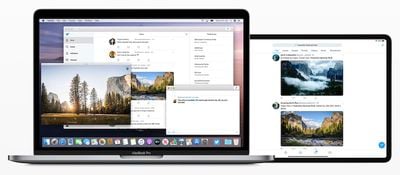
project catalyst
Starting with macOS Catalina and Xcode 11, developers can create a Mac version of an ‌iPad‌ app using UIKit, an Apple framework that until now was intended solely for iOS apps. Adding macOS support to an ‌iPad‌ app is as easy as opening an Xcode project and clicking the Mac checkbox under General > Deployment Info.

While the Mac version of the app should run after the box is checked, this is not always the case, as the Xcode project may contain code that no longer compiles due to frameworks, APIs, or embeddable content that is incompatible with the Mac, according to Apple's developer documentation:

Most iPad apps are great candidates for adaptation, but a few rely on iPad features that don’t exist on a Mac. For example, if your app's essential features require iPad capabilities like gyroscope, accelerometer, or rear camera, iOS frameworks like HealthKit or ARKit, or the app's main function is something like navigation, it might not be suited for the Mac.

Apple has instructions on how to remedy these compatibility issues.

‌iPad‌ apps ported to macOS run natively on the Mac, utilizing the same frameworks, resources, and runtime environment as traditional Mac apps, according to Apple's developer documentation:

The Mac version of your iPad app supports many system features found in macOS without requiring any effort from you…

- A default menu bar for your app.
- Support for trackpad, mouse, and keyboard input.
- Support for window resizing and full-screen display.
- Mac-style scroll bars.
- Copy-and-paste support.
- Drag-and-drop support.
- Support for system Touch Bar controls.

Apple's updated Human Interface Guidelines are a helpful resource for designing and coding the ideal ‌iPad‌ app for Mac.

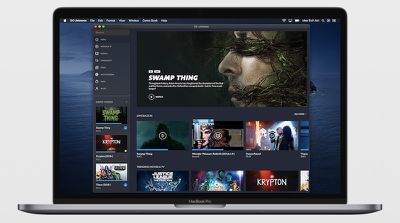
dc universe project catalyst

DC Universe is an example of a Project Catalyst app coming to Mac

If this all sounds familiar, it is because Project Catalyst is Apple's public-facing name for this initiative, which has been referred to by its internal name of Marzipan until now. Apple's plans to allow iOS apps to easily run on Mac were first reported by Bloomberg's Mark Gurman over 18 months ago.

Apple provided us with a first glimpse of Project Catalyst when it brought the ‌iPad‌ versions of its Apple News, Home, Stocks, and Voice Memos apps to the Mac last year in macOS Mojave. Third-party developers are now able to follow suit in macOS Catalina, which will be released to the public in the fall.


Related Forum: macOS Catalina

Popular Stories

iPhone Duo Display Cracking

Apple Alerts Stores to iPhone Duo's Display Cracking Issue

Friday October 30, 2026 3:20 pm PDT by
In a memo shared with Apple Stores and Apple Authorized Service Providers this week, and later obtained by MacRumors, Apple provided technicians with guidance on how to diagnose and address the iPhone Duo's inner display cracking issue. If a customer reports the issue, Apple advised technicians to inspect the iPhone Duo and repair or replace it in accordance with their standard procedures....
iPad mini OLED feature 1

Apple Executive Comments on New iPad Mini Lacking 120Hz Display

Thursday October 29, 2026 1:47 pm PDT by
While the new iPad mini has an OLED display, the device does not support ProMotion, meaning the display's refresh rate is limited to 60Hz instead of 120Hz. ProMotion support would have allowed for the iPad mini's refresh rate to automatically adjust from 10Hz to 120Hz depending on the content being displayed, but evidently Apple has kept the feature exclusive to the iPad Pro among iPad...
Pinched iPad Mini

Apple Avoids Showing Pinched Fingers on iPad Mini Page in South Korea

Thursday October 29, 2026 11:52 am PDT by
In the U.S. and most other countries, Apple's website shows the new iPad mini being held by pinched fingers, but this is not the case in South Korea. The new iPad mini shown with pinched fingers on Apple's website in the U.S. On its South Korean website, Apple simply shows an image of the iPad mini on its own. The new iPad mini shown without pinched fingers on Apple's website in South Korea ...

Top Rated Comments

CE3 Avatar
97 months ago
This should be a big revival for the Mac App Store. Lots of popular apps coming soon.
Score: 18 Votes (Like | Disagree)
bladerunner2000 Avatar
97 months ago
So finally being able to post to Instagram from a desktop computer.
Score: 11 Votes (Like | Disagree)
97 months ago
I like this trend. More choice is always good.
Score: 9 Votes (Like | Disagree)
97 months ago
There's nothing you can say that will get me not to believe Apple isn't going to switch to ARM.
Score: 8 Votes (Like | Disagree)
J InTech82 Avatar
97 months ago
This should also bring over a great deal of productivity apps to the Mac. Win win.
Score: 6 Votes (Like | Disagree)
Krevnik Avatar
97 months ago
Slightly confused. This article says ipad app -> macos. Does that include ios -> macos cause ipad has a different os now.
iPadOS, iOS, tvOS are all still "iOS". The difference is what "Idiom" the platform uses: Phone, Pad, or TV. That changes some of the UI behavior. Pad supports split screen, and uses a UISplitView differently than Phone. TV does some things differently as well.

But I can write one app against UIKit and reuse even UI elements between all three platforms, because it is all UIKit.

Catalyst is UIKit for macOS. Nothing more, nothing less. But it looks like macOS is using the Pad idiom.

Will these "Catalyst" built apps require Catalina? Anyone know.
Yes. Catalyst (UIKit) was private in Mojave, and since Catalina is the first major version with UIKit as a public framework, it will require it.

So, is this anything like Universal Apps in Windows? I vaguely remember there being some derision over this.

I'm not a developer, so from the user perspective I think this could be good, especially if they don't force a dumb down of apps for Mac (which based on the Keynote they aren't).

I guess iOS being based on OSX is finally beginning to fulfill its potential after 12 years.
It is like Universal Apps, but there's a key difference between Apple's approach and Microsoft's. Microsoft built UWP on top of WinRT (edit: the framework, not Windows RT, the SKU) that was part of Win8. These are "Modern" or "Metro" apps. The fact that you had to completely port an app to it to get the benefit made it expensive for established apps like Photoshop. And because of how WinRT worked, you may not even get all the benefit of it since there were some weird issues around WinRT in C++ that I don't know if they resolved in the Win 10 timeframe.

Apple played a longer game. iOS/tvOS/iPadOS and macOS already share a lot of frameworks: Foundation, AVFoundation, Core Data, Core Graphics, Core Animation, Map Kit, etc, etc etc. Before Catalyst, I could still write up an app with a single codebase that compiled for all 4 platforms, mostly. The problem is that AppKit and UIKit are different enough that you have to "fork" a piece of your code for AppKit and one for UIKit. This makes managing things a bit trickier and just more effort. By bringing UIKit to the Mac, what Apple is doing is saying to the (more numerous) iOS devs: "You can now bring your app to the Mac without having to deal with AppKit to do it".

The advantage here is that UIKit is something people already use. iOS has the larger developer base. It's now less of a "semi-port" and now a "tweak it for Mac like you do for tvOS or iPad" situation. That's important.

But, in many ways, because the two have shared most of their core frameworks for years, it was also a lot less work to get here. I think Apple was hoping that only having AppKit/UIKit diverged was enough to entice more devs, but I guess not quite.
Score: 5 Votes (Like | Disagree)
Latest Stories
Apple Watch Ultra 4 Hits All-Time Low Price With Amazon's $99 Discount
14 hours ago
Reminder: Apple's Big Discount on Beats 360 Ear Cushions Ends Today
14 hours ago
Here's a New Tour of Apple's HomeView Software
14 hours ago
Apple Reveals New iPad Mini's Battery Capacity
15 hours ago
Top Stories: Apple's Big MacBook Pro, iPad mini and iMac Updates
17 hours ago
'Pluribus' Season 2 Reportedly Starts Production Today
23 hours ago
iPhone 18 Pro Sales Surge in China, Offsetting Decline in U.S. and Japan
1 day ago
HomeView Software 27.2: Wallpapers, Control Center, and More
1 day ago
Apple Alerts Stores to iPhone Duo's Display Cracking Issue
1 day ago
iOS 27.3 Will Enable These Apple Intelligence Features in China
1 day ago
Apple Says iOS 27.3 Beta Coming Next Week
1 day ago
Apple's Flash Storage Suppliers Are Finally 'Getting Their Revenge'
1 day ago
14 New Things Your iPhone Can Do in iOS 27.2
1 day ago
iPhone Duo Review: One Week Later
1 day ago
Samsung Mocks iPhone Duo Display Cracks in New Ad Campaign
2 days ago
The MacRumors Show: OLED MacBook Pro, iPad Mini 8, and More
2 days ago
MacBook Pro With Touch Display: 15 More Details Revealed
2 days ago
Russia Places Apple on State Surveillance Registry
2 days ago
Halloween Weekend Brings Discounts on Apple Accessories and Pre-Orders
2 days ago
Apple Has Released More Than 25 New Products in the Past Two Months
2 days ago
Local Code Launches as Free, Private AI Assistant Tool for Mac
2 days ago
Apple Acquires Ascend.io
2 days ago
HomePod Mini 2 Launches Today: All the New Features
2 days ago
AirTag 2 4-Pack Drops to New Low Price of $69.99
2 days ago
Rian Johnson's iPhone Camera App Goes Viral
2 days ago
Where Did All the iPhone Duos Go? Mostly to Apple's Stores
2 days ago
Apple's Touchscreen MacBook Pro Could Ship 1.5M Units in 2027
2 days ago
New Apple TV 4K and iPad Mini: RAM Amounts Revealed
2 days ago
Apple Executive Comments on New iPad Mini Lacking 120Hz Display
2 days ago
Here's a Hands-On Look at HomePod Mini 2's New Two-Tone Colors
2 days ago

🔗 Related Apple News & Rumors

Stay updated with the latest Apple ecosystem news and verified rumors