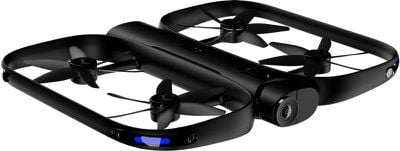
Earlier this year, drone company Skydio introduced its first product, the self-flying R1 drone camera with advanced automation and tracking capabilities.
The R1 was designed to be the first fully autonomous drone, able to work without the need for a person controlling its every movement. Prior to today, using the R1 was as easy as tapping a few buttons in the Skydio iPhone app, and now it's getting even easier.
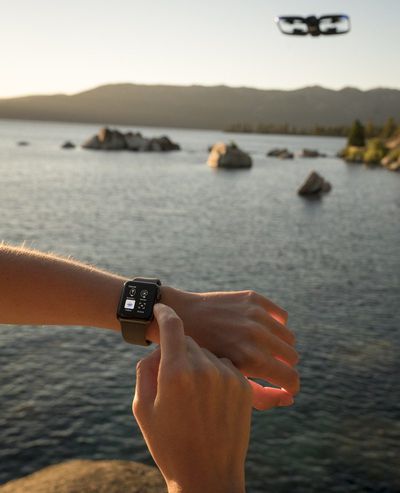
As of today, the R1 can be directed through a newly introduced Apple Watch app that provides one-tap controls and directives right on your wrist.
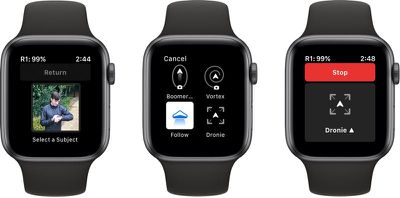
The Skydio Apple Watch interface provides quick access buttons to set the R1 to follow you or a friend as well as options for doing tricks and stopping flight. While there are no manual controls available via the wrist, the R1 operates largely on its own. If you do want to control it manually, you'll need to do so through the iPhone app.
MacRumors was able to give the R1 and the new Apple Watch app a try ahead of its launch, and it's as simple as Skydio describes. The R1 detects people in front of it, and with just a tap, it can be set to follow you, where it records everything you're doing as a sort of flying personal camera or photographer.
The R1 is a hands-off action cam replacement that's fantastic for hiking, biking, skiing, and similar activities where you might want to capture action-oriented video without the hassle of controlling a drone.
What's great about the R1 is that it has complex built-in obstacle avoidance capabilities. We wove it through trees and watched as it artfully dodged trunk after trunk with skill that even some advanced drone pilots would be unable to match.
The R1 is able to avoid obstacles because it's outfitted with 13 cameras that can see in every direction and identify objects like trees, people, cars, and more, using that information to decide what to do and what to avoid.
Once you set the R1 to auto follow mode, it basically flies itself, and there are some neat tricks that Skydio has programmed into it, such as the Boomerang that sends it flying forwards and backwards to capture a unique video shot.
The Apple Watch app offers up little thumbnails of the people around so you can set it to follow someone (or yourself), and it uses the Digital Crown in a unique way -- a twist of the knob rotates the direction of the drone.
Because it flies on its own, the R1 can do a series of neat little tricks, most of which are executable from the wrist. There are options for Dronie, Rocket, and Orbit, for example.
A Dronie starts close and then zooms out and up for a birds-eye view of a scene, while a Rocket shot starts close and then zooms straight up. An Orbit shot, as the name suggests, spins around you slowly. The Apple Watch app also includes a feature to return the drone to back to its starting place at the iPhone and shut it down, so you can get a full flight from the wrist.
Skydio's R1 basically flies itself and it needs so little interaction that it's simple to use right out of the box, even for those who have no drone piloting experience. All it takes is an iPhone for setup and it can be controlled with nothing other than the Apple Watch.
The R1 is excellent at obstacle avoidance, but it's still a drone and an expensive one at $1,999, so there are rules to follow. It can't be flown in windy conditions, and its cameras aren't able to detect thin branches as we learned during a crash, so caution needs to be exercised.
Skydio is continually improving the R1 drone with new features and further autonomous research. It's out of the price range of most people who would use it casually at this point in time, and it's not the most portable at the size of a pizza box, but the technology is worth paying attention to because this kind of autonomy could be the future of mass-market drone usage in a few years time.
Along with introducing a new Apple Watch app for controlling the R1, Skydio has additional news. Starting today, the R1 is available on the Apple online store and at select Apple retail locations. It can also be purchased from the Skydio website.
Apple's long-rumored smart home hub will have an iMac G4-style design and a host of unique features, Bloomberg's Mark Gurman reports.
The smart home hub is said to feature a square 6-inch display, with variants that can be placed on a countertop or mounted on a wall. It features a single FaceTime camera on the front, with microphones and speakers in its connected base. Gurman described the...
Apple plans to introduce a series of new smart home products on Tuesday, October 13, according to Bloomberg's Mark Gurman.
Apple reportedly plans to debut its long-awaited smart home hub device, a new HomePod mini, and a new Apple TV on the date. The new HomePod mini and Apple TV are set to retain their existing designs, but tout faster chips to support Siri AI. The new HomePod mini will...
Friday September 25, 2026 8:16 am PDT by Joe Rossignol
MacRumors contributor Aaron Perris has uncovered an image file from Apple for an unreleased Apple TV 4K, suggesting that a new model will finally be released soon. The image is specifically for an "Apple TV 4K (4th generation)" model.
Apple TV 4K (4th generation) image (on a gradient)
The image reveals that the Apple TV will have the same external design as the current model, with all of its...
Apple's first foldable iPhone, with a book-style design featuring a 5.4-inch outer display and a 7.6-inch inner display with a minimal crease down the middle.



















































Top Rated Comments