Apple TV Remote App Gains Support for New Screen Sizes, Password AutoFill - MacRumorsOpen MenuShow RoundupsShow Forums menuVisit ForumsOpen Sidebar
Skip to Content

Apple TV Remote App Gains Support for New Screen Sizes, Password AutoFill

Apple today updated its Apple TV Remote app for iOS devices to introduce several new features for the 2018 iPhone lineup and the iOS 12 update, which was released this morning.

The app now supports new screen sizes, making it compatible with the upcoming 6.5-inch iPhone XS Max and the upcoming 6.1-inch iPhone XR. The iPhone XS Max will be available starting this Friday, while the iPhone XR is coming in October.
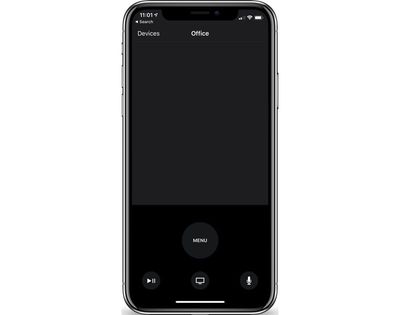
appletvremoteapp
Today's Apple TV Remote update also brings support for AutoFill Passwords, a feature that is designed to let you fill saved passwords securely from an iOS device to the Apple TV, alleviating the need to type in a full username and password.

Apple TV Remote is also automatically being added to Control Center as a default option, providing quick access to controls for the fourth and fifth-generation Apple TV. Apple TV Remote access has been available in Control Center since iOS 11, but until now, it was not one of the default Control Center icons.

Apple TV Remote can be downloaded from the App Store for free. [Direct Link]

Related Roundup: Apple TV
Buyer's Guide: Apple TV (Don't Buy)

Popular Stories

Apple TV Sans Remote Feature

New Apple TV 4K Leaked

Friday September 25, 2026 8:16 am PDT by
MacRumors contributor Aaron Perris has uncovered an image file from Apple for an unreleased Apple TV 4K, suggesting that a new model will finally be released soon. The image is specifically for an "Apple TV 4K (4th generation)" model. Apple TV 4K (4th generation) image (on a gradient) The image reveals that the Apple TV will have the same external design as the current model, with all of its...
Apple iCloud Plus expansion hero

iCloud+ Now Includes Apple TV, Apple Arcade, and Curated Apple Music Stations in Over 100 Countries

Tuesday September 15, 2026 1:43 am PDT by
Apple today announced a new subscription initiative that turns paid iCloud+ subscriptions into a broader services bundle in more than 100 countries. In select countries, Apple says every paid iCloud+ plan, including the cheapest 50GB tier, now includes Apple TV and Apple Arcade "at no additional cost," while family sharing extends the storage, TV and Arcade access to up to five people....
HomePod minis Apple TV and iPad mini Leak Feature

iPad Mini With A20 Pro, New HomePod Mini Colors, and New Apple TV 4K All Just Leaked

Friday September 25, 2026 8:18 am PDT by
The next iPad mini, HomePod mini, and Apple TV 4K models have all leaked, just a few weeks before the devices are expected to be announced. Specifically, MacRumors contributor Aaron Perris discovered a few of Apple's official images of the devices, confirming their existence and some new features that are planned. The most notable iPad mini details revealed in today's leak include an A20 Pro ...

Top Rated Comments

105 months ago
Volume control???
It's there, just use the volume buttons on your phone.
Score: 5 Votes (Like | Disagree)
105 months ago
Other than what I posted how would I find that out? As best I know it’s set to auto. Either way that’s the remote itself curious why the ios remote ATv app would try to use an IR setting when the iPhone has never had an IR emitter
For my setup I had my ATV4 learn the control for my A/V remote. It can’t turn it on but it can control the volume. I have and older A/V setup, no Bluetooth or Wifi.

Did you have to do the same?

What I’m getting at is in order for the iPhone to communicate with your setup, there has to be some method for it to talk to your TV, A/V etc..

I’m not an A/V expert so perhaps someone else who has a working volume control and more knowledge can jump in.

If you could take a pic of your Settings - Remotes and Devices - Volume Control screen it may shed some light.

Edit: I found this on Apple site:

Looking for the app's onscreen keyboard or volume controls?


* A keyboard appears in the Apple TV Remote app when you select a text field on your Apple TV.
* Want to change the volume using your iOS device? Receivers with HDMI-CEC volume support let you adjust volume with the volume buttons on the side of your iOS device. You just need to plug your Apple TV directly into your receiver and not into your television. Get help with HDMI-CEC ('https://support.apple.com/kb/ht205225').

[doublepost=1537235796][/doublepost]After playing around with two different setups and reviewing your original comment, it appears your TV is setup to “Auto via IR (TV)”.

If that is the case it appears you are not using HDMI-CEC which is what is required according to what I posted earlier.
Score: 2 Votes (Like | Disagree)
105 months ago
Nope. Doesn’t work from iPhone 8/256GB on iOS 11. I tried before and after TVOS update (11, now 12). My ATV4 is connected directly to my TV using HDMI. Only the TV remote or the ATV4 remote will control volume.

Settings, Remotes & Devices:
Volume Control is ser to “Auto” yet displays “Auto via IR (TV)”. Only TV via IR, Off, or Learn New Device are my options.

Maybe you think it’s my HDMI Cable?
Question. Is your ATV4 remote using the IR sesnsor to control sound?
Score: 2 Votes (Like | Disagree)
105 months ago
@sinsin07 , the early post as stated above was to my situation and since I have no receiver the ATV is using IR to control myTV volume which sucks I’ve noticed the icon for volume change to sho the TVs on screen display vs the ATV volume display. So bummed out but it works so not too bad.

Well...you could look at it this way...this is an excuse to get an a/v receiver that supports hdmi-cec. Maybe one of those "theater in a box" setups has the feature. I'm not sure. It will enhance your movie watching/music listening experience a lot. Or, build your own system...

There are tv's that have hdmi-cec, too. But, that won't sound as good.
Score: 1 Votes (Like | Disagree)
105 months ago
FALSE
Not clear why you insist the remote app on the iphone cannot control volume.
Yes the iphone does not have an IR Transmitter.
It can control volume throudh HDMI-CEC as specified earlier.
It may not help DeepIn2u but your conclusion is incorrect, there is a method.

If you have any links that show Apple is in error, please post for the benefit of all, otherwise stop posting false information.
I was responding to someone’s post. In their case, they do not have an hdmi-cec tv. They won’t be able to control tv volume with their iPhone. They were asking why they could with the ATV remote, but not with the phone.
I was responding to ONE person. NOT making a general comment. Simma down na.
Geeez...o_O
Score: 1 Votes (Like | Disagree)
105 months ago
[doublepost=1537361174][/doublepost]
I don’t have a receiver of any kind.

TV plugged into wall, HDMI input direct from ATV4. ATV4 has WiFi connection to Cable Módem/Router.

TV has its own remote to control volume. ATV remote can control volume. Yet the iOS Remote app on iPhone doesn’t control the TV or shows volume being sent by the ATV. ATV settings for Audio is Auto and no I’m not using SPDIF either.
tv OR receiver. o_O Doesn’t matter. Either way. I was just saying...

Anyway...the iPhone doesn’t have an IR transmitter. It can’t control the volume on your tv. The  TV remote has an IR transmitter, so, it can.

[doublepost=1537362188][/doublepost]
Your comment contradicts Apple’s help site.

* Want to change the volume using your iOS device? Receivers with HDMI-CEC volume support let you adjust volume with the volume buttons on the side of your iOS device. You just need to plug your Apple TV directly into your receiver and not into your television. Get help with HDMI-CEC ('https://support.apple.com/kb/ht205225').

Are you saying the above is incorrect?

Control your TV or receiver with your Siri Remote or Apple TV Remote ('https://support.apple.com/en-us/HT205225')
[SIZE=3]Use the Apple TV Remote app ('https://support.apple.com/en-us/HT204989')[/SIZE]
Nope
Score: 1 Votes (Like | Disagree)
Latest Stories
PSA: Apple Mail on Mac May Stop Syncing Microsoft 365 Accounts Today
17 minutes ago
Apple's Smart Home Hub: Everything We Know So Far
11 hours ago
Apple's Home Hub Borrows From the iPhone Duo's StandBy Mode
12 hours ago
Apple Invites App Updated With Three New Features
16 hours ago
Apple Event on October 13?
17 hours ago
Apple Watch SE 3 vs. Series 12 Buyer's Guide: Which Should You Buy?
19 hours ago
iPad Mini 8 to Offer These 10 New Features
19 hours ago
DoorDash Unveils AI Food Ordering Through Apple's Messages App
20 hours ago
Amazon Takes Up to $150 Off Select M5 MacBook Air Models
21 hours ago
Apple Still Plans to Release a New Full-Sized HomePod
22 hours ago
Apple Working to Expand HomeKit
23 hours ago
Apple Smart Home Hub to Feature iMac G4-Style Design
23 hours ago
Three New Apple Smart Home Products Coming on October 13
1 day ago
Apple Pay Now Available in India With Axis Bank Cards
1 day ago
OpenAI Launches Always-On 'Dots' Agents to Rival Meta's Muse
2 days ago
AirPods 5 Teardown: Batteries Removable, Case Still Tough
2 days ago
iPhone 18 Pro Owners Complain of Speaker Crackling or Popping
2 days ago
You Can 'Get Ready' for iPhone Duo Pre-Orders on October 12
2 days ago
Apple Pay Reportedly Launching in India Today
2 days ago
Apple Releases New AirPods Beta Firmware
2 days ago
Apple Shares New Guide for Using iOS 27 Parental Controls
2 days ago
Apple Creator Studio and Final Cut Camera Get New Features
2 days ago
Apple Explains Why It Removed ICE Tracking Apps Last Year
2 days ago
Amazon Expands $779.99 Apple Watch Ultra 4 Deal to More Models
2 days ago
Switch Siri AI for ChatGPT on Your Mac
2 days ago
Apple Says Emergency SOS via Satellite Now Available in Norway
2 days ago
AppleCare Guide: Is it Worth Paying For?
2 days ago
Apple Reportedly Planned to Replace 5,000 Support Employees With AI
2 days ago
Apple Planning to Launch Products Faster and More Often
2 days ago
Amazon Discounting New Mac Mini and Mac Studio Alongside Early Prime Day Deals on Monitors
2 days ago

🔗 Related Apple News & Rumors

Stay updated with the latest Apple ecosystem news and verified rumors












































